
This month, we’re rolling out new features and product enhancements that help you capture more information from your documents using Smart Fields, keep tasks moving with greater control over reassignment and routing, and do more with Smart Chat and Agents. Explore these updates and more from our latest Cloud release.
Smart Fields Expands Intelligent Capture to Marks, Images, and More
Documents often contain critical information that cannot be captured through text extraction alone. Checkmarks, shaded answer bubbles, signatures, images, and handwriting can all communicate important information. Until now, Smart Fields had limited ability to interpret these visual elements, leaving teams to review documents and enter information manually even when the rest of the document could be processed automatically.
This update adds enhanced visual understanding to Smart Fields and AI-assisted form fill, allowing Laserfiche AI to interpret text and visual information in a document together to populate metadata or fill form fields.
This includes support for optical mark recognition (OMR), enabling Laserfiche AI to interpret marked selections such as checkmarks, shaded bubbles and boxes.
Other new capabilities include interpreting and describing images within your document and capturing text from logos and watermarks.
Smart Fields and AI-assisted form fill also perform better in other scenarios that rely on visual understanding, including detecting the presence of signatures and extracting difficult-to-read handwriting such as cursive.
Together, these enhancements allow you to capture a more complete picture of the critical data and key details within your organization’s content using Laserfiche AI.
New Controls for Task Configuration and Management
New updates to task configuration and management give team managers more flexibility to redistribute work and process designers greater control over task reassignment and routing.
Team managers can now reassign tasks within their own teams without needing to manage the process that created them. When a team member is unavailable or workloads become uneven, managers can now redistribute work directly to another team member, without escalation to a process owner or administrator. This gives managers the operational flexibility they need to manage their team’s tasks, without granting broader access to process data or administrative control over process instances –keeping permissions aligned with their responsibilities.
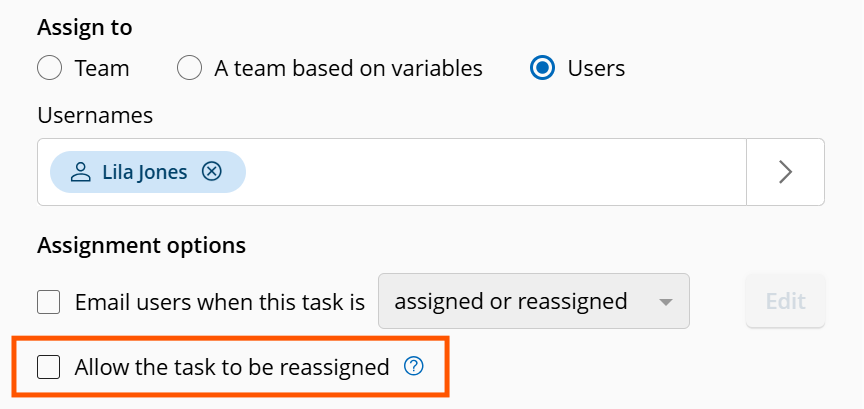
Additionally, process designers can now control whether users can reassign tasks assigned directly to them. This helps prevent tasks that should remain a specific person’s responsibility, like manager approvals or performance reviews, from being handed off. Authorized team managers, process owners and administrators can still reassign these tasks when needed.
These updates also make task handoffs more predictable by preserving specialized routing when a task is released. When a team member releases a task they previously claimed, Laserfiche now reruns its assignment rules to determine who can claim it next, rather than making it available to the entire team. This helps ensure released tasks continue to follow the routing logic built into the process.
Together, these updates help keep work moving, simplifying task management and making reassignment and release more controlled and predictable.
To learn more about the latest task management updates and get a preview of what’s coming next, register for our upcoming webinar: Inbox Innovations: Simplifying Task Routing and Management.
Do More with Agents
You can now use directed agents to edit repository field values directly, further expanding their utility for metadata management.
To stay up to date on the latest in Laserfiche AI, join us for the New Laserfiche AI Innovations webinar series, with sessions in October, November, and December.
Ask Smart Chat About Your Workflows
Now, Smart Chat can help process designers understand their account’s workflows faster and with more confidence. Open Smart Chat in the workflow designer to ask questions about the specific workflow you’re viewing and get responses based on the actual design.
- Summarize Workflow Designs: Get grounded, plain-language summaries of what a workflow does, including its purpose, triggers, major branches and terminal paths.
- Explain Individual Activities & Logic: Ask about specific workflow activities to understand what they do, how they’re configured, and how they contribute to the overall automation. Follow how activities connect, how work moves through the design and why specific branches run.
- Troubleshoot and Onboard More Efficiently: Review complex, inherited or legacy workflows to identify issues and get up to speed faster.
Smart Chat Usability Improvements
New updates to the Smart Chat interface make it easier to read responses, customize your workspace and work across multiple tabs. You can now resize the chat window horizontally to best fit your content. Plus, switch between docked and floating views, follow responses more naturally as they’re generated and manage Smart Chat independently in each browser tab.
Dynamic Fields Improvements
Previously, a lookup rule could only take its input from a field filled by another lookup rule. Now, any field can serve as an input, allowing you to configure dynamic fields to display options based on free-form text entered by a user or a value generated by a field formula. This provides greater input flexibility while reducing the number of rules you need to build and maintain.
Lookup rules can also now populate multiple fields with dynamic data from a single data source. Instead of creating a separate rule for each field, you can use one rule to return multiple outputs and fill several fields in a template.
Additional interface improvements make it easier to configure dynamic fields and work with their values. A new label in the Properties pane of the template designer lets you quickly identify the field type, and improved error handling provides clearer feedback when an invalid input is selected. Additionally, users working with document metadata in the repository can now search within a dynamic field’s available options, making it easier to find the right value when a lookup returns a large number of results.
Import Agent Enhancements
Import Agent can now save email attachments as separate documents when importing email files from a local disk or directly from an email server. It can also ignore metadata assignment errors during import, applying valid values while logging invalid ones for administrators to review later, without stopping or rolling back the entire migration.