How Educational Service District 112 Processes Agreements with Laserfiche and Signix

Contributed By: Kathy Koren, Technology and Software Coordinator, Educational Service District 112

Located in Vancouver, WA, Educational Service District 112 (ESD 112) is an agency that provides support services to school districts throughout the state of Washington and eight other western states.

One type of service provided by ESD 112 is purchasing contact negotiation. If a school needs to purchase furniture or projectors, for example, ESD 112 sends out an RFP to vendors and manages the bidding process. This allows school districts to simply purchase from one of the approved vendors rather than manage the bidding process independently.

For this to happen, a school district must sign an interlocal purchasing agreement with ESD 112. Prior to Laserfiche, managing these agreements was quite burdensome. Agreements must be renewed regularly, which requires additional processing. With 296 school districts in the state of Washington alone, and eight other states using this service, ESD 112 processed a high volume of agreements on a weekly basis. As many as 750 agreements were awaiting renewal, and new school districts request agreements regularly.

ESD 112 streamlined the submission, review and signing of interlocal purchasing agreements with Laserfiche Forms, Workflow and an integration with Signix e-signatures. Traditionally, staff spent approximately 45 minutes per contract. Time spent per contract was reduced by over 90%.

“What used to take a minimum of a week can now be done in minutes,” says Kathy Koren, Technology and Software Coordinator. “We had 25 signed contracts in the first 2 days of introducing this process, with about 1 hour of staff time to process all of them.”

The New Process

To submit an interlocal purchasing agreement, a district fills out and submits a simple Laserfiche form.
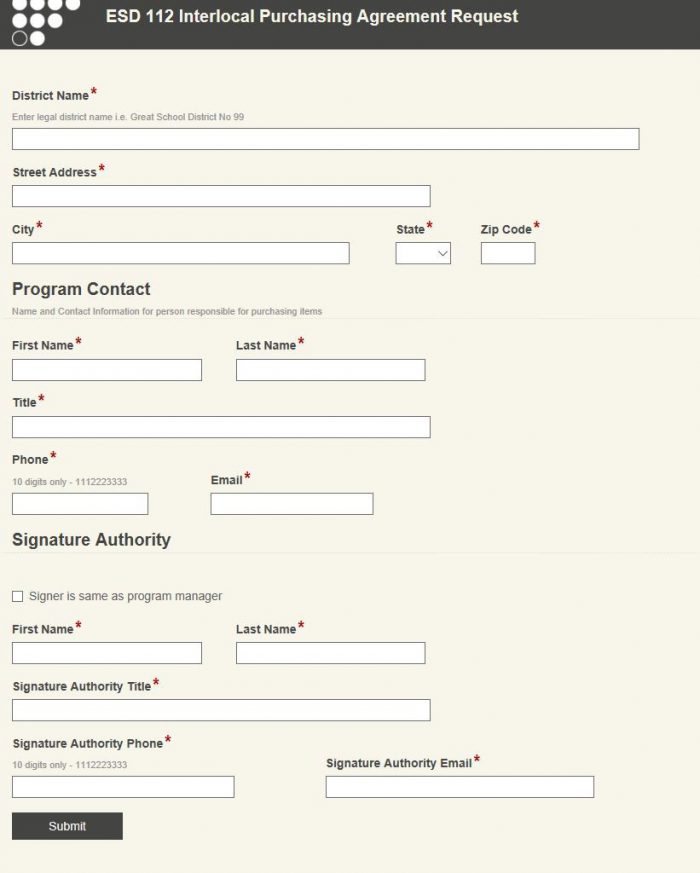
School districts apply for an interlocal purchasing agreement by filling out an electronic form

Once this form is submitted, it is automatically routed to the accounting department for review. Accounting staff reviews the submission to ensure that it is valid, and verifies that there is no existing interlocal purchasing agreement on file. If the form is filled out correctly and the request is valid, accounting staff approves the request.

Laserfiche Workflow populates a PDF interlocal purchasing agreement template with the data from the form. It then adds fields to the PDF to turn it into a fillable PDF form. Workflow sends an email to the district representative with a link to this agreement document in Signix. This is done using a custom Workflow activity developed for ESD 112 by Cities Digital. A notification email is also sent to the purchasing coordinator, alerting them to be on the lookout for the signed contract.

Workflow files the unsigned contract in the repository and applies metadata.
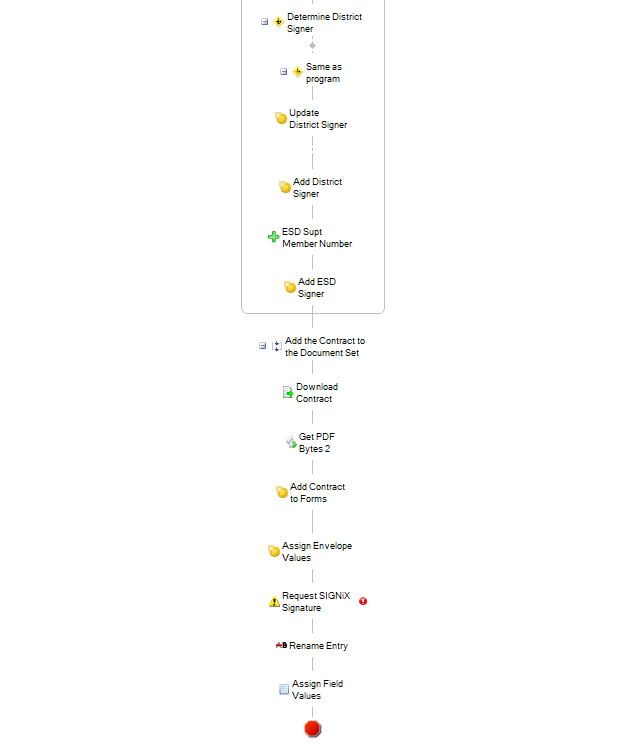
Laserfiche Worklow automatically routes the interlocal purchasing agreement to the district for signatures with Signix

The representative signs this agreement in Signix and sends it back to ESD 112. Once the signed contract is returned, Workflow replaces the unsigned copy with the signed copy. It then sends a notification to the purchasing department.
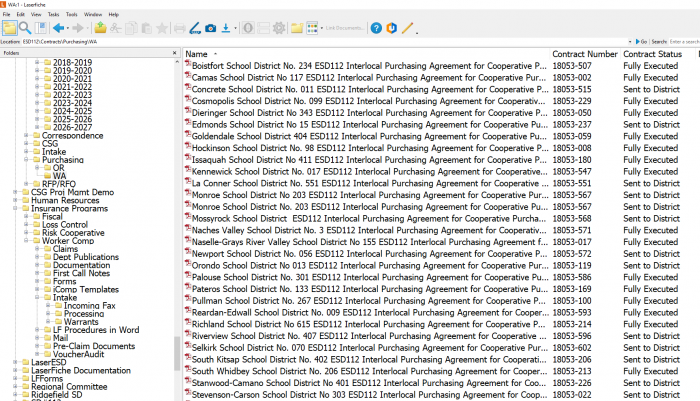
The interlocal purchasing agreements are stored in one folder with metadata clearly showing their status

The purchasing department can run a report in Laserfiche Forms at any time to see the contact information for interlocal purchasing agreements.
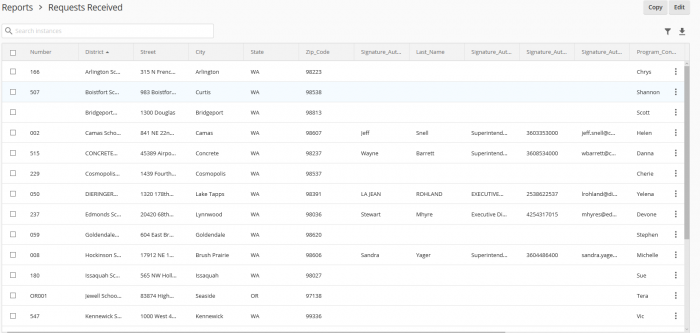
A report in Laserfiche Forms shows the status of all interlocal purchasing agreement

Laserfiche Public Portal

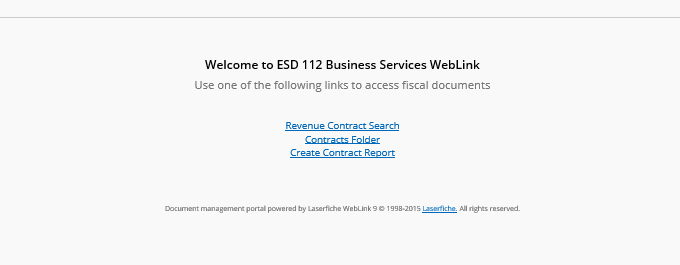
All agreements are available for viewing by ESD 112 employees using the Laserfiche public portal. An employee can select one of three options in the public portal:

  • Revenue Contract Search
  • Contracts Folder
  • Create Contracts Report
Employees can view agreements and contracts through the public portal

If the employee chooses to create a contract report, he is prompted to fill out a Laserfiche form to select what contracts he wants to see.

A simple Laserfiche form streamlines contract report requests

When he clicks submit, information from the form is passed to Workflow, which automatically generates a report and emails it to the requestor.
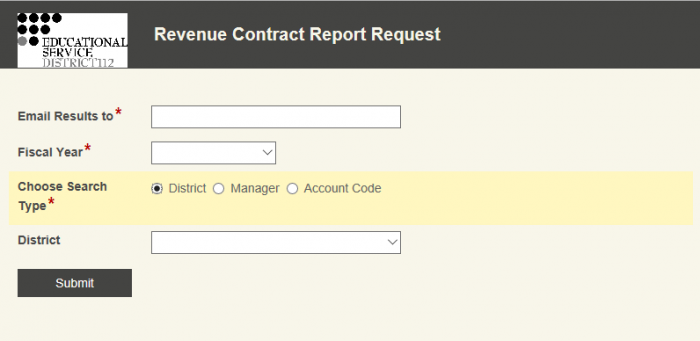
Reports are automatically emailed to the requestor

Benefits of Laserfiche

Streamlining the interlocal purchasing agreement process with Laserfiche and Signix has resulted in the following benefits for ESD 112:

  • Time spent processing each agreement has been reduced by 90%, from 45 minutes to just a few minutes.
  • Output has increased significantly, as 25 agreements have been requested, reviewed and signed in the first two days of introducing this process.
  • Mailing costs have been eliminated, and contracts are executed more quickly.


How Ramblers Worldwide Holidays Uses Laserfiche Forms and Laserfiche Workflow

Laserfiche Solution Contributed by: Richard Clowser, IT & Business Systems Manager, Ramblers Worldwide Holidays

Based out of the United Kingdom, Ramblers Worldwide Holidays has been organizing guided walking tours and holidays around the world for over 60 years. Most of their business processes are centered on documents. Here is how Laserfiche Forms and Laserfiche Workflow transformed its day-to-day operations.

Laserfiche Forms

Ramblers uses Laserfiche Forms to:

  • Coordinate a meeting time with the tour and clients who will not be travelling on the same flight as the group
  • Register tour leaders around the world for the annual Ramblers conference

Laserfiche Forms also drives Ramblers’ private group sale cycle from the conception phone call to providing a quote. This process works as follows:

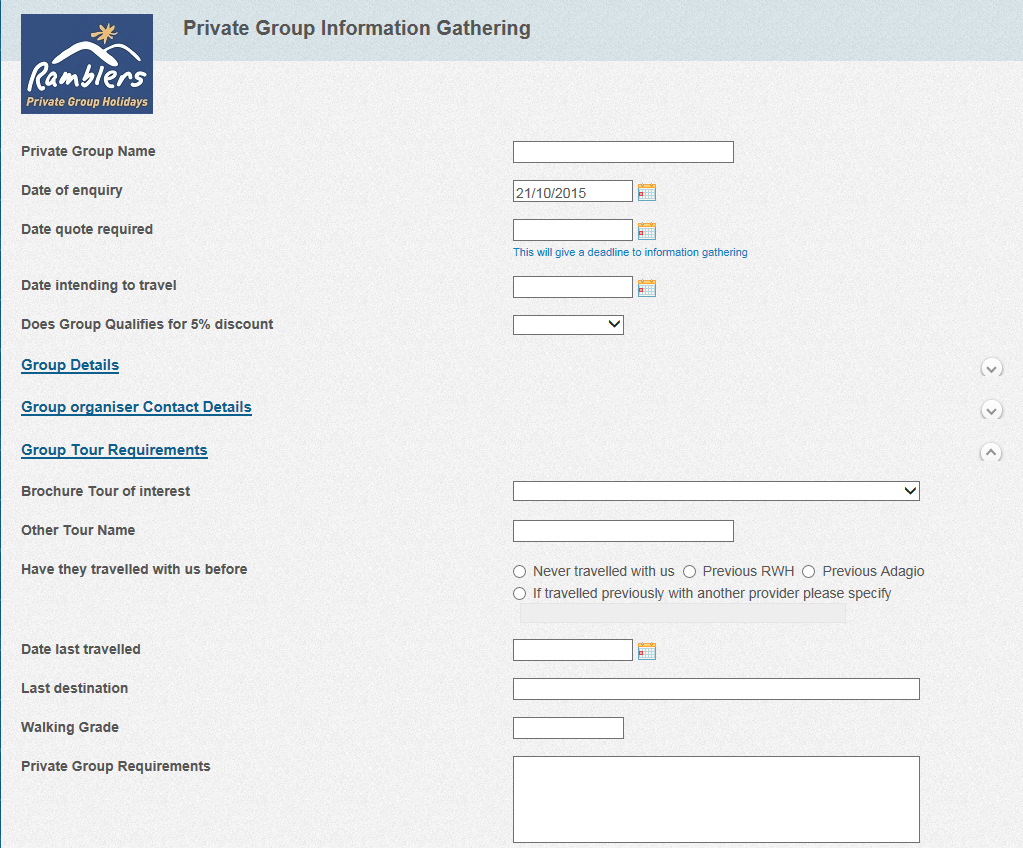
1.  The private group manager captures the client’s requirements in a form

Information about private group tours is entered into a Laserfiche form

2.  Once the requirements are submitted, information must be obtained regarding travel, itinerary and available trip leaders to see if this trip is logistically feasible and generate trip costs. All of this information is entered into a different form by representatives from various departments. They can either indicate that they require more time to find pricing or information or supply the final information.

  • Each price quotation has to have a “Valid Until” date specified in the form. Laserfiche Workflow monitors this field and sends reminders when a quotation is about to expire.
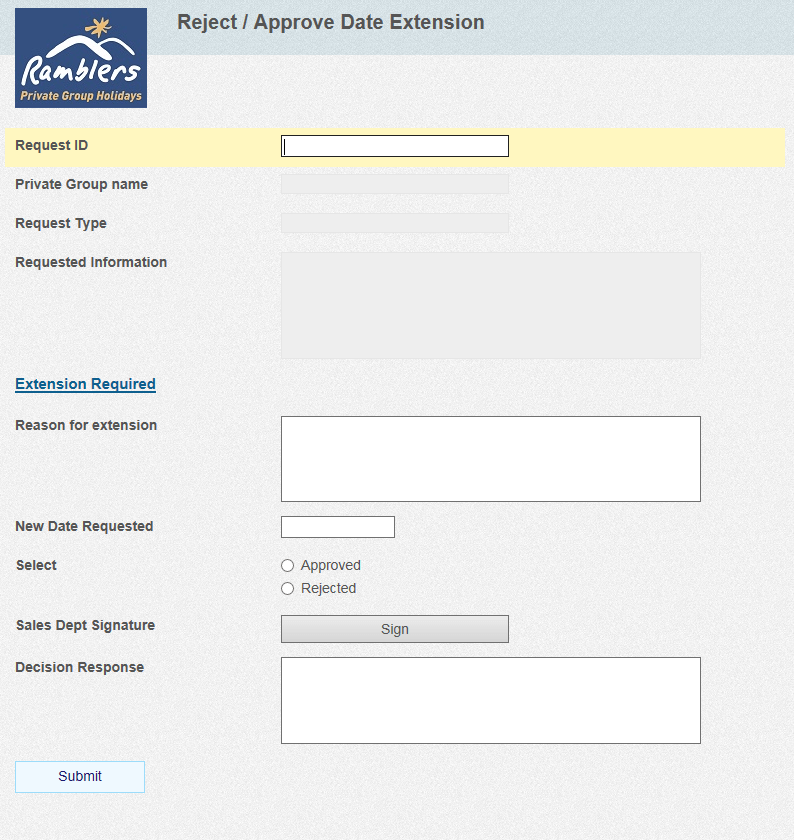
  • A private group prospect can request an extension on any price quotes. The private group manager can approve or reject the extension.
Extensions are rejected or approved by filling out another Laserfiche form

3.  The final form is sent to the sales manager, who generates a final price quotation

Laserfiche Workflow generates reminder emails at each step to ensure that any completion or cancellations of the prospects will notify any departments and people involved. These include:

  • Sales and reservations
  • Product planning
  • Travel department
  • Tour leaders
  • Overseas departments

Laserfiche Workflow

Laserfiche Workflow is also used to automate 15 key business processes, which include:

  • Extending support to disaster recovery processes by replicating the critical documents to the Laserfiche cloud server when changes are made
  • Assisting departments in filing documents
  • Performing nightly statistical report runs that would otherwise exhaust system resources during working hours

Marketing research indicated that customers who booked a second holiday with us in the first six months after their first were more likely to become regular customers.

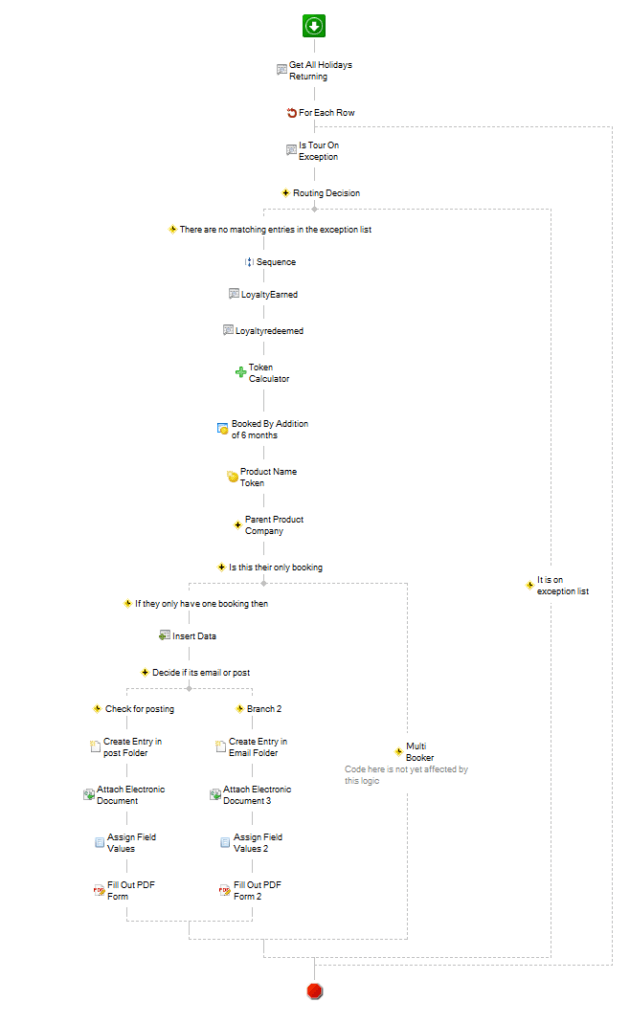
Laserfiche Workflow monitors the reservation database and identifies first-time clients who have just returned from a holiday. It then sends them a voucher for a second holiday, which is redeemable within six months. Laserfiche Workflow:

  • Runs a defined SQL query every night to identify returning clients
  • Checks that the tour they have just taken is not on any exception list (such as a private group tour)
  • Gathers data about the client from the database such as their current loyalty bonus points earned and points redeemed (if any)
  • Calculates a date six months from the day of return and stores it in a token
  • Identifies the parent company of the tour that the client has returned from
  • Checks to see if the client is a first time booker by counting the number of tours the customer signed up for in the database
  • Inserts the booking reference number into the database. This acts as the unique voucher number and is used when the customer redeems the voucher in the future
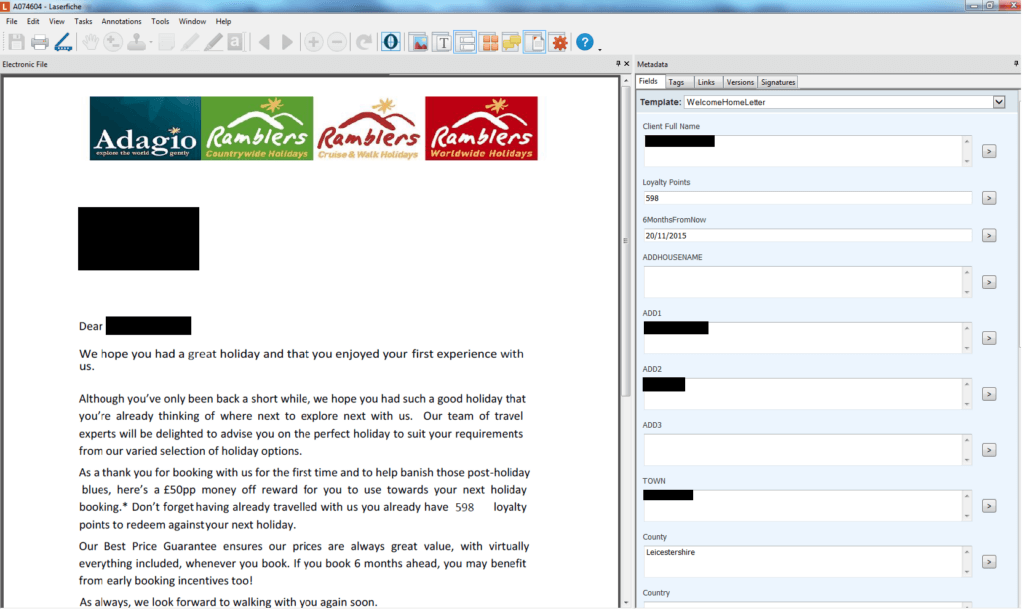
  • Creates a new document in the “Welcome Home Letter Voucher” folder and attaches a PDF form template to this document
  • Fills out this PDF form with the data collected in the first part of the process and also uses it to populate the document’s template
An example of a voucher with associated metadata

Here is what this workflow looks like:

Laserfiche Workflow moves the completed voucher into a special folder, where it awaits review by operations management. The supervisors check the voucher for accuracy and confirm that the client is new and is not found in the old reservations system. Once verified, they change the status field to “Approved,” which triggers a second workflow that sends an email to the client with the voucher included in the text as well as a PDF attachment. The final document is then stored in the processed folder.

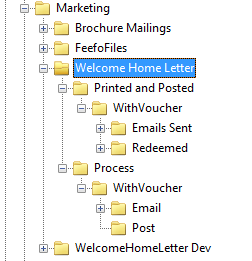
When the client wants to redeem the voucher for £50 off their next holiday, the sales assistant checks that they have a valid voucher stored for future use, and moves it to the Redeemed folder.

Vouchers are saved in a special section of the repository

Benefits

Implementing Laserfiche at Ramblers Worldwide Holidays has resulted in the following benefits:

  • Laserfiche Forms makes it possible to directly populate external database systems without having to export a csv file or import the data manually
  • Projects can go live sooner than standard application development because Laserfiche Forms enables a fast response to changing requirements
  • Laserfiche Workflow has made Ramblers more efficient in handling day-to-day manual tasks related to data checking
  • The Laserfiche Workflow designer is so intuitive that an external business process analyst was able to create five workflows that managed the entire online sales support process after just half a day of training
  • Instead of hiring four additional employees to drive the secondary sales voucher initiative, Ramblers was able to automate the process with Laserfiche and have only one staff member handle approvals

Would you like to see how Laserfiche Forms and Laserfiche Workflow can automate processes within your organization? Get a free demo today.

How the Iowa Tribe of Oklahoma Created a Paperless Human Resources Department

Contributed by:  Iowa Tribe of Oklahoma

With more than 350 employees, the Iowa Tribe of Oklahoma is one of the largest employers in Payne County, OK. Prior to implementing Laserfiche, we had to deal with inconsistent personnel files and paperwork being constantly misfiled or lost. Laserfiche completely revitalized our human resources department and made it almost completely paperless. With twenty-five different workflows running in our HR department, we’ve used Laserfiche to automate everything from employee onboarding to employee separation.

Job application

The employee onboarding process begins when a job requisition is submitted electronically through our Microsoft SharePoint approval system. Once this requisition is approved, the HR assistant sends it into Laserfiche with Laserfiche Snapshot. Laserfiche Workflow then routes this document into a special requisition folder in Laserfiche.

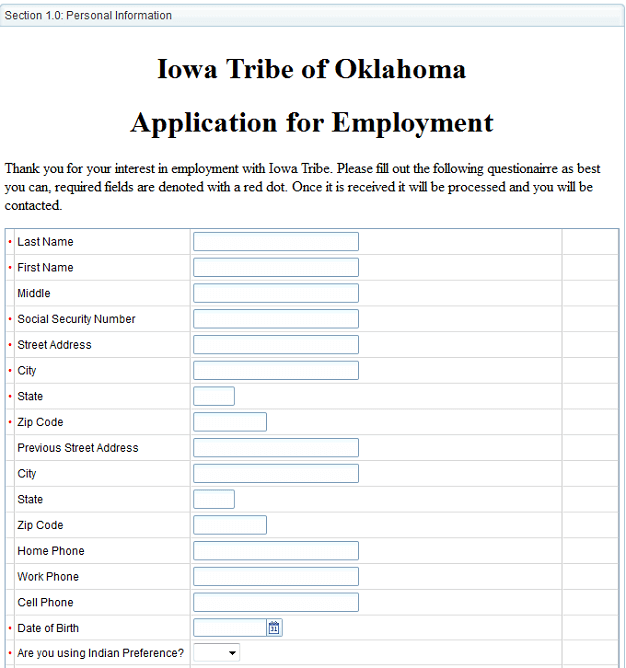
The HR assistant posts this job description on our Website. Potential employees apply for the position by filling out an electronic employment application created with LincDoc – software that creates electronic forms.

Iowa Tribe Job Application<br />

LincDoc is fully integrated with Laserfiche, so once a candidate submits the employment application, it is automatically saved in the “LincwareApplications” folder in the repository with the appropriate template automatically applied.

Employment Application<br />

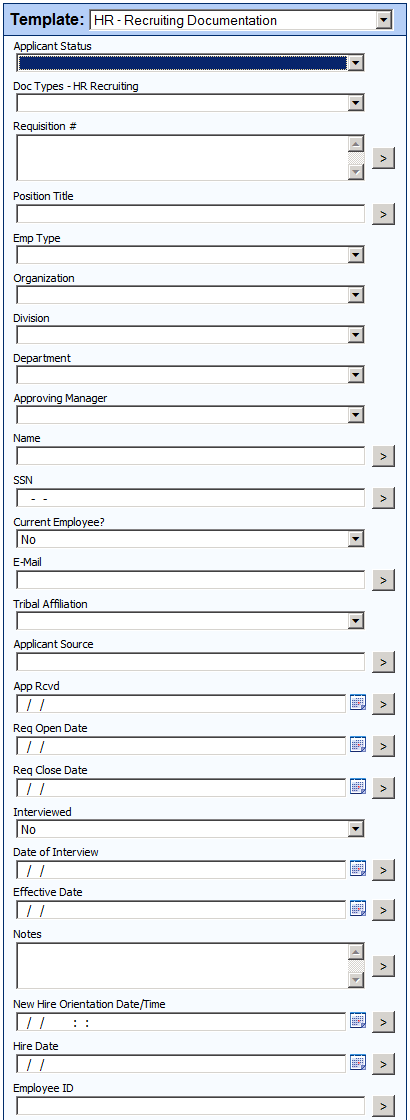
A large number of the fields in the template, such as “Name”, “SSN” and “Tribal Affiliation” are also populated automatically through the Laserfiche/LincDoc integration.

Laserfiche/Lincdoc Integration<br />

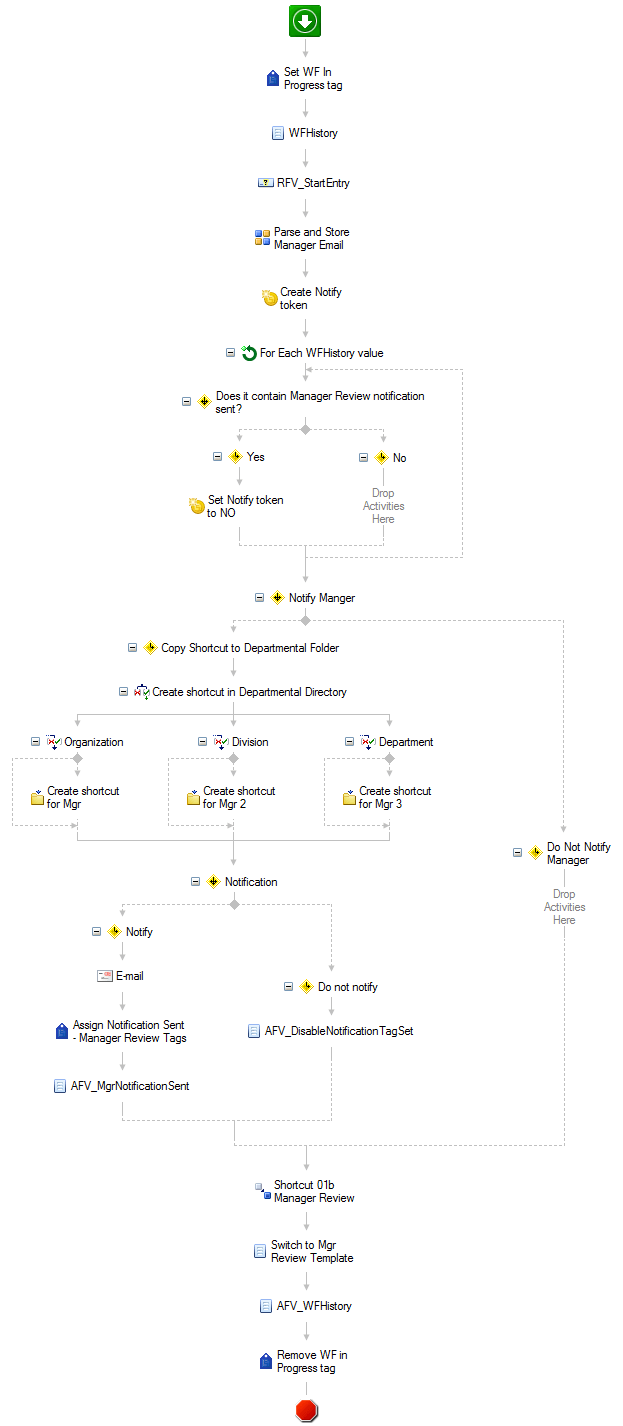
Laserfiche Workflow monitors the “Applications” folder and automatically routes incoming applications to the appropriate hiring manager for consideration based on the value of the “Approving Manager” field. Here is a screenshot of this workflow:

Laserfiche Workflow<br />

A shortcut to this job application is also placed in the requisition folder to await a hiring selection.

The hiring manager is able to communicate with candidates during the entire application review process by changing the value of the “Applicant Status” list field. Candidates receive an e-mail notifying them of every status change. Some of the status updates a manager can select are:

  • Does not meet minimum qualifications.
  • Application received after closed.
  • Manager declined.
  • Selected for hire.

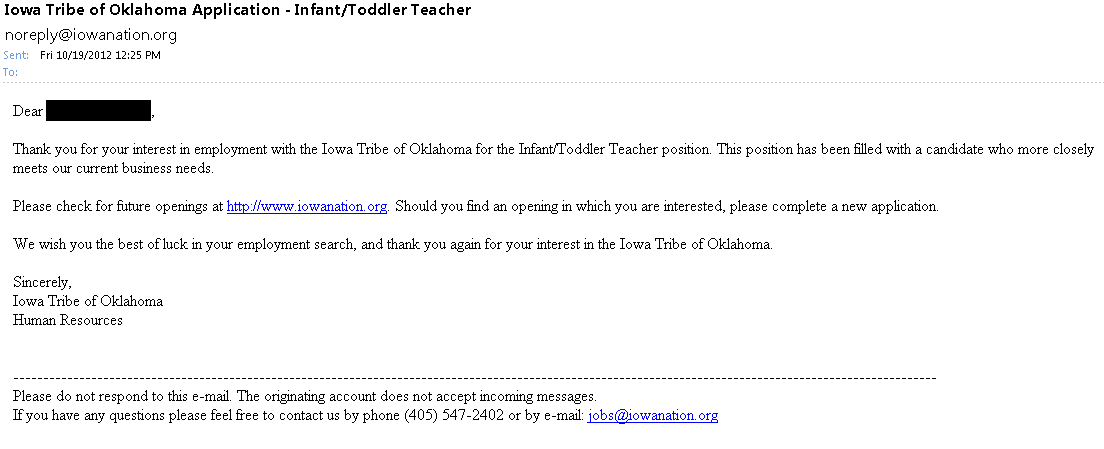
Here is an example of an e-mail notification that is sent when the status is changed to “Manager declined”:

"“Manager

Employee onboarding

Once a hiring manager decides to hire an employee, the application is routed to Human Resources to complete the remainder of the onboarding process. HR maintains communication with the hiring manager throughout the hiring process by updating the “Applicant Status” field. Some of the different statuses they can choose from are:

  • Offer accepted.
  • Drug screen and background check completed.
  • New hire orientation scheduled.
  • Hired.

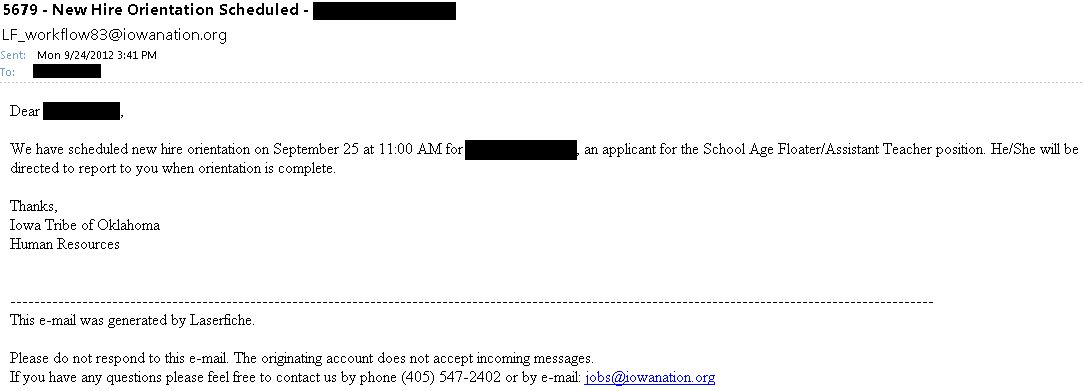
Here is an example of a notification e-mail that is sent when the status is changed to “New hire orientation scheduled”:

"“New

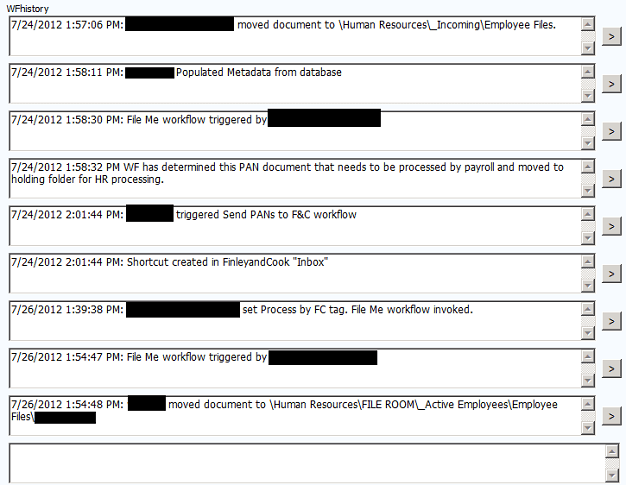
Throughout the process, every action taken on the document by Laserfiche Workflow is tracked in a special “WFhistory” multi-value field.

“Wfhistory” Multi-Value Field<br />

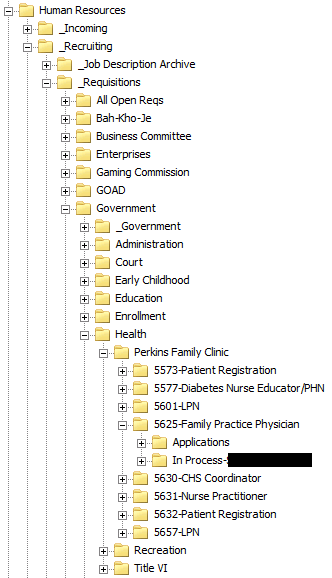
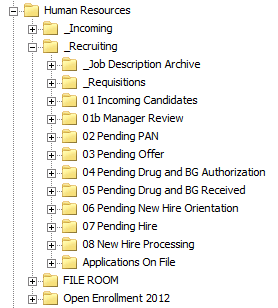
As the application moves through the various steps in the onboarding process, it also physically moves through the various folders in the Laserfiche repository.

Laserfiche Repository<br />

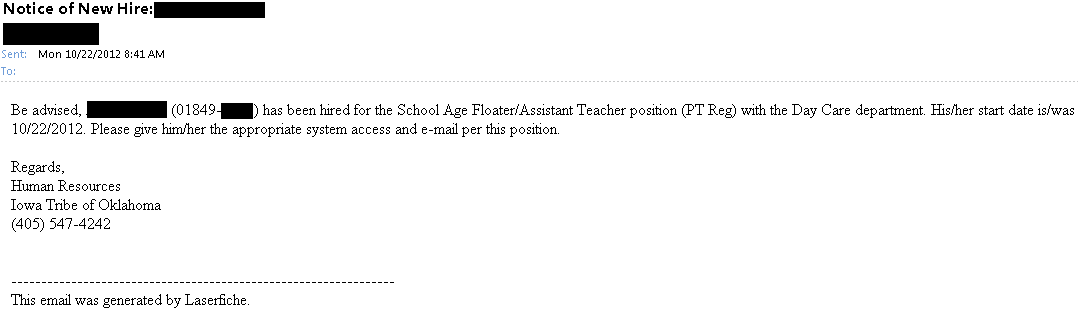
Once an applicant’s status is changed to “Hired”, Laserfiche Workflow notifies Payroll, Purchasing and IT by e-mail to begin distribution of company resources in preparation for the employee’s start date.

"Notifies

Laserfiche Workflow also:

  • Finds all other job applications that the applicant has in Laserfiche for other positions and sets their status to “rescinded”.
  • Finds all of the other job applications for this particular position and sets their status to “Manager declined”. This automatically notifies the candidates by e-mail that the position has been filled.

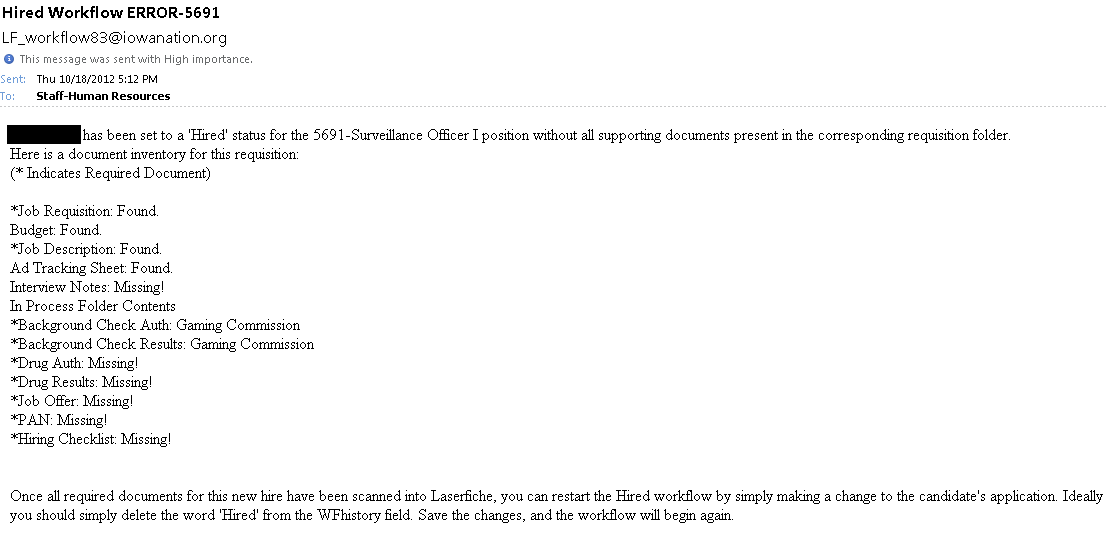
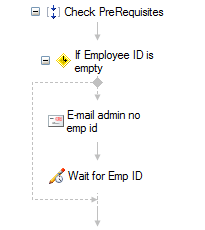
Another workflow performs an inventory of the requisition folder to check if the new employee has any missing documents.

  • If there are missing documents, HR is notified by e-mail.
"Notified
  • If no documents are missing the new employee’s documents are converted to recruitment documents and moved to a pending hire folder where they await an employee number.
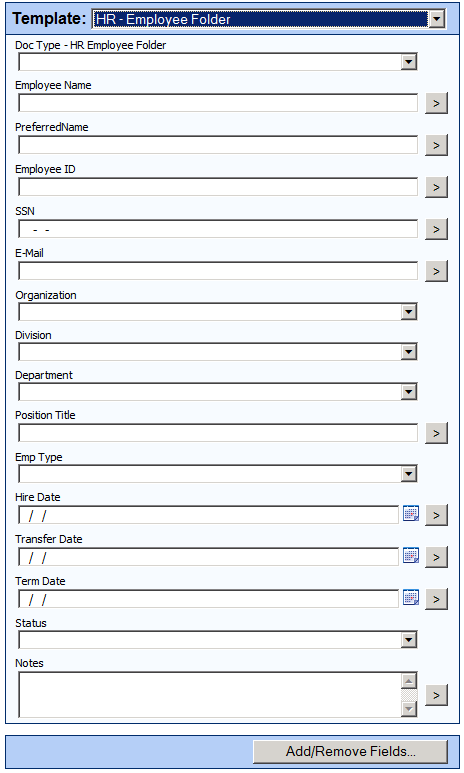
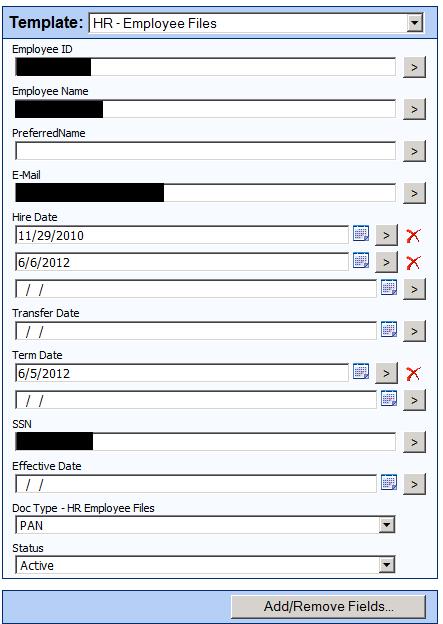
  • As soon as HR assigns an employee number and fills out the “Employee ID” field, all of the documents are moved to a brand new active employee folder where an “HR-Employee Folder” template is assigned.
“Hr-Employee Folder”<br />

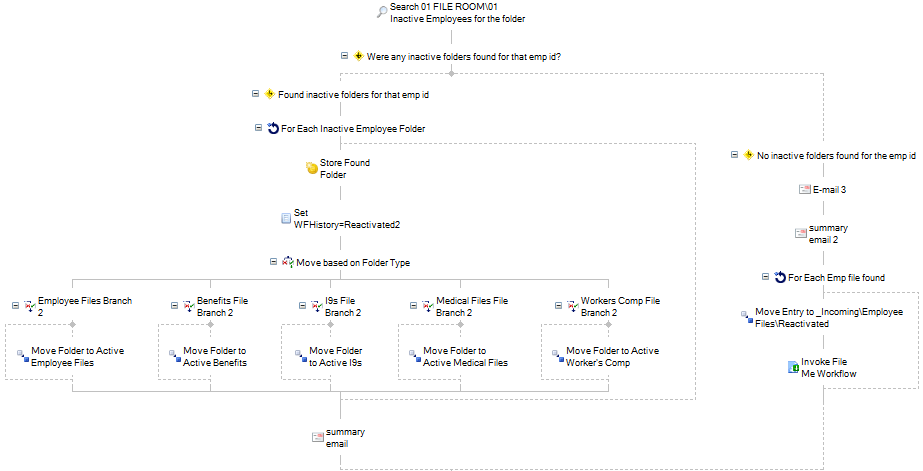
Another workflow scans the inactive employee record series to determine whether the new hire is a previous employee with an existing employee file. If it locates one, it automatically moves all documents back to the active employee folder.

"Workflow

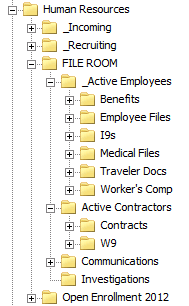
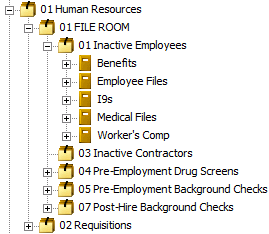
Here is a screenshot of our active employee folders:

Active Employee Folders<br />

Employee document management

In addition to new employee documents, all other HR documents are stored in Laserfiche as soon as they are received. Some of the different document types are:

  • Personnel Action Notices (PANs) – forms that contain any change to an employee’s record or status.
  • Direct deposit forms.
  • Employee evaluations.
  • W4s.
  • I9s.
  • Benefits enrollment.
  • Worker’s compensation forms.
  • Discipline forms.
  • Certifications.
  • Leave donations.
  • Medical return to work letters.
  • Incident drug screens.
  • Garnishments.

All of these documents are either created electronically and sent to Laserfiche with Laserfiche Snapshot or scanned onto the network, imported into Laserfiche with Import Agent and immediately shredded. They are also assigned the “HR-Employee Files” template.

Hr-Employee Files<br />

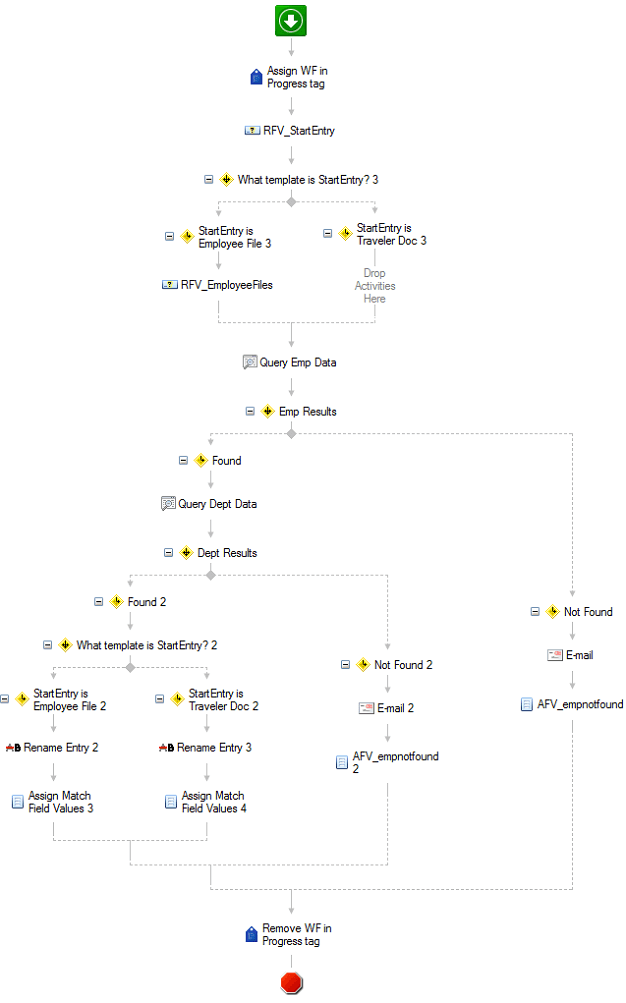
Laserfiche Workflow finds each new document, determines its type and routes it to either Payroll or Benefits as needed. Workflow also performs a database lookup to automatically populate the metadata. Here is the main workflow that processes our incoming employee documents:

Main Workflow<br />

Employee separation

Employee Separation<br />

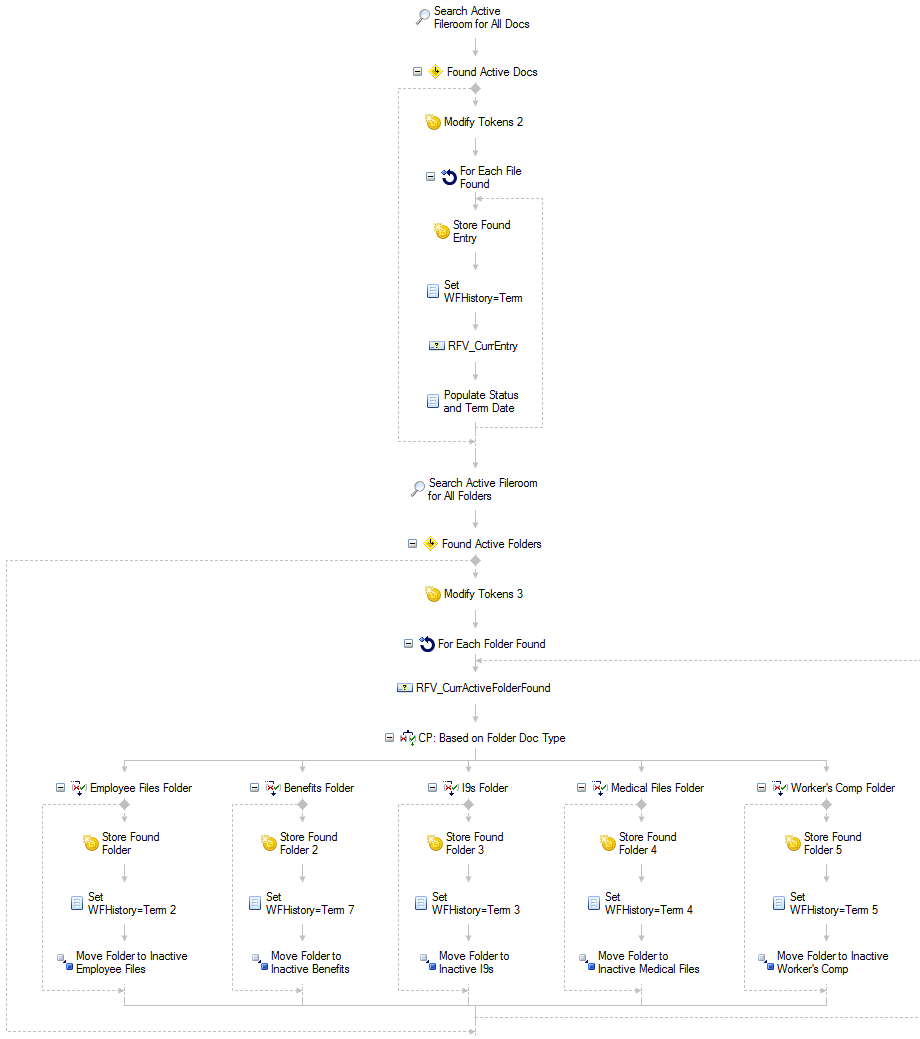
In addition to employee onboarding, Laserfiche Workflow also manages employee separation. Once HR staff submits a separation PAN, Workflow scans the repository for all documents for that employee, terminates them, and files them in our inactive employee record series to keep on file per the retention schedule for each document type.

Here is a section of our separation workflow:

"Separation

Benefits of Laserfiche

Implementing Laserfiche in the HR department has resulted in the following benefits at Iowa Tribe of Oklahoma:

  • We have eliminated 80 cubic feet of filing cabinets.
  • Authorized users can access any active employee file onsite from a Web browser or offsite via authorized VPN access.
  • The workflow which checks for missing documentation saved us 300 hours a year of employee time.
  • There is now clear and constant communication between everyone involved in the employee onboarding process including the hiring managers, job candidates and HR staff.

You can learn more about paperless processes in HR by downloading the free guide to HR automation