Laserfiche self-hosted includes a host of integration tools that you can leverage to connect external third-party systems to your automated Laserfiche solutions. Learn how to use web requests and database connections to tap into data in another system to streamline and simplify your Laserfiche automated processes.
Laserfiche Cloud includes a host of integration tools that you can leverage to connect external third-party systems to your automated Laserfiche solutions. Learn how to use web requests, direct database connections, and lookup tables to tap into data in another system and streamline your automation.
This month, we’re introducing new features and product enhancements that help you complete forms faster, do more with Laserfiche AI Agents, and get more visibility into AI usage. Explore these updates and more from our latest Cloud release.
AI-Assisted Form Fill
Filling out a form often means uploading a document and then reentering information from that document into the form. AI-assisted form fill uses Laserfiche AI to automatically populate relevant fields with information from the uploaded document, making form completion faster and easier.
How to Set It Up: When building a form, designers can enable this feature with a single setting on a file upload field.
Just select the file upload field of your choice and check the box next to “Extract and fill fields with AI” to tell Laserfiche AI which documents to analyze. Only files uploaded to a field with this setting enabled will trigger AI population.
With this setting enabled, Laserfiche AI handles both data extraction and field matching, so designers don’t need to configure any other form fields or define and maintain additional extraction rules or field-mapping logic.
How It Works: When someone uploads a file to an enabled field, Laserfiche AI reads the document, identifies the relevant data, and determines on its own which form fields the information belongs in. It then populates those fields automatically.
AI-assisted form fill never clears a field or overwrites information the submitter has already entered. If Laserfiche AI cannot find or confidently identify the information a field requires, that field remains blank.
The person completing the form can review the populated information, make corrections if needed, and complete any remaining fields before submitting the form.
AI-assisted form fill consumes AI units. Learn more about how usage is measured here.
By letting uploaded documents do more of the work, organizations can create a smoother submission experience and collect structured form data and supporting documents in one connected Laserfiche process.
Do More with Directed Agents
Laserfiche AI Agents can now take on more document management work with less back-and-forth.
Automate Complex Tasks with Fewer Interruptions: Complete complex tasks more efficiently. Now, for multi-step tasks, Agents will present their full plan upfront, giving you the option to review and confirm the proposed actions in one go instead of confirming each step one by one.
Create and Delete Collections: Agents can now create new personal Collections or delete existing ones on your behalf. Ask your Laserfiche AI Agent to find related documents, create and name a Collection, and add the documents to your new Collection in a single operation.
More Visibility into AI Usage
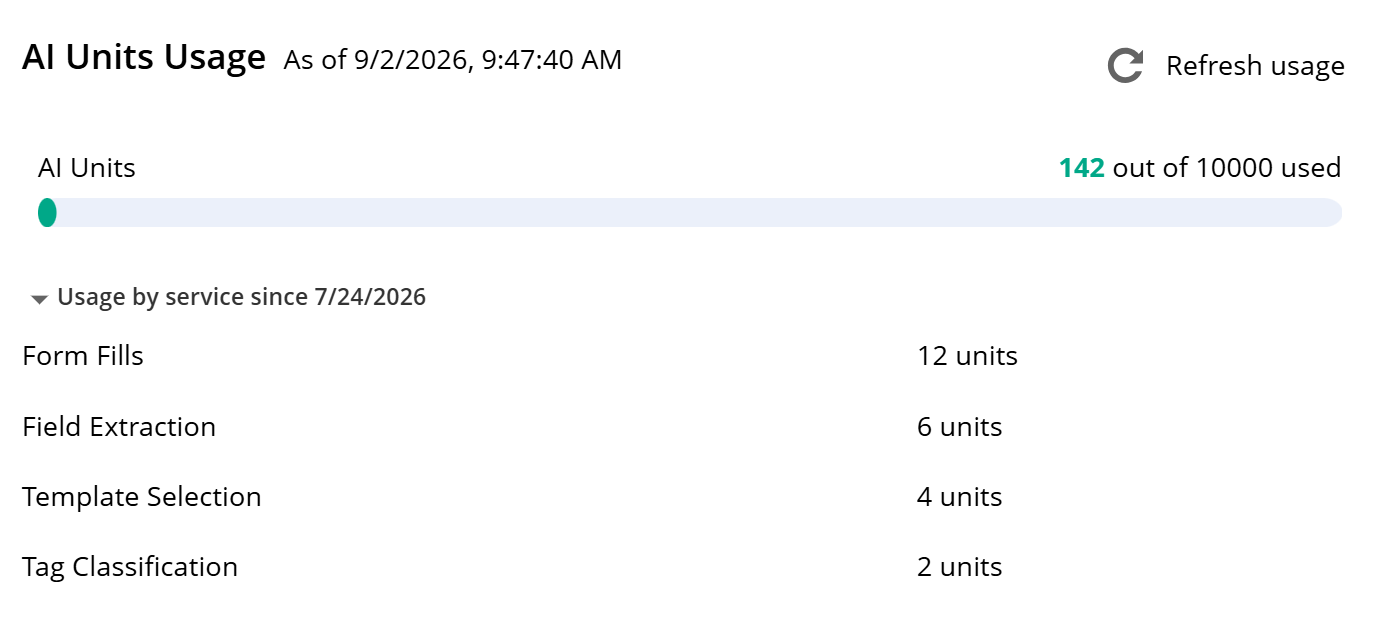
Admins can now get a clearer picture of how their account is using Laserfiche AI. The Plan page now includes a breakdown of AI units consumed by each feature, making it easier to understand which features are driving usage.
By providing more granular visibility into Laserfiche AI usage, this update helps admins more easily monitor where AI units are being used, spot inefficiencies that may be inflating usage, and manage AI resources more effectively.
Usage by service information is available for operations performed beginning on or after July 24, 2026.
Updated Software Development Kit
A new version of the Laserfiche Software Development Kit (SDK) is now available, providing a more current and secure foundation for building custom applications that interact with Laserfiche. The latest version, SDK 12, is now distributed through NuGet, making it easier for developers to install and deploy the components they need. SDK 12 also delivers upgraded versions of the Repository Access library and other supporting integration libraries, along with modernized interfaces and enhanced security. Additionally, documentation is newly available in the Laserfiche Developer Center.
Organizations using earlier SDK versions to connect to Laserfiche Cloud should begin planning to migrate to this latest SDK version, or to the Laserfiche API, as connections through earlier SDK versions will be discontinued in the future.
Additional Updates
Configure Audit Data Retention: You can now configure and enforce how long audit data is retained in Audit Trail for your account. This update gives administrators the control they need to meet compliance requirements and manage data growth.
Web Request Allotment Visibility: You can now view the number of web requests per day available for your account on the Plan page in Account Administration. Accounts that need an increased allotment have the option to purchase additional capacity as an add-on.
Dynamic fields are a useful tool for making your repository metadata cleaner, more consistent, and easier to manage, strengthening data integrity across Laserfiche. This month, we’ve introduced new updates that expand the capabilities of dynamic fields to make them even more powerful.
Previously, dynamic fields were limited to data sourced from static lookup tables. Now, you can configure dynamic fields using data query and web request rules, allowing you to pull live values from external applications directly into your metadata in real-time.
This update allows dynamic fields to display field value options that are based on live business data, reflecting the most current information instantly, no matter where it is stored.
In addition, dynamic field configuration is now available within the template designer, providing a more intuitive place to create and manage these connections.
Together, these updates offer new ways for teams to keep their repository metadata accurate, current and synchronized across their line-of-business systems.
Improve AI Data Capture with Dynamic Fields
Smart Fields can now use list options supplied by dynamic fields to guide metadata extraction. By checking extracted values against the currently available options, Smart Fields can produce more consistent metadata that aligns with an organization’s approved data. Organizations can continue managing these options in their existing source, without duplicating this information in each Smart Fields prompt.
Expanded Audit Trail Events
Laserfiche Cloud Audit Trail is expanding to provide broader visibility into security-sensitive and administrative activity across your cloud environment. Administrators can now better review privileged actions, identity-related changes and account administration activity from a centralized place.
This expansion includes team and project activities along with account-level security and user events.This allows organizations to extend audit visibility beyond the repository into process automation and account-level operations. With a clearer record of what happened and when, it’s now easier to monitor critical account activity and troubleshoot issues for faster investigation and clearer oversight.
Other updates:
Laserfiche Forms Mobile App Update: You can now sign into the Forms mobile app on your iOS or Android device using fingerprint or facial recognition. Biometric authentication now supports Single Sign-On (SSO) for Laserfiche Cloud, including SAML and AD FS authentication. This update also supports a deep linking feature that allows you to open the app directly to a specific form, making it easier to access the right form faster.
Repository API update: The Repository API now supports new capabilities for interacting with documents and metadata, including the ability to manage access rights, document annotations, records management and users’ Recent Documents, Starred documents and personal Collections. See the full changelog for more details.
Idle Session Termination: Administrators can now enable idle session timeout to automatically sign users out after a selected period of inactivity. This gives organizations greater control over session security and helps protect information when a signed-in device is left unattended.
New Toolkit for Developers: Explore the new LF Form Builder, which includes a toolkit of resources and examples to help you modernize how you build, test, and maintain Laserfiche Forms customizations.Learn more about the resource here.
Managing Decades of Records Across Nearly 1,000 Institutions
Accrediting a college or university isn’t a one-time event. It’s a continuous process that spans years and generates extensive documentation at every step, including evaluation reports, institutional filings, compliance materials and records.
For the Higher Learning Commission (HLC), an institutional accreditor that works with approximately 1,000 institutions to evaluate all aspects of their offerings and operations, managing this volume of records is essential to ensuring quality and accountability across higher education. HLC depends on accurate documentation and timely access to information.
“Behind every accredited college or university is a decade-long trail of documentation,” said Jon Davenport, CIO at HLC. “From initial evaluations to ongoing compliance reviews, we have hundreds of thousands of documents tied to institutions.”
Each institution’s accreditation cycle involves multiple review points and hundreds of associated documents. Over time, HLC digitized many records and relied on a legacy document management system. But as the organization grew, that system couldn’t effectively manage the volume and diversity of document types. Search functionality was inconsistent and slow. And retrieving records for accreditation reviews took valuable time.
Much of this work began in Salesforce, where staff manage institution data and track accreditation activity. However, accessing supporting documentation required switching systems and manually searching for records, adding friction to everyday workflows.
At the same time, retention processes relied on manual tracking. This created compliance challenges and increased the risk of human error.
Aligning Technology with Accreditation and Compliance Needs
HLC set out to find a more capable and scalable platform. To ensure the solution met both technical and day-to-day needs, HLC involved stakeholders across departments such as records management, IT, legal and regulatory affairs, human resources and accreditation operations in the selection process.
Joan Mitchanis played a key role in evaluating potential solutions and ensuring the platform could support HLC’s long-term records management requirements. “We needed a system that was built for content and records management,” said HLC’s records manager. “Retention, security and the ability to manage information over the long term were all critical considerations for us.”
After a detailed evaluation, HLC selected Laserfiche. It stood out for its records management capabilities, search functionality and automation tools.
Working with Laserfiche solution provider Modified Logic, HLC migrated hundreds of thousands of documents into a centralized repository. The team approached the project with careful planning, focusing on maintaining user familiarity while improving structure and performance.
The migration prioritized:
Clear metadata and document structure
Improved search and reporting
Automated retention policies
A scalable foundation for future workflows
This approach enabled a smooth transition and laid the foundation for continued growth and innovation.
“Laserfiche gives us the flexibility to build and improve processes as our needs evolve,” said Davenport. “We can automate workflows, improve access to information and continue expanding what the system can do.”
Transforming Everyday Work for Everyday Users
HLC quickly saw improvements across daily operations, particularly in how staff access and work with information. Teams can now search within documents, quickly locate key details and manage large volumes of records with greater ease. Combined with automation and system integrations, these changes reduce manual work, improve consistency and lower the risk of human error.
Faster, more accurate search. Laserfiche makes it easy for HLC to refine searches, reuse saved queries and surface the right information without starting from scratch. This is especially valuable when gathering documentation for accreditation reviews. “I can find exactly what I’m looking for the first time,” said Cheryl Rothwell, human resources and operations manager. “Being able to use relative date ranges, like the last 10 years, makes it much easier to pull the right records without extra work.”
Simplified document handling. Laserfiche streamlined routine document management tasks for HLC. Files with duplicate names are automatically differentiated, reducing the risk of missing documents or overwriting files. Staff can also download large sets of documents at once, saving time and eliminating repetitive steps. “It’s the small improvements that matter most,” said Claire Boyan, accreditation processes coordinator. “Tasks like downloading large sets of documents now take about half the time.”
Automated records retention and compliance. Retention management is critical for HLC, which must meet strict regulatory and legal requirements. Laserfiche introduced structured retention policies with clear timelines and visibility, while also supporting litigation holds. These enable HLC to assign retention policies and to lock documents in place during legal procedures or formal investigations while continuing to add new records. “Laserfiche gives us confidence in our retention processes,” said Mitchanis. “It removes the risk of accidentally deleting something that should be retained.”
Streamlined feedback workflows. HLC regularly receives feedback from external stakeholders that requires careful documentation and timely communication. Previously, managing feedback involved several manual steps, including assigning retention policies and tracking documents individually. Laserfiche simplified key parts of this process. “What used to take two steps now takes one,” said Sarah Hallett, manager of legal and governmental affairs. “With the volume we handle, even small efficiencies like that save a significant amount of time.”
Seamless Salesforce integration. HLC integrated Laserfiche with Salesforce to improve access to records. Staff can now open institution-specific folders directly from Salesforce with a single click. “It’s become a bit of a magic button for our users, especially our leadership team,” said Will Mahoney, associate director of information technology. “They can go straight from Salesforce to the exact information they need without switching systems or searching.”
Advancing the Mission with Better Data Access
HLC staff now spend less time searching for documents and more time supporting institutions. Processes are faster and more consistent, with improved data accuracy and visibility across teams.
With a strong foundation in place, HLC continues to expand its use of Laserfiche. The organization created a governance group to prioritize new initiatives and evaluate opportunities for automation and process improvement. Future plans include expanding workflow automation, increasing use of Laserfiche Forms, enhancing integrations with internal systems and exploring AI capabilities. “Laserfiche helps us do our job better every day,” said Davenport. “It directly supports our mission of ensuring quality in higher education.”
In the fast-paced, often chaotic world of healthcare, every second counts. For a multi-state healthcare organization with 50 locations, the challenge wasn’t just delivering quality patient care; it was also managing the complex web of administrative tasks that often pulled their staff away from what mattered most — patients.
“Our corporate mission statement is to deliver quality, effective nursing care to our seniors, pediatrics and young adults,” said Jeff Nichols, chief technology officer at The Alden Network. “But our mission from an IT perspective is to deliver a great experience to our clients, who are also our fellow employees.”
One factor getting in the way of that mission was the organization’s reliance on manual processes. Documents were being faxed, emailed, or physically carried from one department to another. This led to delays and prevented staff from spending all their time and skills on patient care.
To address the issue, Alden turned to Laserfiche. Now, instead of faxes and emails, the organization has over 100 automated Laserfiche Forms processes in place, with even more on the way. The solution has improved efficiency by 70% to 80%, allowing staff to refocus their time and talent to patients.
The Problem: Monotonous Tasks and Wasted Time
Before Laserfiche, core business processes — like those in human resources or accounts payable — were not only manually driven but also largely inconsistent across Alden’s 50 locations. When the Alden IT team began looking for an electronic document management system, they saw in Laserfiche a larger opportunity for consistent data orchestration.
“We thought that document storage was going to be 90% of how we used Laserfiche,” Nichols said. “But we are now using Laserfiche Forms and workflow automation in a significant way. Laserfiche Forms helps us get the tasks into the hands of our users, and workflow does all the backend processing of the data.”
In the accounts payable (AP) department, for instance, employees were using triplicate carbon copy forms for purchase orders (POs). “Correspondence [was] going back and forth in email, or some buildings were even just sending a stack of paper in a tote via courier to the AP department,” said Ralph Reinhofer, IT project manager at Alden Network. AP processors had to manually match invoices to receipts, a cumbersome process that could easily lead to delays.
Another company-wide activity — the onboarding process for new hires — was also full of manual, disconnected tasks. “There were times IT would find out that when someone started, they didn’t get a notebook, or door access, or whatever they needed,” Nichols explained. These manual tasks were not just frustrating; they also detracted from the core mission of providing excellent care.
The Solution: Streamlining with Forms and Workflow
“One of the main goals with Laserfiche was removing monotonous, repetitive tasks from our employees, so they can spend more time focusing on the patient, or things related to patient care, rather than moving data from one place to another,” said Reinhofer.
Laserfiche Forms and workflow were the key to solving some of Alden Network’s biggest challenges. Working with Laserfiche solution provider Proven IT, Alden used Laserfiche as a solution to automate AP processes and streamline HR administration. This initiative allowed Alden to digitize and standardize operations across all 50 locations.
Now, instead of relying on couriers or faxes to send information between locations, the organization manages a wide range of tasks digitally. These include:
Purchase order approvals: A digitized PO process replaced the old triplicate carbon copies, allowing locations to upload delivery receipts and confirm orders digitally. This resulted in significant time savings, plus more on-time payments and a better experience for vendors.
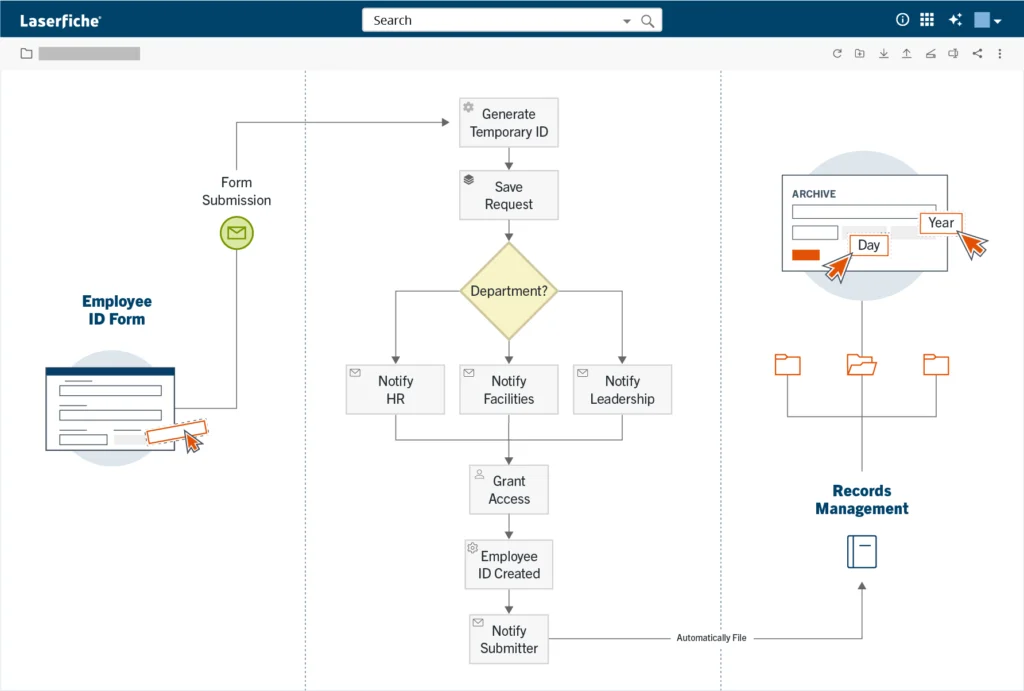
Onboarding and offboarding: The new onboarding process ensures that new hires have everything they need on their first day, from temporary passwords to door access. This process was a critical improvement, Nichols noted, not only for new hires, but also promotions and intracompany transfers.
Customer care surveys: The organization’s customer care surveys are now streamlined through Laserfiche, providing a more efficient way to collect patient feedback.
HR and payroll tasks: Rate changes, uniform orders, and other HR-related tasks are all handled through standardized forms, supporting consistency and accuracy. A Laserfiche integration with Alden’s HRIS pulls milestones like new hire dates and anniversary dates to further streamline these processes.
Expense reimbursement: Requests submitted by employees are automatically routed to the appropriate personnel. These requests are resolved swiftly, with receipts and other documentation archived as needed.
“Name any internal business process at Alden, and there’s probably a Laserfiche form for it,” Reinhofer said. “And we’ve now given everyone a single way to do everything, so there’s a lot of consistency now.”
The consistency is not only more efficient, but it also helps with employee retention and recruitment. When a new employee needs to learn a process, “there are four other buildings doing it the same way and there’s certainly enough people they can lean on to ask, ‘How does this work?’” Nichols explained. “And it’s always the same answer.”
The Results: A Shift in Focus
Since implementing Laserfiche, Alden has seen dramatic improvements in efficiency and productivity. The team has automated over 100 Laserfiche Forms processes with more on the way. Many of these automated processes now run 70% to 80% more efficiently than the manual workflows they replaced. Work that required a full week of manual effort can now be completed in an hour, allowing the IT team to manage workloads that were previously difficult to scale. “We created a monster, because we let the staff think outside of the box,” Nichols said. “Anything that they’ve asked for, we’ve made it into a process. We don’t fault them, because we started this — and it’s effective.”
Alden also relies on Laserfiche to support evolving Centers for Medicare & Medicaid Services CMS administrative requirements. The platform’s flexibility allows the team to respond quickly to regulatory changes while maintaining consistent documentation and tracking across the organization.
The most significant benefit has been empowering staff to focus on their core duties. By automating repetitive administrative tasks, the organization has freed up employee time. “We know people have other things to do,” Nichols said. “They have better uses of their time than these manual tasks you can deploy a robot to do. That’s essentially what Laserfiche has done for us.”
Ultimately, the goal has been to get back to the heart of the organization’s mission. “We want our clinicians to do clinical work,” Nichols explained. “The IT department doesn’t know how to take care of your mom or dad or grandparent. We want the clinicians to do that. We don’t want processes to take our healthcare providers away from what they do best.”
The most useful AI experiences are the ones that fit naturally into the systems and workflows employees already use every day. That’s where AI moves beyond isolated tasks and becomes part of how operational work actually gets done.
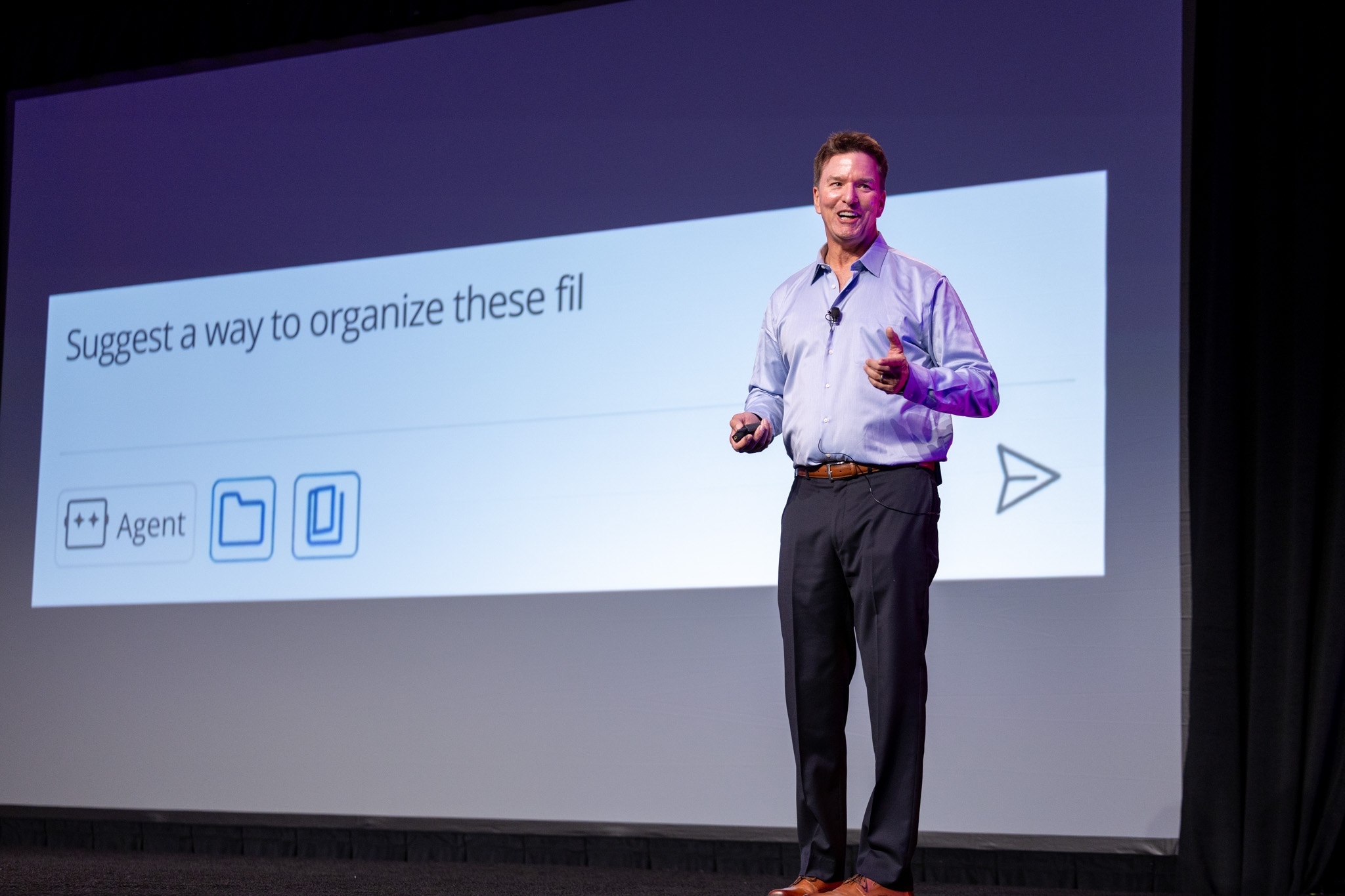
At Empower 2026 — Laserfiche’s premier annual conference— we introduced Laserfiche AI Agents, new virtual assistants designed to help teams bridge the gap between manual work and traditional automation. Using the Smart Chat interface in Agent mode, these digital coworkers tap into advanced generative AI reasoning models to analyze content and take meaningful action, all within the secure, governed environment of the Laserfiche repository.
Here’s what that looks like in practice.
Offload Tedious Tasks to AI Agents: Reorganize, Classify, Identify and Extract
Because so much work still gets stuck between manual effort and full automation, teams are often left managing repetitive operational tasks that don’t quite justify building a dedicated workflow. As anyone handling records at scale can tell you, that work multiplies quickly when policies or compliance requirements change, or large sets of records need to be reorganized.
One example we demonstrated at Empower involved the new California Senate Bill 513 (SB 513) that expanded the definition of personnel records to include employee training and education materials. For HR teams, that seemingly small change can create hours of tedious administrative work, from reviewing records to creating new folder structures to moving documents into the right employee files.
With Laserfiche AI Agents, an HR manager can simply use natural language prompts to tell Agents to move training records into matching employee personnel folders and create a new Training and Education subfolder. The Agent analyzes the request, recommends actions and carries out the work while still allowing the manager to review and approve each step before moving forward. With intelligent content management, tasks that previously required hours of manual effort can now be completed in seconds.
That same approach can help simplify a wide range of everyday work across departments:
Reorganizing records and metadata based on updated business policies or compliance requirements
Classifying incoming documents and automatically routing key business information into workflows and business systems
Identifying sensitive information that may require additional review or governance controls
Extracting action items, deadlines and responsibilities from unstructured emails or documents
Improving knowledge discovery through semantic search that understands context, meaning and intent
Individually, these tasks might seem incremental, but together, they can dramatically improve how work moves through an organization.
The first step in moving work forward is being able to find the right information quickly. Anyone who’s spent time digging through repositories and shared drives knows how frustrating this can be. Most organizations have enormous amounts of information spread across repositories and business systems, but finding what you need often depends on knowing precisely where to look.
Laserfiche’s agentic semantic search helps change that experience. Employees can search based on concepts, intent or meaning rather than relying entirely on exact keywords. For instance, a user can instantly surface vendor agreements related to “indemnification,” even if the document only uses terms like “liability” or “damages.”
The real-world speed of these capabilities was on full display at Empower. Business users configured AI prompts and extraction rules in minutes using natural language instructions instead of traditional technical configuration methods. In one internal onboarding demonstration, AI-powered document and metadata management reduced manual data capture work by 90%.
That accessibility empowers the employees closest to operational bottlenecks to solve them directly, allowing organizations to adapt instantly without waiting for IT support.
None of this works without trust. Laserfiche AI Agents prioritize human review, transparency and auditability, giving organizations total visibility. Agents strictly inherit your existing user permissions and governance policies, so you stay in control of every action.
The Next Phase of Autonomous AI Agents
The next phase of Laserfiche AI Agents will be even more dynamic, context-aware, and autonomous. Today, they help users complete one-off tasks interactively through natural language requests. Soon, process agents will seamlessly embed into existing workflows, replacing complex decision trees—like invoice approval routing—with intelligent automation.
The next evolution of Laserfiche AI will introduce background agents that run autonomously in the background to monitor repositories for specific business signals. For example, a marketing manager can task an agent with tracking files for a specific campaign. Using contextual reasoning rather than rigid keywords, the agent will automatically identify relevant documents the moment they are published and curate them for the team. Information actively helps move work forward rather than sitting inside siloed systems.
At its best, AI should help organizations reduce operational friction, adapt more quickly and give employees more time to focus on meaningful, high-value work. That vision shaped many of the conversations we had at Empower this year, and it continues to guide how we think about the future of work at Laserfiche.
Our June updates deliver smarter tools to help you manage workloads and connect your systems with ease. Discover what’s new in Laserfiche Cloud this month, including a comprehensive upgrade to the Operational Dashboard, plus new capabilities and modern updates for your daily workflows and line-of-business integrations.
New Tools for Monitoring and Managing Processes in the Operational Dashboard
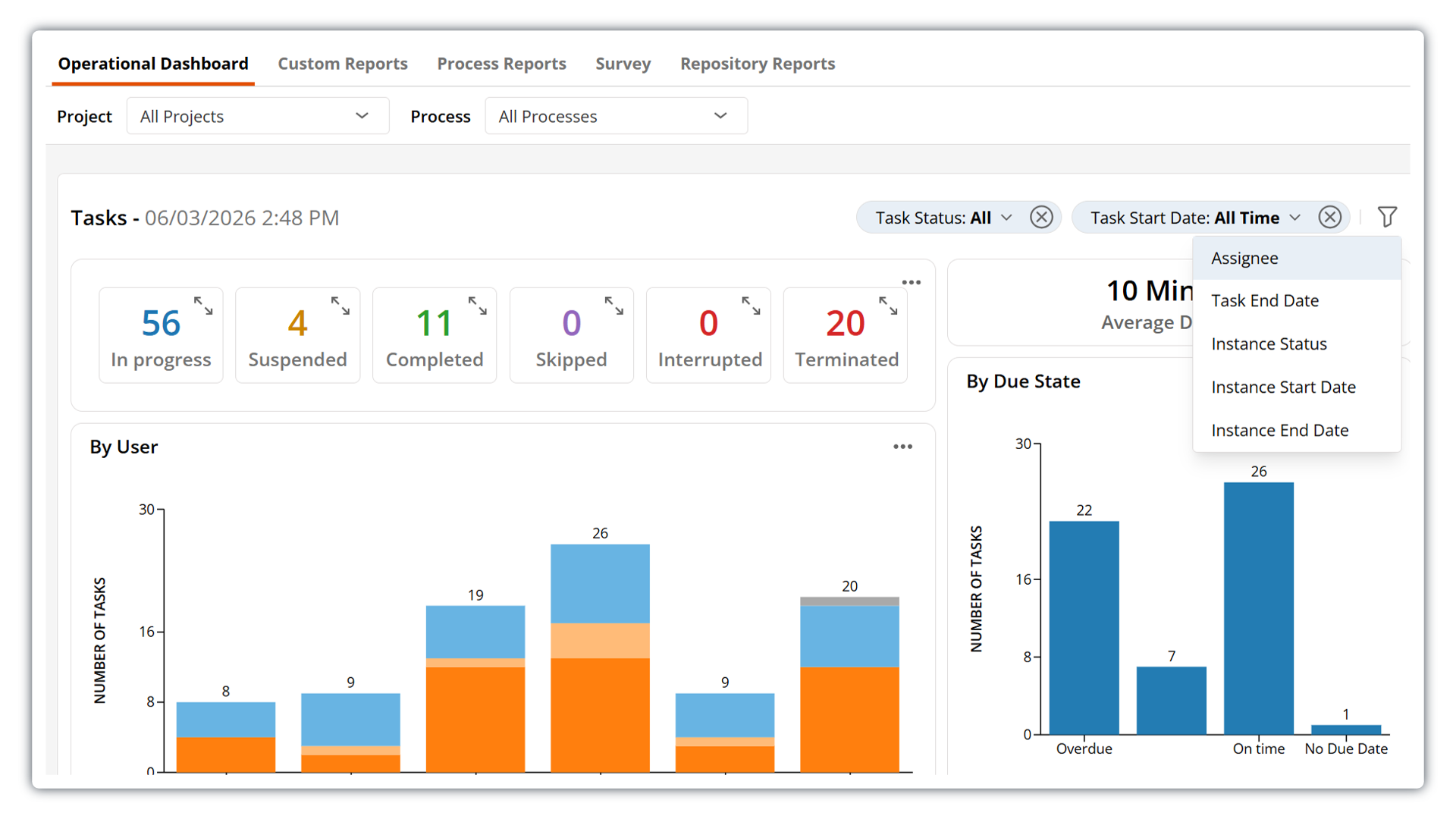
New enhancements to the Operational Dashboard make it easier for teams to monitor work, understand process and task status, and take action faster.
With new bulk task reassignment, managers can quickly rebalance workloads when priorities shift, team availability changes or work starts to pile up. Rather than reassigning tasks one at a time, you can now select multiple tasks and reassign them in a single action directly from the Operational Dashboard – less manual effort and fewer repetitive steps.
This update also introduces the ability to perform bulk actions on process instances from within the dashboard, so you can move from spotting issues to resolving them all in one place. Retry, skip, interrupt, or stop multiple instances that need attention at once – so you can address exceptions more efficiently and keep processes on track without switching between views.
The dashboard also features a modernized, more intuitive filtering experience that makes it easier to focus on the data that matters to you. Quickly apply available filters from a streamlined new drop-down menu. Applied filters now appear in a horizontal filter bar, giving you clear visibility into which filters are currently active and allowing you to easily modify or remove them as needed.
This update also introduces a new option to filter by assignee, giving you more control when refining dashboard views and making it easier to understand workload distribution across your team.
Save and Organize Emails Faster with the Updated Outlook Add-In
The Laserfiche Outlook Add-In for Microsoft 365 includes new capabilities that make it even easier to save and organize emails from Outlook directly into your Laserfiche repository. With the new save-on-send functionality, you can automatically file emails and attachments upon sending them. This update also adds support for assigning metadata tags and generating pages or text on import — all directly from Outlook.
Other updates:
Customize sender display name for emails sent from Workflow: Get more control and more personalization when using Workflow to automatically send out emails. You can now select from the same list of custom email display names available across Process Automation.
Repository API V2 update: This update brings new capabilities to the Laserfiche API, including the ability to generate and update pages, lock and unlock entries, and check documents in and out. See the full changelog for more details.
Salesforce External Client Apps Support: Laserfiche Application Connection now supports Salesforce External Client Apps for new Salesforce integrations. This update aligns with Salesforce’s latest authentication approach for connection setup. Existing Salesforce connections using Connected Apps remain supported and functional.