What’s New in September: AI-Assisted Form Fill and Expanded Agent Capabilities

This month, we’re introducing new features and product enhancements that help you complete forms faster, do more with Laserfiche AI Agents, and get more visibility into AI usage. Explore these updates and more from our latest Cloud release.

AI-Assisted Form Fill

Filling out a form often means uploading a document and then reentering information from that document into the form. AI-assisted form fill uses Laserfiche AI to automatically populate relevant fields with information from the uploaded document, making form completion faster and easier.

How to Set It Up: When building a form, designers can enable this feature with a single setting on a file upload field.

Just select the file upload field of your choice and check the box next to “Extract and fill fields with AI” to tell Laserfiche AI which documents to analyze. Only files uploaded to a field with this setting enabled will trigger AI population.

Shows the new "Extract and fill fields with AI" setting in the Laserfiche form designer.

With this setting enabled, Laserfiche AI handles both data extraction and field matching, so designers don’t need to configure any other form fields or define and maintain additional extraction rules or field-mapping logic.

How It Works: When someone uploads a file to an enabled field, Laserfiche AI reads the document, identifies the relevant data, and determines on its own which form fields the information belongs in. It then populates those fields automatically.

AI-assisted form fill never clears a field or overwrites information the submitter has already entered. If Laserfiche AI cannot find or confidently identify the information a field requires, that field remains blank.

The person completing the form can review the populated information, make corrections if needed, and complete any remaining fields before submitting the form.

AI-assisted form fill consumes AI units. Learn more about how usage is measured here.

By letting uploaded documents do more of the work, organizations can create a smoother submission experience and collect structured form data and supporting documents in one connected Laserfiche process.


Do More with Directed Agents

Laserfiche AI Agents can now take on more document management work with less back-and-forth.

Automate Complex Tasks with Fewer Interruptions: Complete complex tasks more efficiently. Now, for multi-step tasks, Agents will present their full plan upfront, giving you the option to review and confirm the proposed actions in one go instead of confirming each step one by one.

Create and Delete Collections: Agents can now create new personal Collections or delete existing ones on your behalf. Ask your Laserfiche AI Agent to find related documents, create and name a Collection, and add the documents to your new Collection in a single operation.


More Visibility into AI Usage

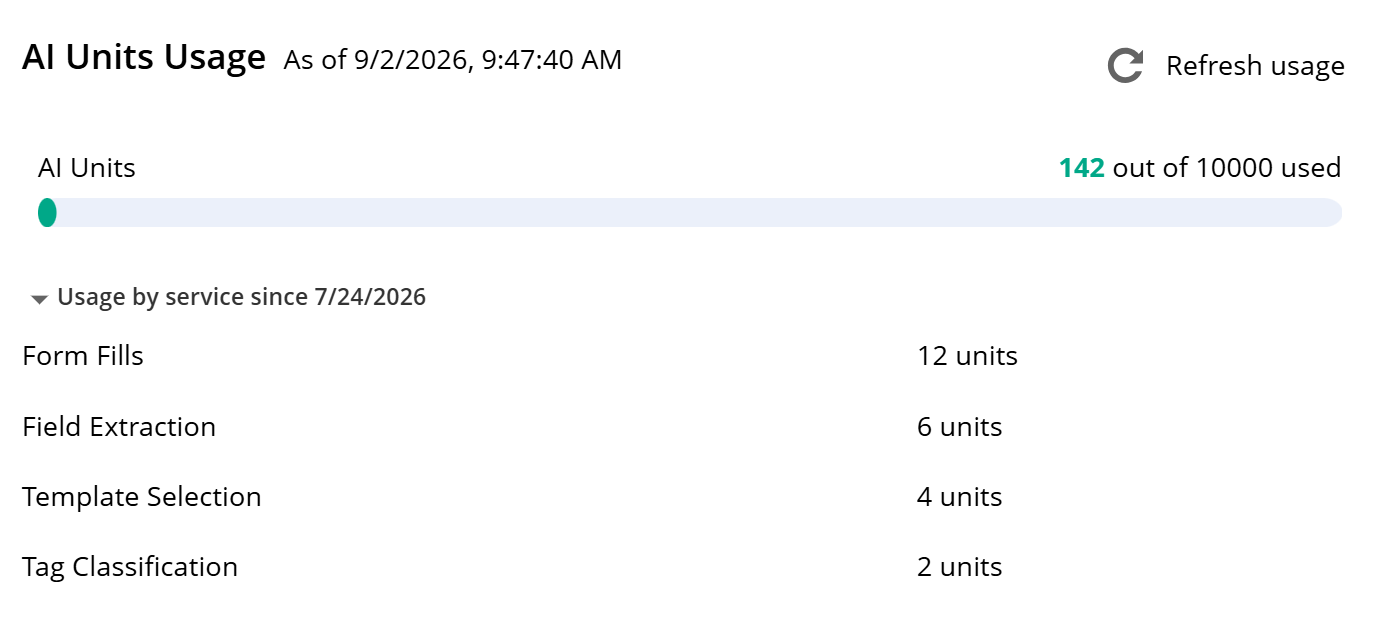
Admins can now get a clearer picture of how their account is using Laserfiche AI. The Plan page now includes a breakdown of AI units consumed by each feature, making it easier to understand which features are driving usage.

By providing more granular visibility into Laserfiche AI usage, this update helps admins more easily monitor where AI units are being used, spot inefficiencies that may be inflating usage, and manage AI resources more effectively.

Breakdown of Laserfiche AI units consumed by feature.
Usage by service information is available for operations performed beginning on or after July 24, 2026.

Updated Software Development Kit

A new version of the Laserfiche Software Development Kit (SDK) is now available, providing a more current and secure foundation for building custom applications that interact with Laserfiche. The latest version, SDK 12, is now distributed through NuGet, making it easier for developers to install and deploy the components they need. SDK 12 also delivers upgraded versions of the Repository Access library and other supporting integration libraries, along with modernized interfaces and enhanced security. Additionally, documentation is newly available in the Laserfiche Developer Center.

Organizations using earlier SDK versions to connect to Laserfiche Cloud should begin planning to migrate to this latest SDK version, or to the Laserfiche API, as connections through earlier SDK versions will be discontinued in the future.


Additional Updates  

Configure Audit Data Retention: You can now configure and enforce how long audit data is retained in Audit Trail for your account. This update gives administrators the control they need to meet compliance requirements and manage data growth.

Web Request Allotment Visibility: You can now view the number of web requests per day available for your account on the Plan page in Account Administration. Accounts that need an increased allotment have the option to purchase additional capacity as an add-on.

What’s New in August: Connect Dynamic Fields with External Data, Expanded Audit Trail and More

Dynamic Fields Now Support External Lookups

Dynamic fields are a useful tool for making your repository metadata cleaner, more consistent, and easier to manage, strengthening data integrity across Laserfiche. This month, we’ve introduced new updates that expand the capabilities of dynamic fields to make them even more powerful.

Previously, dynamic fields were limited to data sourced from static lookup tables. Now, you can configure dynamic fields using data query and web request rules, allowing you to pull live values from external applications directly into your metadata in real-time.

This update allows dynamic fields to display field value options that are based on live business data, reflecting the most current information instantly, no matter where it is stored.

In addition, dynamic field configuration is now available within the template designer, providing a more intuitive place to create and manage these connections.

Together, these updates offer new ways for teams to keep their repository metadata accurate, current and synchronized across their line-of-business systems.


Improve AI Data Capture with Dynamic Fields

Smart Fields can now use list options supplied by dynamic fields to guide metadata extraction. By checking extracted values against the currently available options, Smart Fields can produce more consistent metadata that aligns with an organization’s approved data. Organizations can continue managing these options in their existing source, without duplicating this information in each Smart Fields prompt.


Expanded Audit Trail Events

Laserfiche Cloud Audit Trail is expanding to provide broader visibility into security-sensitive and administrative activity across your cloud environment. Administrators can now better review privileged actions, identity-related changes and account administration activity from a centralized place.

This expansion includes team and project activities along with account-level security and user events. This allows organizations to extend audit visibility beyond the repository into process automation and account-level operations. With a clearer record of what happened and when, it’s now easier to monitor critical account activity and troubleshoot issues for faster investigation and clearer oversight.


Other updates:  

Laserfiche Forms Mobile App Update: You can now sign into the Forms mobile app on your iOS or Android device using fingerprint or facial recognition. Biometric authentication now supports Single Sign-On (SSO) for Laserfiche Cloud, including SAML and AD FS authentication. This update also supports a deep linking feature that allows you to open the app directly to a specific form, making it easier to access the right form faster.

Repository API update: The Repository API now supports new capabilities for interacting with documents and metadata, including the ability to manage access rights, document annotations, records management and users’ Recent Documents, Starred documents and personal Collections. See the full changelog for more details.

Idle Session Termination: Administrators can now enable idle session timeout to automatically sign users out after a selected period of inactivity. This gives organizations greater control over session security and helps protect information when a signed-in device is left unattended.

New Toolkit for Developers: Explore the new LF Form Builder, which includes a toolkit of resources and examples to help you modernize how you build, test, and maintain Laserfiche Forms customizations. Learn more about the resource here.

Introducing: Enterprise Security Add On and New Business+ Tier

Enterprise Security

We’re excited to introduce Laserfiche Enterprise Security, a suite of advanced compliance and data protection tools built directly into Laserfiche Cloud as an add-on for qualifying customers. The new add-on is designed to help organizations reduce risk, improve operational resilience and confidently manage their most essential information.

Laserfiche Cloud has always been built on a secure foundation, and Enterprise Security extends that for organizations who may have elevated security and compliance requirements.

For agencies handling Criminal Justice Information and state, local and tribal governments, along with other regulated public entities, Enterprise Security removes a major barrier to cloud adoption with a NIST 800-53–backed, CJIS-ready, GovRAMP-aligned environment.

Key Features:

Enhanced Disaster Recovery
Enterprise Security introduces cross-regional disaster recovery with four-hour snapshots, helping organizations recover faster from regional outages while maintaining data residency requirements. This reduces downtime, improves business continuity and gives IT teams greater confidence that critical services can keep running when they’re needed most.

CJIS and GovRAMP  
Enterprise Security includes CJIS-ready operational controls and an environment built to GovRAMP standards. These frameworks align with U.S. NIST standards and are designed to help agencies modernize operations with Laserfiche Cloud while supporting key security controls that may be required for compliance. 

See all that’s included with Enterprise Security on our Trust & Compliance Page, and register for our upcoming webinar to learn more.


NEW Business+ Tier

We have added a new enterprise tier that includes Enterprise Security along with expanded storage, additional API capacity, increased AI usage, more workflow resources and a dedicated sandbox environment for testing and validating changes before deployment. It’s built for organizations that need enterprise-scale performance, flexibility and security as they continue to grow. 

Business+ includes Enterprise Security and:

  • Expanded cloud storage
  • Increased API capacity
  • More AI usage
  • Additional workflow resources
  • A dedicated sandbox environment for testing and validating changes before deployment

Learn more about what’s included on our pricing page.


What’s New in July: Smarter Context for Laserfiche AI, Forms Mobile App, and More

Our July updates make it easier to give AI the right context, complete forms on the go and manage repository information through expanded API capabilities. Discover what’s new in Laserfiche Cloud this month, including updates to Smart Chat and Laserfiche AI Agents, Android availability for the new Laserfiche Forms mobile app and new Repository API V2 enhancements.

Give Smart Chat and Laserfiche AI Agents the Right Context

Smart Chat and Laserfiche AI Agents work best when they have the right context: the documents, folders, search results or collections relevant to your question or requested action. With this release, we’re making that context easier to provide and easier to verify.

Previously, Smart Chat and AI Agents only used the repository entries that you explicitly selected. Now, when no entries are selected, they automatically use the content in your current repository view as context. This means you can ask questions or prompt actions based on what you’re already looking at, whether that’s a folder, search results, a personal collection or a default collection such as Recent Documents.

You still control the scope. To focus on a narrower set of content, simply select the specific documents, folders or collections you want to include. Explicit selections always take precedence, so Smart Chat and AI Agents will use only your selected sources and ignore everything else.

We’ve also added a new selected sources badge that shows what repository content is currently in scope. The badge may display selected folders, documents or personal collections, or, when nothing is selected, a count of the entries in your current view.

Together, these updates reduce setup time, clarify what content Smart Chat can reference and what AI Agents may act upon, and help users  confidently transition from finding the right content to putting it to work.

Tip: Collections let you group related documents from across the repository into a reusable source of AI context. Open a collection and Smart Chat or AI Agents can use its contents automatically. Watch the video above to learn more about using collections.


Laserfiche Forms Mobile App Now Available on Android

The new Laserfiche Forms mobile app is now available to both iOS and Android users.

With the new app, you can securely manage your tasks and complete digital forms from anywhere. View all the tasks assigned to you, update key details like due dates and priority, reassign tasks to another user or team or complete your tasks directly from the app.

You can also launch, complete and submit forms on the go, with a mobile-friendly experience that supports image attachments directly from your device.

Download the new app today by searching for Laserfiche Forms in the App Store or on Google Play.


Repository API V2 Update

This update gives repository administrators more ways to configure repositories and discover document information through the Laserfiche API. Administrators can now manage metadata fields, list values and templates, including template field layout, with safeguards for higher-risk changes. The update also adds document size and folder child-count details to support storage reporting.

See the full changelog for more details.

Optimize Your Processes with an Upgraded Operational Dashboard

Our June updates deliver smarter tools to help you manage workloads and connect your systems with ease. Discover what’s new in Laserfiche Cloud this month, including a comprehensive upgrade to the Operational Dashboard, plus new capabilities and modern updates for your daily workflows and line-of-business integrations.

New Tools for Monitoring and Managing Processes in the Operational Dashboard

New enhancements to the Operational Dashboard make it easier for teams to monitor work, understand process and task status, and take action faster.

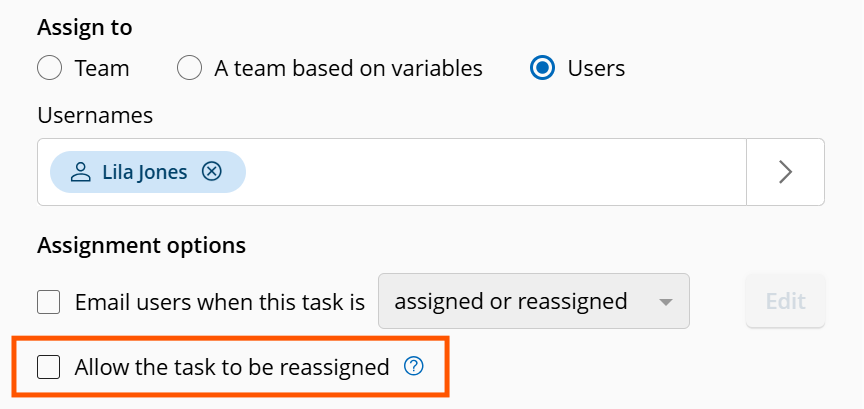
With new bulk task reassignment, managers can quickly rebalance workloads when priorities shift, team availability changes or work starts to pile up. Rather than reassigning tasks one at a time, you can now select multiple tasks and reassign them in a single action directly from the Operational Dashboard – less manual effort and fewer repetitive steps.

This update also introduces the ability to perform bulk actions on process instances from within the dashboard, so you can move from spotting issues to resolving them all in one place. Retry, skip, interrupt, or stop multiple instances that need attention at once – so you can address exceptions more efficiently and keep processes on track without switching between views.

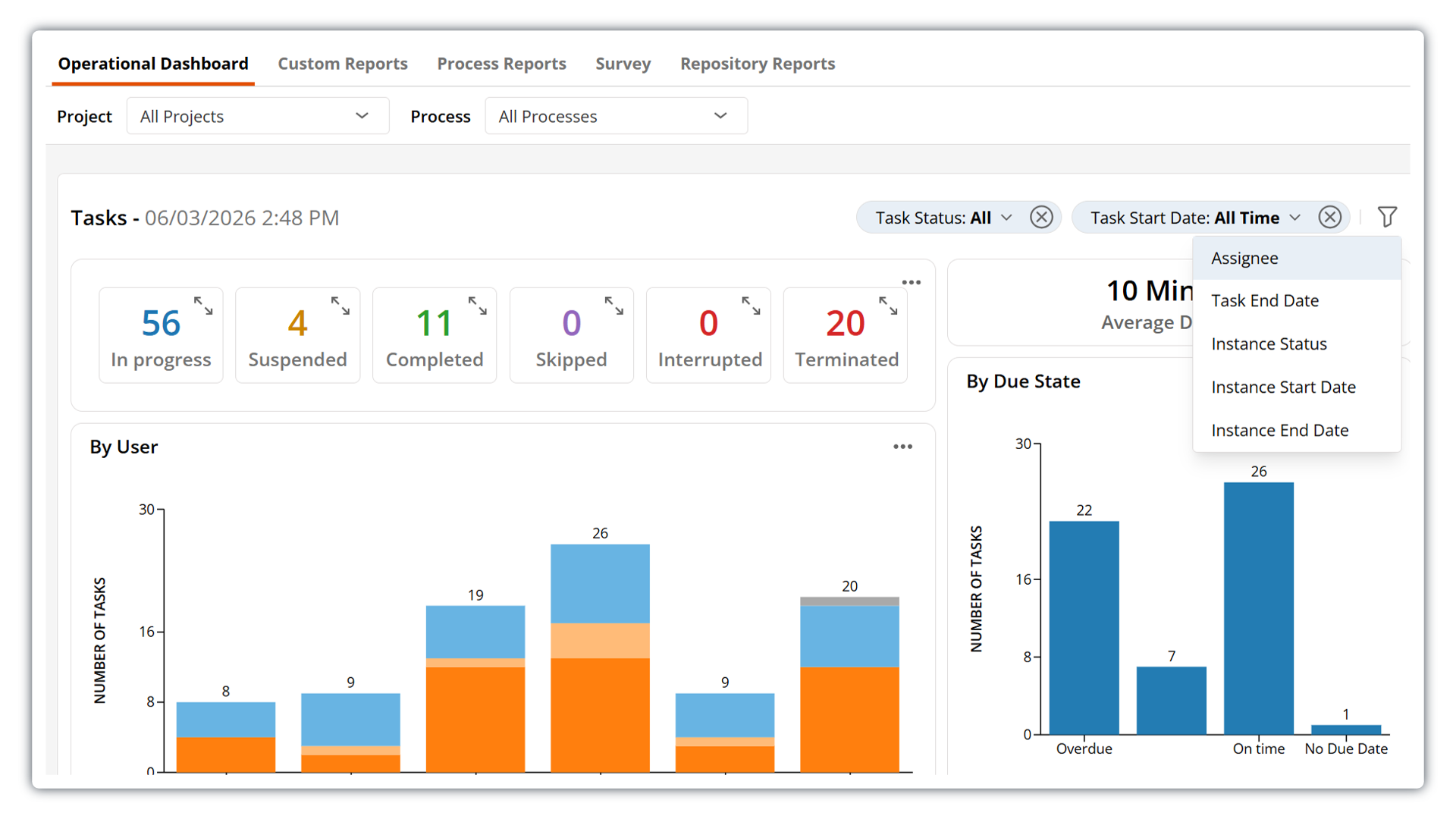
Modernized filtering interface in Laserfiche Operational Dashboard

The dashboard also features a modernized, more intuitive filtering experience that makes it easier to focus on the data that matters to you. Quickly apply available filters from a streamlined new drop-down menu. Applied filters now appear in a horizontal filter bar, giving you clear visibility into which filters are currently active and allowing you to easily modify or remove them as needed.

This update also introduces a new option to filter by assignee, giving you more control when refining dashboard views and making it easier to understand workload distribution across your team.


Save and Organize Emails Faster with the Updated Outlook Add-In

The Laserfiche Outlook Add-In for Microsoft 365 includes new capabilities that make it even easier to save and organize emails from Outlook directly into your Laserfiche repository. With the new save-on-send functionality, you can automatically file emails and attachments upon sending them. This update also adds support for assigning metadata tags and generating pages or text on import — all directly from Outlook.


Other updates:  

Customize sender display name for emails sent from Workflow: Get more control and more personalization when using Workflow to automatically send out emails. You can now select from the same list of custom email display names available across Process Automation.

Repository API V2 update: This update brings new capabilities to the Laserfiche API, including the ability to generate and update pages, lock and unlock entries, and check documents in and out. See the full changelog for more details.

Salesforce External Client Apps Support: Laserfiche Application Connection now supports Salesforce External Client Apps for new Salesforce integrations. This update aligns with Salesforce’s latest authentication approach for connection setup. Existing Salesforce connections using Connected Apps remain supported and functional.

Introducing Laserfiche AI Agents, Collections and More

The latest Laserfiche release is headlined by Laserfiche AI Agents, your new virtual assistants that turn Smart Chat prompts into repository actions. Alongside this major AI milestone, we are introducing Collections for better personal organization, a brand-new Forms mobile app, updates to Import Agent and more.

Laserfiche AI Agents 

Meet Laserfiche AI Agents: your intelligent virtual assistants for handling tedious work. You provide the instructions, and Agents take action on your behalf.  

This initial release introduces directed agents, which allow users to use natural language prompts to delegate repository actions, such as organizing content and applying metadata.

Read the full Agents press release. 

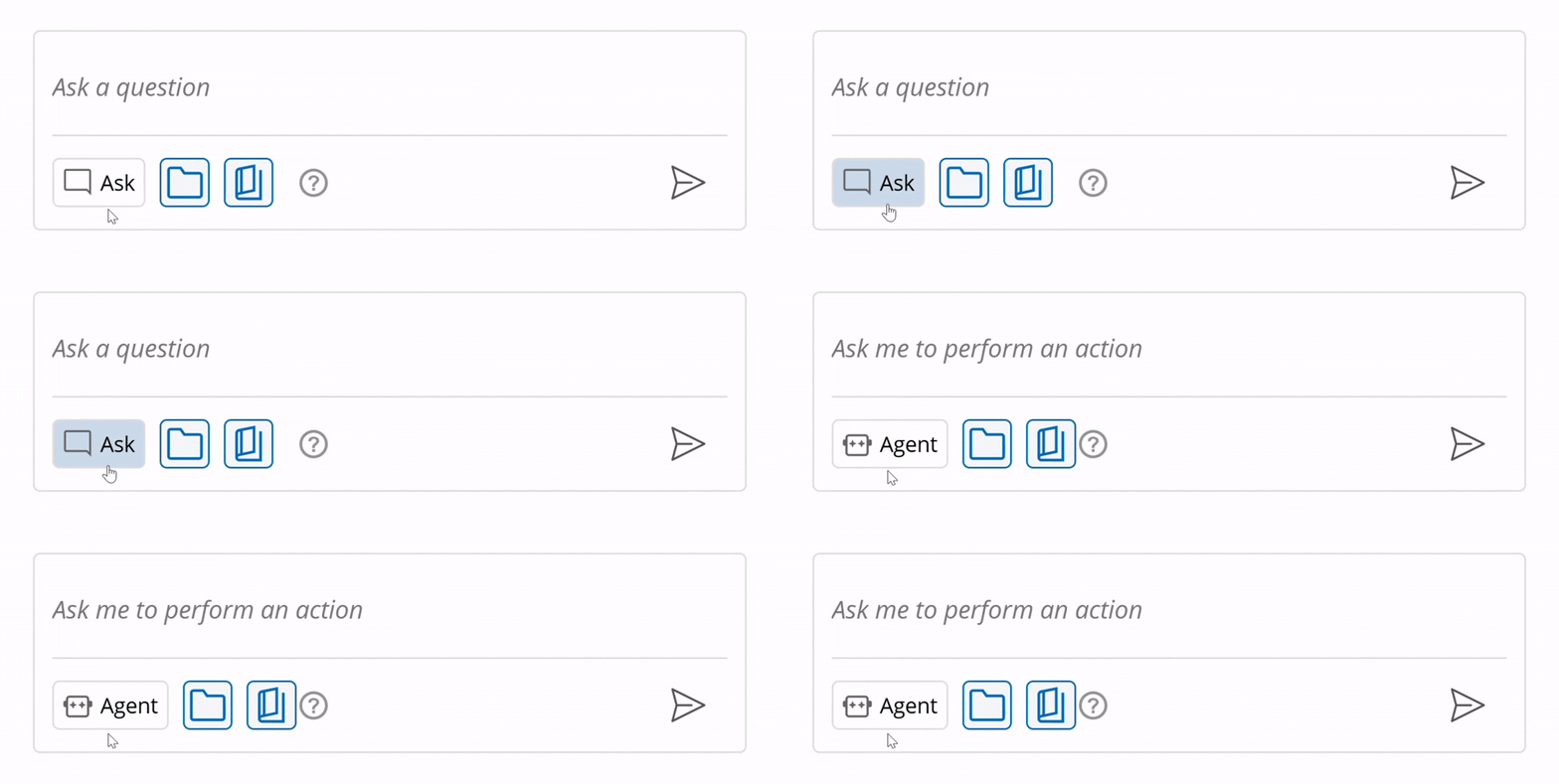
To start using Agents, open Smart Chat, switch to Agent mode, and describe what you want the Agent to do. Agents understand your intent, break goals into steps, and make intelligent judgments when needed to turn your natural language requests into system actions. 

User interface for toggling between Ask mode and Agent mode when interacting with Laserfiche AI Agents.

What you can do with Agents

Some of the operations currently supported by Agents include: 

  • Moving or copying documents  
  • Creating folders or shortcuts 
  • Adding or removing tags and templates 
  • Renaming documents, folders, and shortcuts 
  • Adding entries to your starred documents or personal Collections

See the full list of supported actions in the product documentation. 

Built-in controls for secure Agent actions

Laserfiche AI Agents were designed with trust, security, and control in mind. 

Agents act as extensions of the user interacting with them and operate within that user’s existing permissions. For transparency, every operation is recorded in audit logs and attributed to the user who prompted the Agent. 

Before executing a request, the Agent provides a summary of the actions it plans to take, giving you the option to confirm or cancel, and allowing you to adjust your prompt if needed. 

Learn more about what you can do with Laserfiche AI. 


Collections 

Collections give users a flexible way to organize related documents together for easy access, without impacting the repository structure for the rest of their team.  

Repository folder structures are often designed around organizational security and governance needs, which may not always match how individual users need to access content in their day-to-day work. Similar to quick access views like Starred and Recent Documents, Collections function like personal virtual folders, allowing users to group documents they reference frequently without moving them in the folder tree. 

Collections are specific to each user, not visible to others in the repository, and can be created, renamed, and updated as needed. Users maintain full control over which entries belong in each Collection. 

Collections can also be referenced in interactions with Smart Chat and Agents, helping users provide Laserfiche AI with the right context more efficiently through a predefined set of documents.

Learn more about Collections. 


New Forms Mobile App

Work with Laserfiche Forms from anywhere with the new Laserfiche Forms mobile app, redesigned from the ground up with a modern, mobile-first experience. View and update your tasks, find and fill out forms, start new Forms processes, attach images directly from your mobile device, and more.

Available now on iOS, with Android coming soon. 


Other updates: 

New functionality in Import Agent: Improved support for ad-hoc batch and bulk operations with the ability to run profiles on demand. Additionally, stay on top of troubleshooting with new email digests that notify you of issues like expired passwords. 

Quick Fields & Quick Fields Agent: Enjoy a refreshed user interface and expanded OCR language support, including Vietnamese, Hebrew, Arabic, and Thai. 

What’s New in April 2026

AI Prompt Rule

Build more powerful, flexible processes with custom AI activities directly in your Workflows and Forms. Just add a prompt to describe your custom task and choose whether to send the prompt to Laserfiche AI or to a compatible external LLM. Use the new AI prompt rule in business processes and workflows to automatically detect key information, route forms, perform sentiment analysis, and more. Level up your processes and build smarter, more powerful solutions.
Visit www.laserfiche.com/products/ai to learn more about what you can do with Laserfiche AI.

New AI Units for Measuring Laserfiche AI Usage

Instead of separate allowances for Smart Fields and Smart Requests, all advanced and automated AI activity will now draw from a single, shared allowance of AI units.
We’re also removing fixed consumption limits for manual, user-initiated AI interactions. This allows users to explore and use Laserfiche AI tools freely without worrying about using up a limited allowance, or needing to monitor or ration usage.
Ultimately, this change simplifies how AI usage is measured and transforms AI from a limited resource into a readily available capability, helping organizations unlock more value from their Laserfiche investment.

Repository Field Formulas

Repository fields now support formulas, allowing you to perform calculations, manipulate dates, and reference other fields using the same syntax as formulas in Forms fields. Make your repository metadata more useful, more consistent, and easier to manage – and get the data you want at your fingertips automatically.

Office Document Check-In Update

The Laserfiche Office Integration has been updated with a new tray app that makes checking documents in and out of your repository easier and more seamless. Checking documents back into your repository is now performed in the new tray app, or by clicking on the Windows notification that appears when you close your document. Documents that have been opened directly to edit will be checked back in automatically after the file is closed – allowing you to more seamlessly make quick edits to Word documents, PowerPoint presentations, and other Microsoft Office files.

Read the full release summary…

March 2026 Cloud Updates

Smart Chat: More Control, Larger Queries, Faster Responses

New one-click toggles give you more control over how Smart Chat generates responses, allowing you to include or exclude folder contents and Laserfiche product documentation as query sources. Smart Chat now also supports querying up to 1,000 entries at once – 10x the previous limit – so you can analyze more content in a single request. Plus, performance improvements further reduce pre-processing. time, allowing Smart Chat to deliver responses more quickly.
Together, these updates provide greater flexibility, expanded coverage across your content, and a faster overall experience when surfacing insights from the content within your repository.

Scheduled Custom Reports

Custom reports can now be generated and delivered automatically on a recurring schedule. Choose how often a report runs and have it sent via email or saved directly to your repository.
With the new scheduling capability, teams no longer need to manually export reports to stay informed. Insights from your business processes are captured and shared consistently, making it easier to monitor performance, track trends, and support data-driven decisions over time.

Operational Dashboard Enhancements

The Operational Dashboard is now available directly in the Reports tab, making it easier to find and access alongside your other process insights. Updated filtering removes the need to select a process version and introduces clearer, more flexible filters by project, process, team, and user.
State persistence has also been added, allowing you to return to the dashboard exactly as you left it or share configured views with others. Together, these updates make it simpler to monitor active work, identify bottlenecks, and keep teams aligned with less manual reconfiguration.

View the full release summary…

January and February 2026 Cloud Updates

Auto-Assign Tags with Smart Fields

Stay organized and compliant with intelligent tagging to classify your content using AI. Label documents based on status, sensitivity or document type to automatically apply informational and security tags to your files. Use natural language to define the conditions under which a tag should be applied to a document, and our AI tools will automatically apply that tag during import or on demand.

Smart Chat Response Streaming

Smart Chat now streams responses as they’re generated, delivering information to the user in digestible, continuous updates. Previously, responses appeared only after they were fully complete, creating a pause before the user saw any output. With streaming, users can observe Smart Chat processing their request in real time, resulting in a more interactive and engaging chat experience.

Enhanced Task Assignment for Business Processes

New task assignment enhancements make it easier to route work to the right people with more precision while keeping team structures simple and minimizing manual work. Role-based assignment allows you to create custom assignment roles within the same team and direct tasks to the right people based on these roles, eliminating the need to create and maintain multiple teams for different functions. Participant-based assignment improves continuity across multi-step workflows by automatically routing work based on participation in earlier steps, such as sending approval tasks back to the same person.

Trustee Management Usability Improvements

Trustee management is now faster and easier, especially for organizations with large numbers of users. Faster page load times, more advanced selection controls and filtering, and more visibility when performing bulk actions help administrators onboard and manage thousands of users with more confidence, fewer errors, and minimal frustration.

Read the full release summary…