
This month’s release includes updates to Laserfiche AI that let you search your repository in your own words through the Smart Chat interface and extract metadata from longer documents with increased Smart Fields page limits. Additional updates deliver more options for saving Office files, scheduling form submissions, and managing AI capabilities and account usage. Explore what’s new in the latest Laserfiche Cloud release.
Search Your Repository Using Natural Language with Laserfiche AI
Use everyday language to locate the documents you need. New search capabilities in Laserfiche AI Agents make it easier to find and work with content across your repository.
To get started, open Smart Chat in Agent mode and describe what you’re looking for in your own words. You can combine several criteria in one request, such as “Show me invoices involving Client A with a total amount greater than $5,000” or “Find any documents from 2025 that mention housing development project incentives.”
Laserfiche AI automatically builds a repository search based on your request, using the templates, fields, tags, and folders in your specific repository. The Agent responds with a preview of matching entries and explains the search criteria used.
Open the full search results to see all matching documents with the search filters already filled in. You can add, remove, or modify filters from here to refine your results as needed.
Use natural language search to discover relevant entries beyond your current repository view, then use them in interactions with Laserfiche AI. Ask follow-up questions using Smart Chat or instruct Agents to take action on the content you find, giving you a direct path from finding what you need to completing the task at hand.
Extract Key Information from Longer Documents with Smart Fields
By default, Smart Fields now extracts information from the first 50 pages of all documents, increasing coverage for image pages from the previous 10-page limit.
A new setting in Repository Administration also lets admins increase this extraction limit even further, up to a maximum of 200 pages per document. This repository-wide setting applies across document types, giving your organization the flexibility to configure a limit that fits your needs.
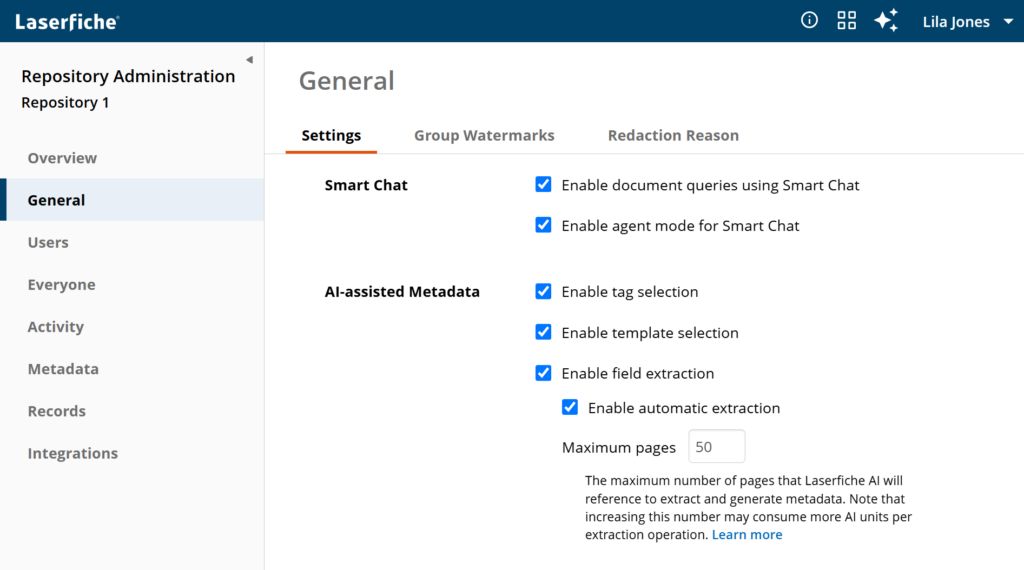
Processing more than 50 pages may consume additional AI units per operation. These changes apply to AI-assisted extraction only; template and tag classification page limits remain unchanged.
More Options for Saving Office Documents to Your Repository
The new Laserfiche Office Integration add-in lets you save Office files directly to Laserfiche from more places, including Office for the web and documents stored in OneDrive.
With this update, you can save directly from the web versions of Word, Excel, and PowerPoint, in addition to the desktop applications. You can also save documents currently stored in OneDrive directly to your Laserfiche repository.
The new add-in will be available on the Microsoft Marketplace soon.
Schedule When Forms and Surveys Open for Submissions
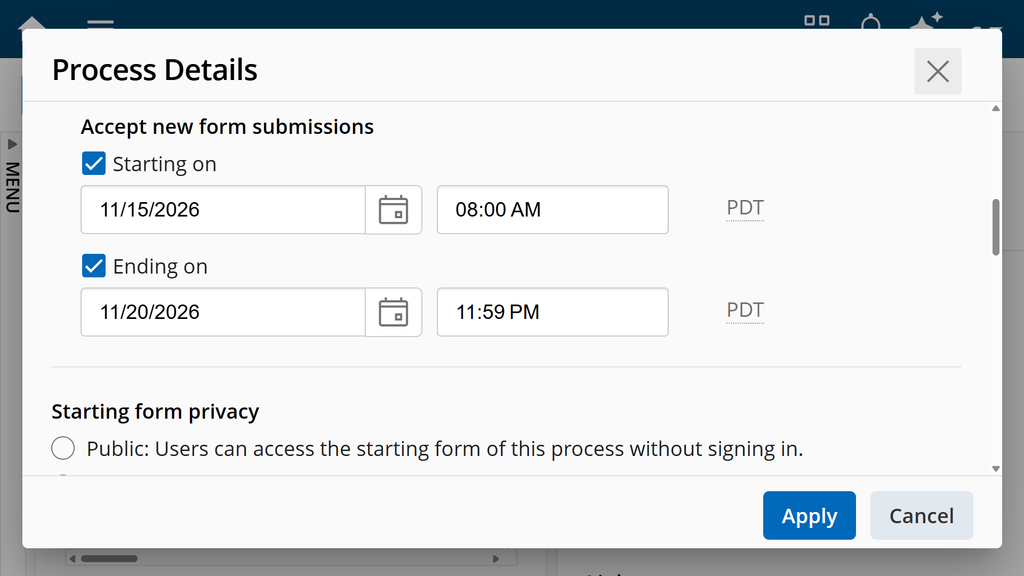
Open and close forms and surveys on schedule, whether you’re opening enrollment, accepting applications, or collecting evaluations. Process and survey designers can now set a start date and time for forms and surveys to begin accepting submissions, removing the need to enable them manually at the opening time. Use the start date on its own or combine it with the existing end date to define a submission window. This option can be configured for any business process or survey.
New Admin Controls for Laserfiche AI in Process Automation
New settings in Account Administration let admins enable or disable AI-assisted form fill, AI Prompt Rule, and Smart Chat for workflow queries across their account. Admins can manage each capability individually or use a single control to enable or disable all three together.
Stay Informed with Email Notifications for Usage Limits
Account administrators now receive email alerts when usage of AI units, API calls, or audio/video transcription minutes reaches 80%, 90%, and 100% of their plan limits. All account admins receive these notifications automatically, helping them anticipate approaching limits and know when to consider purchasing additional usage to support their team’s needs.
Published: November 5, 2026