Lebanese American University Shines with On-Demand Student Services

Lebanese American University (LAU) is an accredited American university operating in the Middle East with two main campuses in Beirut and Byblos, hospital facilities and an academic center in New York. The university consists of seven major schools and 800 faculty and staff serving approximately 10,000 students each year.

To maintain LAU’s status as a leading institution, the organization’s leadership is always looking for new ways to align its administrative services with student preferences, and reduce bottlenecks during busy enrollment and graduation periods.

Forming Digital-First Academic Services

“Students these days are digital natives, and they like to transact with us on their preferred devices, which are their phones,” says Camille Abou-Nasr, Assistant Vice President for Information Technology at LAU. “We needed really to automate all the processes that students carry out with the Registrar’s Office, and to do it in a manner that is plausible and really encourages them to do these kinds of transactions with us.”

Starting with the Admissions and Registrar’s Offices, the university used Laserfiche Forms to provide students with online access to transcripts and academic records. With on-demand digital access, academic advisors across student enrollment, recruitment, advising, student retention, outreach and student aid programs can now immediately review, approve or follow up with students in days instead of weeks.

Moving Towards Campus-Wide Mobility

Due to Laserfiche’s ease of use and open integrative capabilities with core systems like Banner and SharePoint, the university quickly expanded its initial mobile forms solution to other campus departments such as Student Development, Legal and Facilities Management. With a campus-wide solution, the university can truly enable students to submit any academic or administrative form online and get their results quickly.

Mobility has also benefited busy executives in the Facilities Management department, who oversee the numerous campus facilities. They can now use iPads to access and approve budget allocations in Laserfiche while traveling abroad.

“There is one platform where you can do document management, you can do forms, and you can do business process automation,” said Abou-Nasr. “It’s scalable.”

Benefits:

  • Student services, such as course petitions and transcript requests, can be initiated by students at any time via online forms.
  • Students receive immediate updates on their requests from advisors and can track the progress of submitted forms and requests at every step of the review process.
  • The university has greatly reduced the amount and cost of paper storage.

“Through mobility and document management, we were able to achieve our goal to go green, to make our services more accessible and deliver our services in a faster manner,” says Abou-Nasr.

Click here to learn more about using Laserfiche to enhance student services.

The City of Rochester Powers Public Records Requests

As one of the most populous cities in New York state (after New York City and Buffalo), the City of Rochester relies on its IT department to increase efficiency between city departments and enable more effective public services. Servicing over 14 departments including Public Safety, Police and Fire, the city’s IT teams need systems that can power the city’s many interconnected processes.

After a thorough study of how to redesign and modernize multiple city processes together, the city saw Laserfiche’s strength in business process automation, workflow and document retention and management as an opportunity to use one platform to improve many functional areas.

Automating Freedom of Information Law Requests

The city’s initial improvements came from using Laserfiche to build a Freedom of Information Law (FOIL) portal that enables citizens to submit public records requests online.

Previously, it would take staff up to five days to start processing new records requests using paper request forms. With the new portal, citizens can now file new requests via a simple online form and inquiries are immediately sent to the relevant city department for review and approval. Throughout the process, citizens can check the status of their request at any time in the FOIL portal.

An internal Laserfiche progress dashboard also shows department managers the status of open requests and how long it takes each staff member to fulfill them, providing critical data about the city’s efficiency.

“We have gotten really positive feedback from users about the system,” says Harriet Fisher, Senior Business Analyst at the City of Rochester. “One user, in particular, said, ‘This is the best thing since sliced bread!’”

One Platform for City-wide Projects

In addition to reducing processing time for FOIL requests, the city’s police department is currently using Laserfiche for five internal processes, and the accounting department relies on Laserfiche as the backbone of invoice processing. Laserfiche’s user-friendly interface ultimately allows the city to see a quick return on its investment for automation projects and open new avenues for shared services across departments.

“It allows us to easily manage the creation of forms, the development of workflow and security in a way that you do not need to be an application developer,” says Greg Luna, Enterprise Process and Systems Manager at the City of Rochester. “It really is a nice departure from the in-house developed applications—to think out of the box about how we can re-engineer processes, and Laserfiche makes it easy for us to do that.”

Benefits:

  • The city can digitally process over 4,000 FOIL requests each year in half the time that it used to take.
  • More transparent reporting on task efficiency demonstrates the city’s commitment to public service.
  • The city can prove standardized records retention across city operations

Click here to find out how state and local governments are using Laserfiche to streamline citizen service requests.

The Town of Okotoks Centralizes Enterprise Data Across 20 Locations

The Town of Okotoks is the largest town in Alberta, Canada, and provides services to over 30,000 residents. The city operates 20 different business centers that are each responsible for their own document filing. Prior to using a document management system, the city battled isolated information gathering and collaboration, leading to delays in public service delivery and data entry errors.

“The town was looking for a more streamlined solution with a central filing location, easier searching capabilities for the employees and everybody on a broad spectrum,” says Sheila Andrew, HR/Corporate and Strategic Administrator for the Town of Okotoks.

Using Laserfiche’s combined electronic forms, workflow and records management capabilities, the city jump-started an enterprise-wide digital records initiative. One central document repository provided a single point of access for information across the city and standardized each department’s disparate document filing and archiving methods.

The system quickly evolved from just a document storage system. It’s now the town’s primary tool for improving future and ongoing operations. Using Laserfiche Forms, the municipality implemented over 150 forms-based processes for numerous activities, including:

  • Waste management
  • HR applications
  • Permitting and inspection submission, review and approval
  • Expense report submissions
  • Records management for land transactions
  • Digital records archiving

Using metadata, federated search and digital document access, employees across city departments can instantly find and collaborate on the information they need to deliver faster public services.

“We’ve gotten great feedback about how quickly approvals are happening now and the ease of access to forms,” says Andrew. “We only have one location to find forms, instead of lots of different places where people were saving PDFs or filing them.”

Benefits:

  • The permitting department has saved, on average, two months of administrative staff work a year.
  • Fire Department and Inspection teams can complete inspections and deliver permits in six to eight months instead of a full year.
  • The city has increased transparency throughout the document life cycle.
  • The city processes over 21,000 digital forms in one system.

Staff collaborates more quickly and in a more transparent manner on documents and requests.

Click here to learn more about how document management technology can enable faster, better quality public services.

DESAF Supports Social Programs with Digital Documentation

As part of Costa Rica’s Ministry of Labor and Social Security, DESAF finances and oversees a broad range of social services across the nation. The agency is responsible for administering the Fund for Social Development and Family Allowances, which allocates budget to 28 different institutions for education, poverty, housing and other programs.

In 2010, new federal regulations required DESAF to modernize its internal processes, and make its legal operations and administrative processes more accessible to its citizens and clients. DESAF, which relied on large physical facilities to store documents and cumbersome manual document searches, implemented Laserfiche to streamline operations and improve client response time.

Beyond Digitization

The agency began using the Laserfiche system to digitize over 32,000 employer files within its Department of Collection Management. With direct access to client files, staff can streamline funding allocation and track employment needs across each agency.

“Initially, the only expectation that we had was digitalizing all of the documents,” says Robert Delgado Castro, Debt Control Analyst for DESAF. “When we began to use the application and all the tools, we found out that we could obtain a lot of complementary usage of the platform.”

By eliminating physical paperwork and manual processes across the agency, staff members can conduct more productive meetings with employers or clients without worrying about missing documents or delaying service.

“In the past, meetings lasted hours and required the review of physical documents,” Castro says. “Now, a meeting is conducted in a digital way without any risk of losing information. What took hours before, now takes just 10 minutes using Laserfiche.”

Benefits:

  • The new system digitized over 32,000 employer files and provided on-demand access to employment files.
  • DESAF reduced its reliance on off-site scanning and paper storage.
  • The debt prescription process was simplified, and wait times were reduced by 50 percent.
  • The organization streamlined monthly log reports with better data transparency.

Streamlining document access ultimately allows the agency to more quickly allocate the right amount of funding to the right organizations, respond to inquiries from each agency and analyze the efficiency of its social programs across the board.

“I’m sure the relationship between DESAF and Laserfiche will last for many years in the future in order to accomplish our objective, to fight against poverty in a very efficient way,” says Castro.

Click here to learn more about streamlining records management using Laserfiche.

PERI Scaffolding Speeds Invoice Processing With Laserfiche

PERI Formwork Scaffolding Engineering Ltd, based in South Africa, is a global manufacturer of formwork and scaffolding and provides consultant, project and engineering services for the construction industry. With wide-reaching operations across 60 global subsidiaries, the firm manages complex payment streams that require efficient processes and quick response times.

“As technology changes, there’s a need to communicate and distribute to customers more efficiently,” says Jacques Lotriet, Business Analyst for PERI’s Financial Efficiency Projects.

The organization previously relied on paper mail to sort, distribute and pay invoices. Collecting payments from customers often took up to two weeks with no guarantees that documents and payments would be returned on time.

With Laserfiche, the company built a web portal that provides customers and staff with web-based access to monthly statements and invoices. The accounting portal significantly decreased the time it takes staff to process invoices, improved the customer experience and helped the company provide more transparent operations for regulatory compliance.

“Feedback from our customers and our staff internally has been extremely positive, especially with the way to quickly and easily access and distribute documents,” says Lotriet.

Benefits:

  • Reduced accounts receivable and payable processing times from weeks to one day
  • Enabled customers to view invoices, see reminders and complete online payments entirely online
  • Saved $75,000 a year in printing and paper costs, creating a return on investment in the first year of Laserfiche use

The ability to quickly model and execute digital business processes helps PERI Scaffolding continually improve its customer experience and remain competitive in its industry.

“It is very versatile,” says Lotriet. “I like to describe it also as a blank canvas. If you can think it up, you can build it. The electronic flow and distribution is also very efficient, and saves a lot of time and money.”

Click here to learn more about using Laserfiche to streamline the accounts payable process.

What is the difference between RPA and BPM?

For many organizations, achieving digital transformation is not an overnight process. Fortunately, there are tools to help organizations make significant advances and be better positioned to reap the rewards of a digital workplace. For years, business process management (BPM) technologies have been a core part of many organizations’ digital transformation strategies. As new innovations in the industry emerge, organizations are finding even more opportunities to become digitally adept. Robotic Process Automation (RPA) has been gaining popularity as the latest automation tool to drive workplace efficiency and productivity – but how is it different from traditional business process management approaches?

While distinct in their own right, RPA and BPM are complementary to each other and, when deployed together, provide a powerful platform to enable digital transformation organization-wide.

Key Differences between RPA and BPM

As RPA becomes more of a mainstream solution, how does it fit within the context of existing BPM technologies? Let’s investigate the key differences between RPA and BPM.

Difference Between RPA & BPM

Let’s take a step back to outline the definitions of RPA and BPM as distinct methodologies.

Definition of RPA

Robotic Process Automation is a software technology that enables employees to better focus on high priority tasks by pushing routine, monotonous tasks to software “robots” to complete. These robots work directly across application user interfaces, automatically inputting data and triggering actions across multiple systems acting on the behalf of an employee. As a business user-friendly tool that does not involve any programming, robotic process automation technology enables non-technical professionals to self-serve and configure robots for themselves to solve their own automation challenges.

Definition of BPM

BPM is a strategic approach that concentrates on reshaping an organization’s existing business processes to achieve optimal efficiency and productivity. BPM software is the foundational backbone to facilitate completion of an organization’s projects, providing a variety of tools to help improve and streamline how business processes are performed. BPM software components can include business analytics, workflow engines, business rules, web forms, and collaboration tools. Often large-scale projects, BPM process improvement initiatives can impact an organization’s technology, employees, and customers, bringing about significant transformational returns.

BPM and RPA as a Combined Approach

Given their similar goals of increasing productivity and efficiency, BPM and RPA are not competing approaches and work together in harmony. RPA can be a valuable tool in boosting gains achieved with a traditional BPM system.

In many cases, an organization may not always have the resources and time to fully implement a completely integrated and automated process or have a process that does not require any human involvement. Implementing BPM and RPA together can bring about much greater process automation and value that one technology approach alone may not be as positioned to achieve.

Example of BPM & RPA in Action: Network Access Request

Members of the IT department are involved with a number of highly important responsibilities for the organization but may be hindered by a number of repetitive, manual tasks that do not require complex decision making.

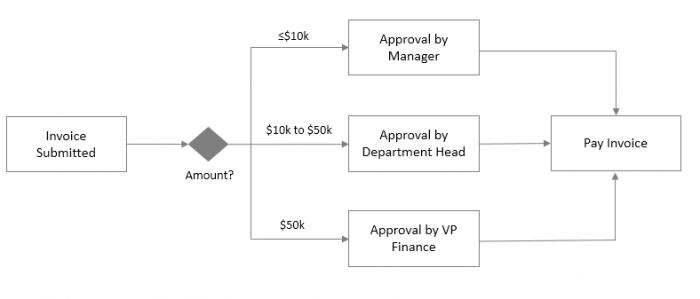
Below is a simplified version of an automated network access request process where an employee submits a request to be granted access to or be removed from a certain software application. After being approved by a supervisor, IT can then review the request and complete the request as appropriate.

In this situation, the process has been automated with a BPM system, but still involves some manual work by IT. Completing the request could involve logging into multiple applications, opening up the appropriate pages to grant access rights, applying the appropriate settings, logging out of the applications, and marking the request as completed.

As an individual request, performing these tasks may not take a significant amount of time, but if it is happening multiple times a day, it can distract from other valuable actions that a skilled IT professional will need to complete.

While IT may want to closely monitor the requests to see who is gaining access to what, the actual actions involved with granting access may not be as important. Adding an RPA bot to perform the manual tasks that will likely need to be repeated multiple times as employees change roles, join the organization, etc., will further optimize the overall process flow and free up the IT staff to focus time on other priority work. It benefits the organization to have IT professionals focus their energy on tasks that actually require human decision-making and nuanced consideration.

Tackling Repetitive, Time-Consuming Work

For professionals, moving between applications to perform specific actions is a common activity. With this so-called “swivel chair” work, employees must constantly switch between multiple systems to complete a particular task in an automated process. Possibly the applications the employees are working with did not have an API available to integrate with or a complete integration was not justified to reduce the employees’ manual work. Manual tasks could include actions such as data entry, searching, copy and pasting, or pulling together reports from different places.

RPA technology helps fill in these types of gaps in a BPM process, allowing organizations to achieve an even higher level of efficiency that may not have been as possible before. Existing systems remain in place, where bots would perform the monotonous actions a person would typically need to perform. Once the bot has completed its task, BPM can take over, pushing follow-up actions and results to the employee to complete or review. Offloading time-consuming, repetitive tasks to bots as part of a BPM solution will help enable employees better focus their talents on more productive work only they can do.

Digital Transformation Driven by BPM and RPA

Although BPM and RPA technologies can be deployed separately in digital transformation initiatives, it is when they are strategically implemented together that their individual benefits are compounded. BPM and RPA complement each other, forming a powerful duo that can help organizations further deliver on their process automation goals. In the future, RPA will become even more of an incorporated part of traditional BPM systems and organizations’ overall digital transformation toolkit.

Laserfiche has long been a provider of powerful BPM tools including workflow, web forms, business reporting and analytics, and capture solutions to streamline and transform business processes.


Key Differences between RPA & BPM [Text Version]

 Robotic Process AutomationBusiness Process Management
TechnologySoftware Technology


Software “bots” are configured to complete routine, monotonous tasks that an employee would normally have to do

Holistic Technology


Encompasses a wide range of software technology components including business analytics, workflow engine, and more to optimize business processes for maximum value and efficiency

Automation FocusManual Tasks


Minimizing manual, repetitive, and rule-based tasks that do not require complex decision making

End-to-End Process Automation


Re-engineering process flows to eliminate bottlenecks, connect systems, and increase productivity enterprise-wide

Deployment EffortLow


Non-disruptively works across an organization’s existing processes and applications without requiring coding or extensive training

High


A longer-term effort which could require dedicated technical resources, depending on process complexity and depth of integrations

Business ImpactQuick & Immediate


Returns can be realized quickly and cost-effectively, but implementations may not always address underlying process inefficiencies

Significant & Transformational


Wide gains can be achieved in overall productivity, agility, cost reduction, efficiency, and compliance

Want to Learn More?

For an overview of how process automation can help your organization streamline operations, watch our webinar, ECM 101: An Introduction to Process Automation Capabilities.

Download the Guide to Robotic Process Automation to take a closer look at the features, benefits and use cases of RPA.

How Educational Service District 112 Processes Agreements with Laserfiche and Signix

Contributed By: Kathy Koren, Technology and Software Coordinator, Educational Service District 112

Located in Vancouver, WA, Educational Service District 112 (ESD 112) is an agency that provides support services to school districts throughout the state of Washington and eight other western states.

One type of service provided by ESD 112 is purchasing contact negotiation. If a school needs to purchase furniture or projectors, for example, ESD 112 sends out an RFP to vendors and manages the bidding process. This allows school districts to simply purchase from one of the approved vendors rather than manage the bidding process independently.

For this to happen, a school district must sign an interlocal purchasing agreement with ESD 112. Prior to Laserfiche, managing these agreements was quite burdensome. Agreements must be renewed regularly, which requires additional processing. With 296 school districts in the state of Washington alone, and eight other states using this service, ESD 112 processed a high volume of agreements on a weekly basis. As many as 750 agreements were awaiting renewal, and new school districts request agreements regularly.

ESD 112 streamlined the submission, review and signing of interlocal purchasing agreements with Laserfiche Forms, Workflow and an integration with Signix e-signatures. Traditionally, staff spent approximately 45 minutes per contract. Time spent per contract was reduced by over 90%.

“What used to take a minimum of a week can now be done in minutes,” says Kathy Koren, Technology and Software Coordinator. “We had 25 signed contracts in the first 2 days of introducing this process, with about 1 hour of staff time to process all of them.”

The New Process

To submit an interlocal purchasing agreement, a district fills out and submits a simple Laserfiche form.

School districts apply for an interlocal purchasing agreement by filling out an electronic form

Once this form is submitted, it is automatically routed to the accounting department for review. Accounting staff reviews the submission to ensure that it is valid, and verifies that there is no existing interlocal purchasing agreement on file. If the form is filled out correctly and the request is valid, accounting staff approves the request.

Laserfiche Workflow populates a PDF interlocal purchasing agreement template with the data from the form. It then adds fields to the PDF to turn it into a fillable PDF form. Workflow sends an email to the district representative with a link to this agreement document in Signix. This is done using a custom Workflow activity developed for ESD 112 by Cities Digital. A notification email is also sent to the purchasing coordinator, alerting them to be on the lookout for the signed contract.

Workflow files the unsigned contract in the repository and applies metadata.

Laserfiche Worklow automatically routes the interlocal purchasing agreement to the district for signatures with Signix

The representative signs this agreement in Signix and sends it back to ESD 112. Once the signed contract is returned, Workflow replaces the unsigned copy with the signed copy. It then sends a notification to the purchasing department.

The interlocal purchasing agreements are stored in one folder with metadata clearly showing their status

The purchasing department can run a report in Laserfiche Forms at any time to see the contact information for interlocal purchasing agreements.

A report in Laserfiche Forms shows the status of all interlocal purchasing agreement

Laserfiche Public Portal

All agreements are available for viewing by ESD 112 employees using the Laserfiche public portal. An employee can select one of three options in the public portal:

  • Revenue Contract Search
  • Contracts Folder
  • Create Contracts Report
Employees can view agreements and contracts through the public portal

If the employee chooses to create a contract report, he is prompted to fill out a Laserfiche form to select what contracts he wants to see.

A simple Laserfiche form streamlines contract report requests

When he clicks submit, information from the form is passed to Workflow, which automatically generates a report and emails it to the requestor.

Reports are automatically emailed to the requestor

Benefits of Laserfiche

Streamlining the interlocal purchasing agreement process with Laserfiche and Signix has resulted in the following benefits for ESD 112:

  • Time spent processing each agreement has been reduced by 90%, from 45 minutes to just a few minutes.
  • Output has increased significantly, as 25 agreements have been requested, reviewed and signed in the first two days of introducing this process.
  • Mailing costs have been eliminated, and contracts are executed more quickly.


Getting Started with Laserfiche eBook

Laserfiche ECM software eBook guide

What’s inside this free eBook?

Getting Started with Laserfiche is your quick start guide to using the platform with ease.

This guide walks you through the most commonly used features to help you easily master the basics

This resource provides a high-level overview of Laserfiche’s interface and platform capabilities, plus bonus tips to make the platform even more intuitive.

In this eBook:

  • Tour of Laserfiche to get you familiar with the user interface
  • Quick guide of the most popular features
  • Tips & tricks to customize the settings for your organization’s needs
  • A glossary defining key Laserfiche terminology

How Oakland County Drives Innovation for Better Citizen Service

Located just north of Detroit, Oakland County, MI, has more than 60 cities, villages and townships with over 1.2 million people living within its borders.

The county’s ongoing commitment to innovation—led by CIO Phil Bertolini, who was inducted to the CIO Hall of Fame in 2017—has resulted in award-winning initiatives such as the G2G Marketplace (an online resource for governments to research, purchase and implement technology solutions and professional services), and Automation Alley, the state’s nonprofit technology and manufacturing business association.

“At the end of the day, my job is about working with a team that provides innovation and collaboration for Oakland County to improve customer service,” Bertolini says.

Oakland County’s IT team recently assessed its document management system, which was becoming time- and cost-intensive to maintain and update in order to keep up with the county’s constant state of digital transformation.

Increasing Information Access and Automating Processes

After evaluating a number of options, the county selected a Laserfiche enterprise content management solution to replace its legacy system. “The Laserfiche team was able to prototype and show us exactly how we would be able to use the software in our organization,” says Kevin Bertram, IT Applications Services Leader. “That was a key factor for us.”

Oakland County is now implementing Laserfiche across departments and business units including the county courts, to provide better access to information and automate key government functions.

“We want to make those processes more efficient, more automatic and better for the public,” says Bill Jobes, Program Manager at Oakland County. “In order to grow, we have to innovate.”

Empowering Employees and Citizens

By using Laserfiche to digitize information and automate processes, Oakland County aims to empower government employees to streamline operations and improve citizen services.

Benefits include:

  • Reclaimed IT staff time previously spent maintaining and supporting the legacy system
  • Increased access to information for authorized government employees
  • Around-the-clock access to public information and services for citizens through online portals
  • Better reporting and analytics for department leaders, leading to more informed decisions about resource allocation
  • Enhanced transparency of processes for citizens who want to be kept informed of how their service requests are progressing

“We’re always looking for opportunities to be more effective and really bring that cost for service or cost per unit down,” Bertram says. “Not for a bottom-line profit like in the private sector, but to try to reduce the cost of service to our constituents, and use their tax dollars appropriately and as wisely as possible.”

North County Transit District Improves Public Records Access and Retention

The North County Transit District manages public transportation operations in the North San Diego County area, including light rail and community rail systems, buses and disability transportation.

“We move approximately 12 million people a year,” says Sonya Finley, Document Control Coordinator. “We’re small in size, but we do a lot of heavy lifting when it comes to transit.”

Maintaining proper access to public records is critical to compliance with regulatory requirements. As a transportation organization, the transit district’s key processes—such as confirming staff members are following standard operating procedures—also ensure the safety of the operation’s millions of passengers.

Moving Away from Shared Drives

In the past, the transit district stored documents on shared drives without a standard organization method, making it difficult for staff to find the right versions for public information requests and new projects. “If you can’t find the documents, you can’t really do business,” Finley says.

To improve staff efficiency, the transit district needed to create a more centralized structure for document management and an organized repository for records retention.

Streamlining Records Retention

Using Laserfiche, the transit district created an organized shared repository for public records as well as department-specific document structures. “If they’re in one centralized place, then my job is a lot easier when it’s time to do a records destruction,” Finley says.

The transit district also used Laserfiche to add in workflows and digital forms to automate processes such as time off requests and new employee onboarding. “The document flows through, and boom, the person gets it. They fill it out and it moves to the next step,” Finley says. “Nothing gets lost on somebody’s desk.”

Benefits include:

  • Reduced staff time spent finding and retrieving documents for Freedom of Information Act (FOIA) requests
  • Quicker submission, review and approvals for contracts, time off requests, staff reports, project approvals and more
  • A more organized, compliant records retention and destruction process

“When staff comes in the morning, they’re opening Laserfiche; it has become part of our daily routine,” Finley adds. “When we have that approval process, those things get cleared and reviewed in a timelier manner. That ensures that all of our staff and even our contractors are following standard operating procedures, so that we can ensure the safety of our passengers.”