Accounts payable (AP) has been an essential part of business for decades. However, today’s organizations have more expected of them in the digital age – vendors now often want payment almost instantly and at the same time completely without error.
To keep up with the changing demands thrust upon modern AP departments, many organizations have used automation software to streamline their processes. However, AP is an incredibly complex process that may still require some manual work.
One of the largest challenges for traditional AP automation is processing data from invoices when the format changes from document to document. Oftentimes organizations design custom solutions to solve this problem. Still, they may take months of setup before AP teams can see value.
However, technology is always evolving. New software can now harness the power of artificial intelligence to recognize not just one type of invoice, but virtually any invoice format sent its way. These new, cutting-edge tools are a boon to organizations looking for a more thoroughly automated AP process, freeing up staff to focus on strategic initiatives and new ideas instead of occupying themselves with busywork.
How AI Makes AP Better
Machine learning is a specific type of AI, used across a variety of industries, from healthcare, to government, technology and finance. The most common way for ML to work is to examine a large data set (say, for example, 1,000,000 photos of various animals) and then find patterns that result in a desired output (for example, which of those photos featured a dog.)
Going back to the challenge of processing invoices, the machine learning solution to this problem works similarly. By examining a wide variety of invoices, the ML algorithm can be trained or instructed to recognize particular patterns, learn from them, and understand fundamentally what makes an invoice, an invoice.
With this knowledge, the ML algorithm, given a group of invoices where no two are formatted the same, would still be able to identify and extract data – such as invoice number, invoice date and vendor name – from each document in the set.
Benefits of Using AI for Invoice Processing
Using process automation software with AI technology offers a wide variety of tangible benefits for your organization, such as:
Accurate information: Easily extract invoice information such as invoice date, PO number, invoice number and total due.
Realize ROI faster: Implement a faster AP solution that doesn’t require extra effort to recognize different invoice formats.
Boost productivity: Minimize error-prone data entry by automatically pushing invoice data to enterprise applications.
Protect against fraud: Identify invoice discrepancies early with automated data validation against previously approved POs.
Improve cash flow: Shorten payment cycles and avoid late fees by automating reminders and streamlining payment processing.
Go Beyond What Was Possible With AI
AI technology allows you to go beyond what was possible before with AP automation. Adding the ability to recognize different invoice formats to your workflows can enable your organization to be more agile, adaptive, and efficient when it comes to paying out to vendors.Find out more about how Laserfiche® can transform your AP department with AI here.
Plus – Laserfiche AI’s intelligent data capture tools don’t stop at invoice processing. To see more use cases for Smart Fields, from contracts to handwritten application forms, check out the Laserfiche AI Smart Fields page here.
The digital transformation of the aviation industry continues to create new ways for airline carriers, leasing companies and aircraft service organizations to compete.
While aviation has traditionally lagged behind other industries in digital innovation, Coopesa RL — a provider of service and skilled personnel to the aviation industry since 1963 — has prioritized investing in new technology to transform its business. Most recently, Coopesa used Laserfiche to digitize and automate its documentation processes, which has resulted in a reduction in employee hours spent on updating and tracking down paperwork, better oversight of documents and processes, and a boost in productivity. Additionally, the improvements have shortened the average time planes are grounded for service, enabling Coopesa to offer more value to clients.
“Every day, more and more airlines, competitors and suppliers are transitioning to a digital environment,” says Herbert Cabrera, IT director at Coopesa. “Additionally, many of our mechanics are millennials; they are very willing to work in a sophisticated digital ecosystem. We recognize the need to provide the tools that will empower them to be as effective and productive as possible.”
Safety and Compliance in the Cockpit
Based in Costa Rica, Coopesa offers major maintenance, inspections, modifications, upgrades, refurbishments and painting for the world’s aviation fleets and leasing companies. The company has three hangars, and plans to open a new facility that will accommodate additional offices, back shops and the service of even more narrow- and wide-body planes. As the company evolves its offerings, Coopesa has also embarked on a journey to digitally transform its business as well.
Coopesa’s IT team identified an opportunity to digitize the process of documentation, which is required for every task involved with aircraft repair and maintenance. Documentation enables the company to comply with numerous regulatory requirements from more than 13 aviation regulatory agencies in the region — plus requirements from clients’ countries. Traditionally very manual and paper-heavy, documentation for a single service could take up to three days.
Some of the challenges Coopesa faced as a result of manual, paper-heavy documentation processes included:
A lack of transparency and accountability, and an inability to assess the status of projects.
Significant amount of manual effort involved with finding, reviewing and approving documentation.
Limited ability to make informed business decisions about resource allocation and other strategic concerns.
The company sought a user-friendly, customizable solution that could help employees digitally and securely document service activities and purchases, as well as reduce the manual tasks involved with managing and updating documentation.
“In order to keep up with our growing clientele while continuing to honor our commitment to quality, safety and compliance with regulatory requirements, we turned to Laserfiche digital document management and business process automation,” Cabrera says. “Laserfiche helps us to meet one of our biggest challenges: complying with civil aviation control entities in each of our clients’ countries as well as our own.”
Laserfiche Takes Coopesa to New Heights
Using Laserfiche, Coopesa digitized critical documents related to services and automated many of the tasks related to reviewing, approving and updating documentation. The company also automated the process of material purchase documentation, which must be kept for two to five years for auditing, depending on material type and client requirements.
“Digitizing these processes allows us to avoid manual review of thousands of documents, and mitigated the risk of lost documents that previously had to be physically transferred between offices. We also have a full audit trail for all documents; everything is completely traceable. This digital experience puts us on par with the largest repair shops in the world.”
—Herbert Cabrera, IT director at Coopesa
The company has plans to integrate Laserfiche with other internal systems, to centralize information and enable employees to more easily locate certificates and other critical documents, no matter where they are stored. Another project on the horizon is the digitization of personnel files, which also require strict controls and security.
“For many years, the aviation maintenance industry was reluctant to adopt technological solutions, but now there is a new digital ecosystem,” says Cabrera. “Laserfiche has enabled us to not only participate but act as a leader in the digital transformation of the aviation industry.”
Offering First-Class Customer Experience
Coopesa’s Laserfiche initiatives have significantly reduced costs related to the printing, storage and transportation of paper documents. More importantly, the documentation process — which previously took up to three days — now only takes one to two hours. Clients automatically receive notifications immediately when they have corresponding tasks to complete.
“Streamlining this process is incredibly valuable,” says Cabrera. “We can shorten our turnaround time, while our clients can quickly schedule the return of their aircraft to operation. This has a positive effect on our revenue as well as the customer experience.”
The increase in transparency across the organization also allows for better planning. Staff are empowered with information regarding hangar space, technician and other resource availability to fulfill clients’ service and maintenance needs in the most efficient manner possible. Managers are also better able to measure performance and productivity by examining process data.
Another important benefit: Employees have reclaimed time from tedious, manual processes to be dedicated to more specialized tasks related to quality control and customer service.
“Our biggest satisfaction is seeing aircraft take off from our facilities, and operating safely and reliably,” adds Cabrera. “We will continue to invest in the technology solutions that enable us to be our clients’ partners in maintenance, and to meet their needs with high-value and competitive solutions for service.”
Merichem is a global company that serves the oil and gas industries with focused technology, and chemical and service solutions. Its proprietary impurity removal processes increase the quality of refinery products and oil and gas streams, and the company beneficially reuses spent caustics and other byproducts from oil and petrochemical plants around the world.
Merichem used Laserfiche to automate a number of approval processes, centralize information and improve information governance. The result has been a decrease in the burden on employees for meeting all of the requirements of ISO 9001, ASME and other documentation requirements, an increase in information accuracy and productivity, and faster turnaround times for customers—all critical improvements for an organization focused on operating safely and efficiently in a fast-changing, highly regulated industry.
“There has been a lot of change in the oil and gas industries,” said Amy Magee, project controls manager at Merichem. “It used to be that hiring a bunch of people wasn’t a big deal because the industry was making a lot of money. It’s never going to be the way it used to be—cost savings have become more important. Everyone in the industry is working to better understand how they are using money and how they are operating, so we can do things differently and more efficiently.”
Putting Quality and Safety First
With three U.S. offices and over 1000 treating units in refineries in 53 countries, Merichem must comply with a multitude of safety standards including those of the ISO, American Society of Mechanical Engineers (ASME) and other organizations related to pressure vessels and refinery equipment.
“Quality and safety are extremely important to us,” said Amy Magee, project controls manager at Merichem. “We need to ensure our systems are built to the right standards. Data sheets are needed for equipment; drawings for construction; plus a lot of testing has to be done. And anyone who operates any of our equipment or the equipment we purchase needs to know what they are doing.”
The company initially needed a new centralized repository for documents, but Magee also realized that the company’s needs went beyond digital storage. “We need the ability to manage licenses with customers and give them access rights to individual folders,” she said, adding that employees previously had to manually track access to specific folders via spreadsheets or on Word documents. “We also have to track versions of documents, and when we disseminate information or updates, we need to know if and when documents are received and reviewed.”
Another essential component of Merichem’s operations, data books, were time intensive to compile, and were often still printed on paper and sent to customers. When a project was completed, employees had to compile anywhere from 10 to 20 books—with about 750,000 pages in each book—in a short time frame. PDFs were manually uploaded, and any time a change is made, it must be carefully tracked and sent to the customer as well. This resulted in increased overtime hours at the end of every project. “Data books were being printed, and employees had to manually mark up the individual copies,” Magee said. “They then had to scan the page back in, and there was no way to know if a customer had opened or looked at it. It was just a monotonous process. You had to check that you didn’t duplicate efforts. A lot had to be done to ensure the information was correct.
“Our cycles are very fast, and a lot of projects are fast-tracked,” Magee added. “Manual work was delaying our processes, and employees had to work overtime to get things done within our time frames.”
The company ultimately turned to Accelerated Information Systems, a Laserfiche Solution Provider, to implement a Laserfiche system that would enable access control, provide tracking capabilities and automate manual processes, including data book compilation.
“Safety is serious business at Merichem,” said Zaheer Master, president of Accelerated Information Systems. “With Laserfiche we’ve automated a critical but monotonous task, freeing employees to work on more important projects.”
Control, Automate, Transform
Today, Merichem uses Laserfiche for document management; Laserfiche provides granular security control so that individual employees are no longer tasked with tracking access to information. Project assistants previously spent on average 750 hours—about half of the hours charged to a typical project—uploading and transmitting documents to multiple outside parties. Today, they have reduced that by about one-third, or 250 hours.
The centralized system also allows employees enhanced search capabilities, saving additional time finding information. “One of the biggest complaints we had about the previous software we were using was that you had to know the exact name of what you were searching for,” Magee said. “Being able to use Laserfiche and do partial or fuzzy searches, and search through OCR and metadata has been huge for us.”
Beyond improving the management of information, Merichem used Laserfiche to automate the process of data book compilation. Today, employees simply need to follow a naming convention for files and an automated workflow compiles the data book in 30 minutes to two hours—a process that used to take a full week.
“I’ve gotten a lot of feedback that Laserfiche makes our employees’ lives easier. It’s had a positive impact inside and outside of my department, across the rest of the organization. It helps all of our employees and alleviates stress related to deadlines, and we are able to expedite the turnaround time for preparing and submitting data books to customers. The end of a project is always a stressful time period, but it’s much easier now since very little manual work has to be done. We don’t have that rush at the end, where everyone’s putting in overtime hours.”
—Amy Magee, Project Controls Manager at Merichem
Continued Improvements, New Efficiencies
Merichem continues to explore new uses for Laserfiche and increase efficiency across the organization. Next, the company has plans to implement Laserfiche for specifications review, another time-intensive and paper-driven process. Magee explained that employees will also use Laserfiche in shipping and receiving, allowing employees to use tablets to take pictures of materials before they are shipped, so that they can upload them to the Laserfiche mobile app. This will assist employees in ensuring the company has records of the exact condition of items before they leave the premises, helping to fulfill requirements of ISO 9001.
Magee encourages her team members to obtain Laserfiche Certification and get involved with process improvement. “Laserfiche has helped in a lot of aspects,” Magee added. “It’s helped to keep everyone on track, and now as we are overseeing and facilitating work, we are able to make sure that people have the tools they need to get important information to customers in a timely manner.”
Solution Provided By: Chelsey Hulsey Pedersen, Laserfiche Specialist, Cowlitz County
Cowlitz County, WA has a population of over 102,000 residents and approximately 60,000 parcels of land – both residential and commercial. Each property is either physically inspected or statistically reviewed by an appraiser every year to determine its property value for taxation purposes. Once the value is finalized, the Assessor’s Office sends the taxpayer a Notice of Value which initiates a 30-day appeal period.
If the property owner disagrees with the assessed value, he or she can submit an appeal during this time. Some of these appeals are resolved without a hearing, though sometimes the appellant must plead their case to the county board of equalization. Whatever the outcome, the process has many intermediary steps, which used to be manual and paper driven. All petitions and their associated attachments were submitted on paper. The assessor’s office would make a copy for their paper files. Even though the documents were stored in petition folders in Laserfiche, the assessor’s office still preferred to keep paper versions.
The county transformed this process using Laserfiche Forms and Workflow.
The New Process is Managed Using Laserfiche Forms
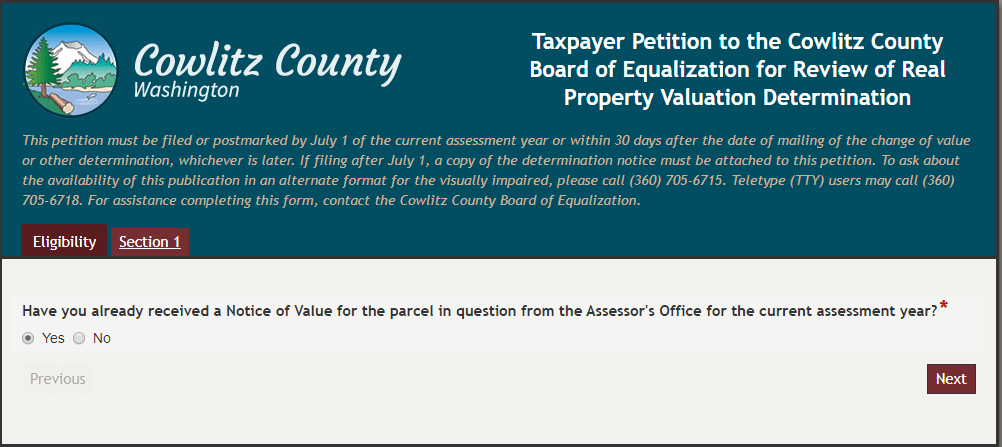
The appellant submits the property value petition through an electronic form. This petition form is divided into six sections. Each section asks for a different piece of information.
Before the letting the appellant fill out the petition, the form ensures eligibility.
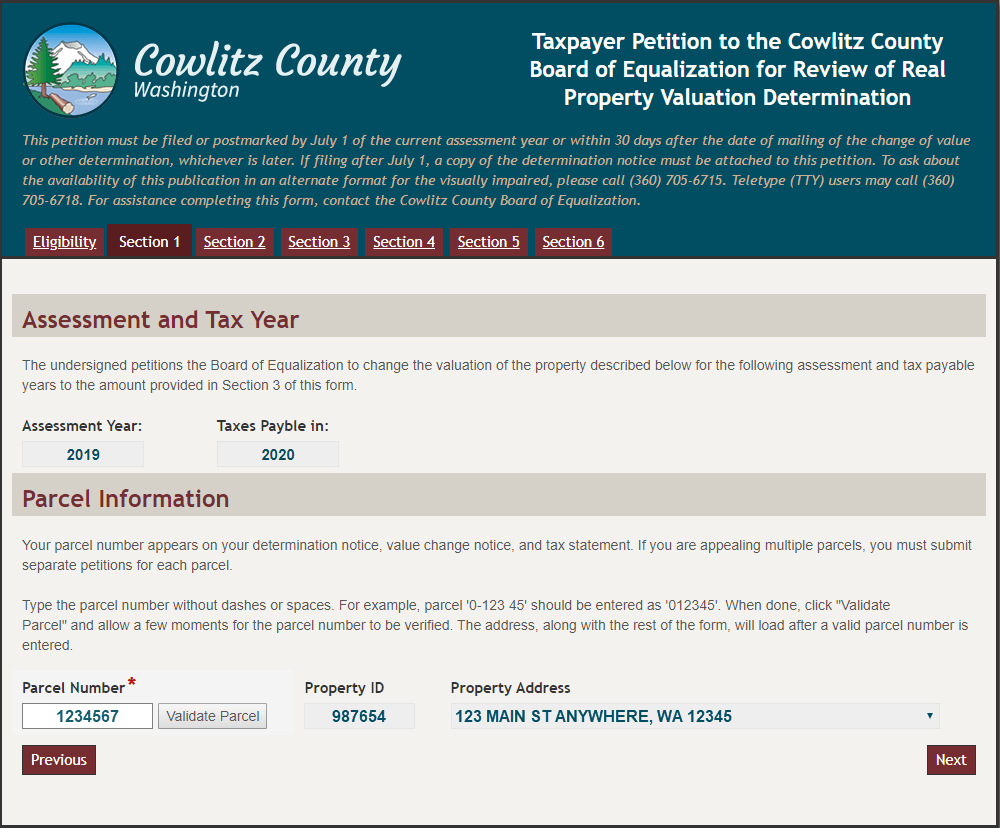
The appellant can only submit one petition per parcel, per assessment year. There is a lookup configured in the form that checks the parcel number against the database to make sure that it is valid and that there are no other petitions on file for it for the current year.
A database lookup in the form validates the parcel.
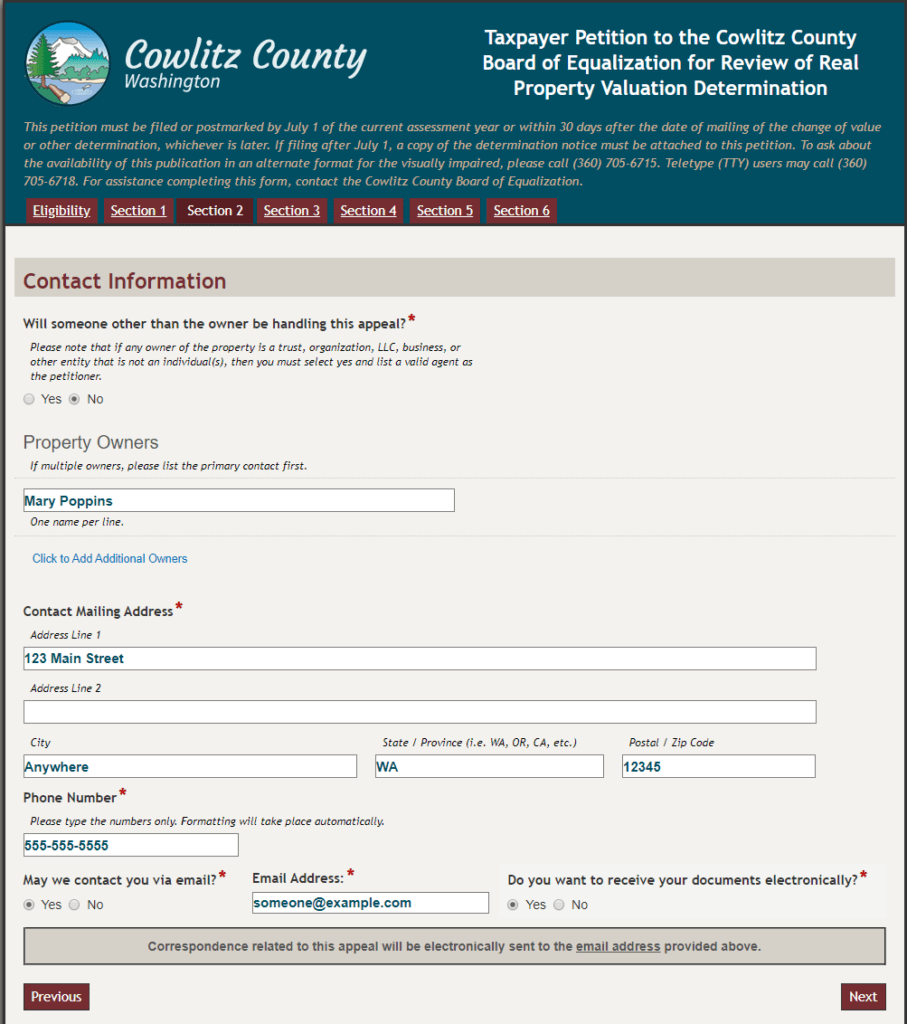
The appellant must specify whether to receive all communication regarding this petition electronically or physically. Appellants who elect to receive electronic communications will receive all notices through automatically generated emails. Applicants who elect to receive physical communications will receive a letter that is printed and mailed by either the clerk of the board or the chief appraiser. Over half of applicants opt for electronic communications.
The appellant fills out contact information, including how he or she wants to receive communications throughout the process.
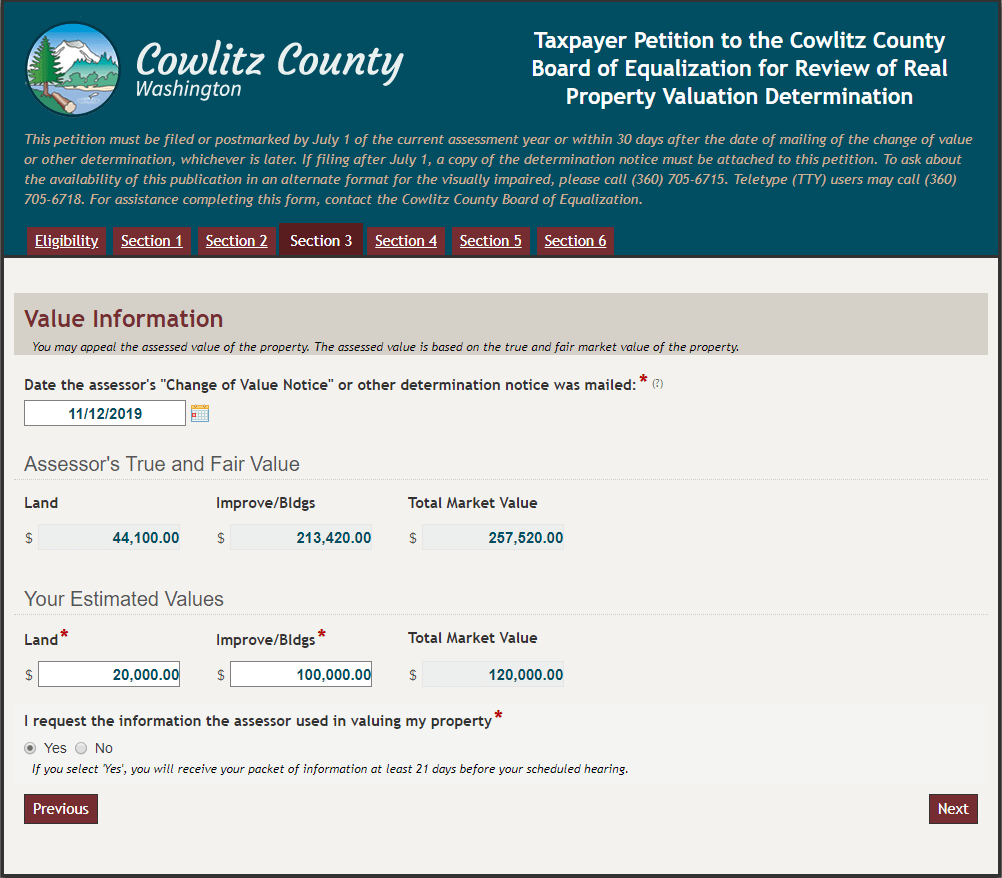
The assessor’s property value is populated from the database based on the parcel number. The appellant must include the property value that he or she thinks is correct.
The appellant provides estimated property values.
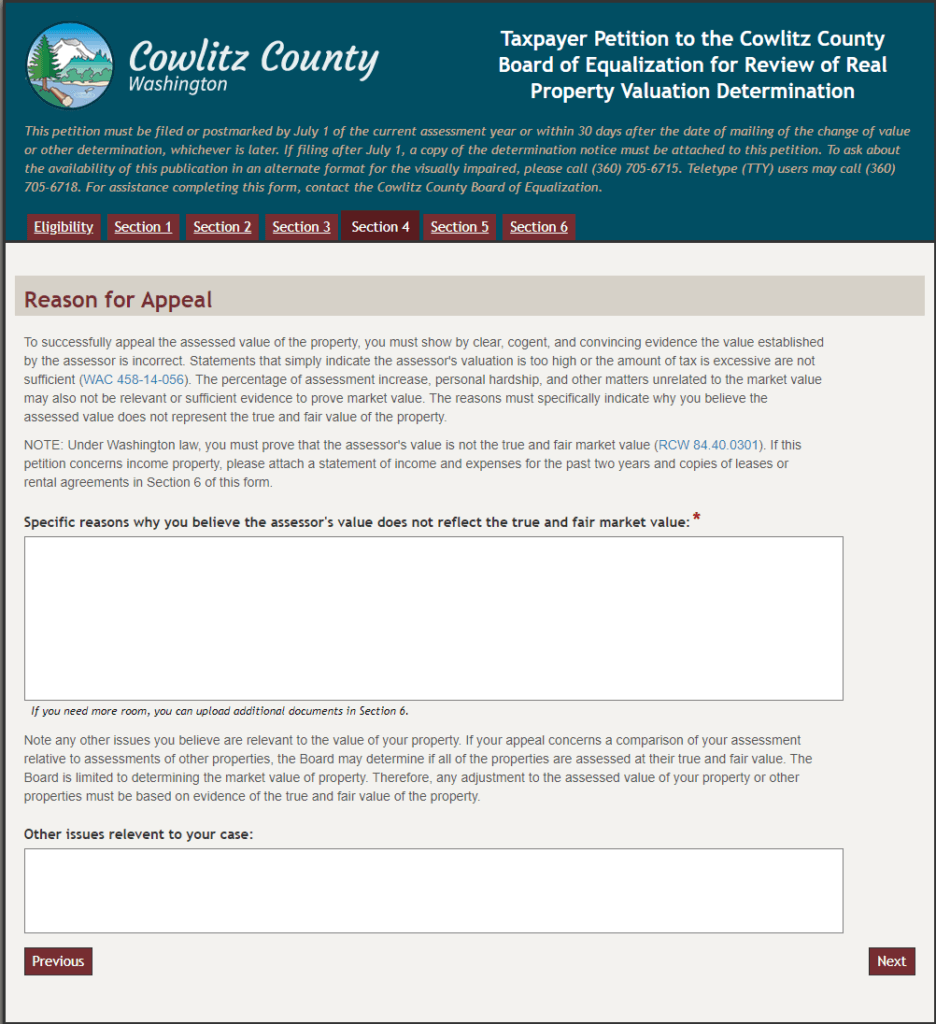
The appellant must also specify a valid reason for the appeal. Some valid reasons include problems/damages with the property that weren’t apparent during the assessment, external economic forces such as a change to the neighborhood containing the property, etc.
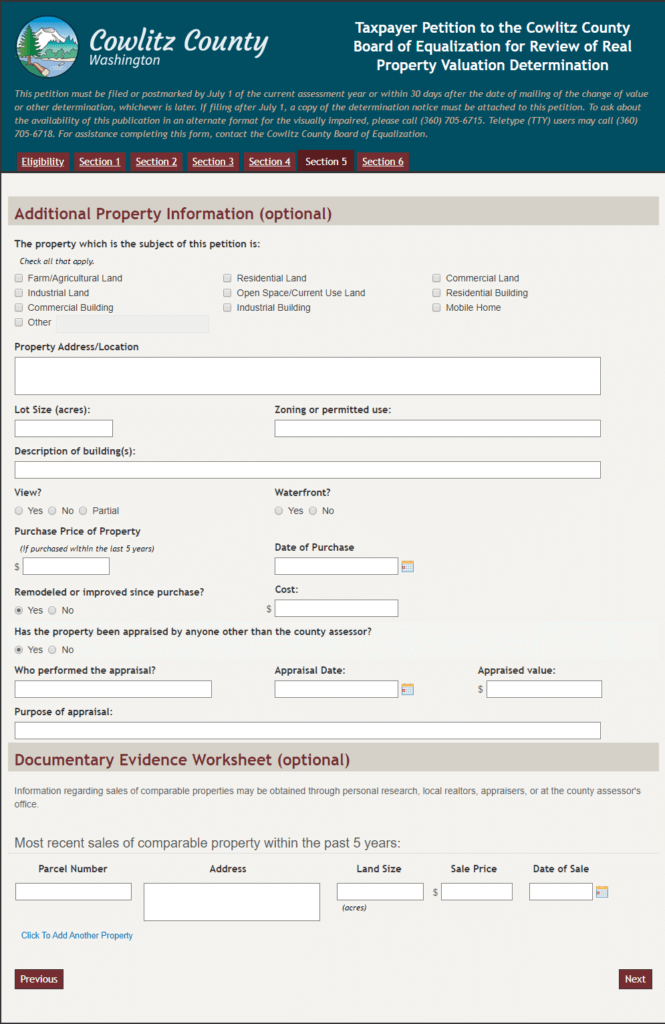
The appellant must provide specific evidence that the property value needs to be changed.The petition includes a section for additional property information that is optional to fill out.
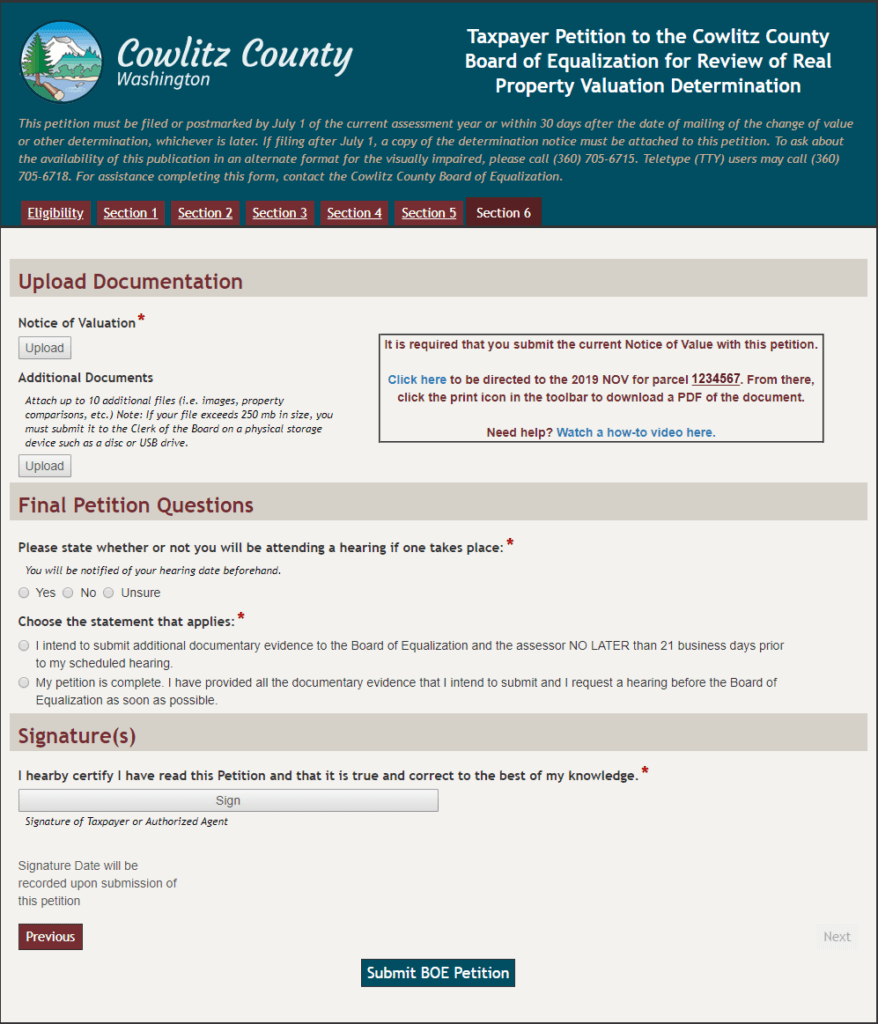
Before submitting the petition, the appellant must upload a copy of the notice of valuation, which was already provided by the assessor. The petitioner may also use a custom link to access a copy of the notice if needed.
The final step in the petition is uploading a copy of the notice of valuation.
Sometimes, an appellant prefers to submit a petition in person. The clerk then fills out the Laserfiche form on behalf of the applicant and scans in any supplemental documents.
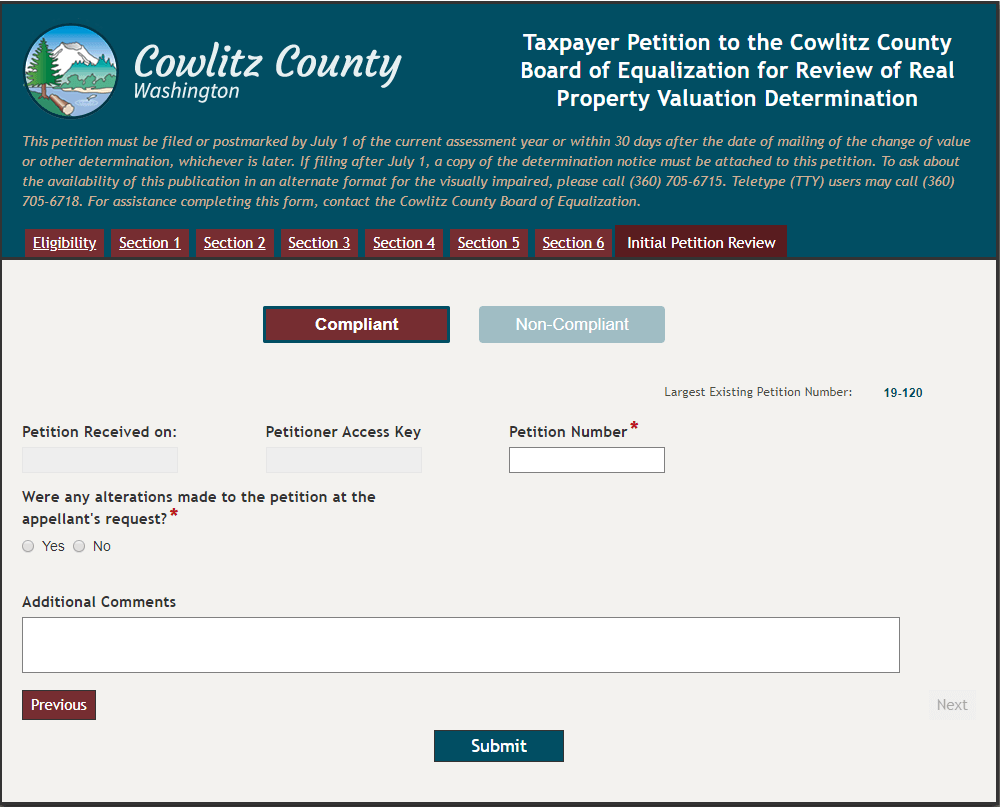
After submission, this petition is routed to the clerk of the board for review. The clerk reviews the petition to make sure that there is enough evidence provided for the petition to be considered compliant. At this step, the clerk can contact the appellant to clarify or update any information. If the petition is compliant, the clerk assigns a unique petition number.
The clerk of the board reviews the petition to make sure that is compliant.
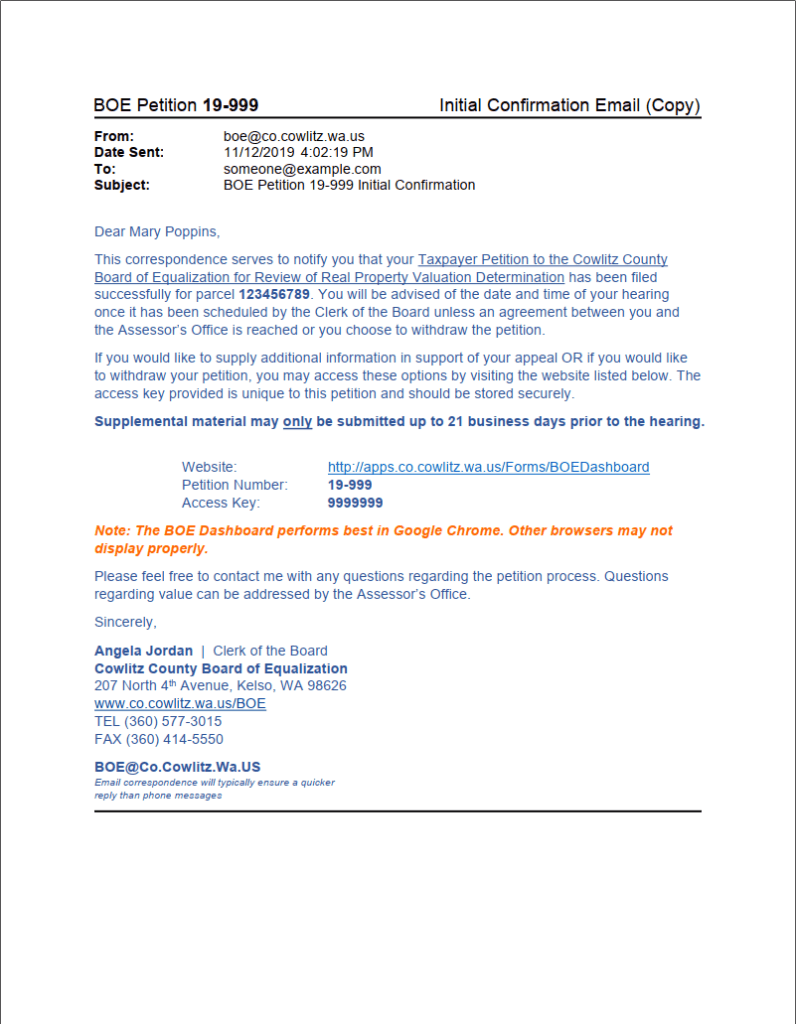
If the appellant elected to receive information electronically, he or she receives a confirmation email once the clerk has completed her task. If the appellant elected to receive information via physical mail, Workflow generates a letter that the clerk prints and mails.
The email and letter contain the petition number as well as the access key that the appellant can use to look up documentation related to the petition in the future.
Appellants receive a confirmation email or letter once their petition has been accepted.
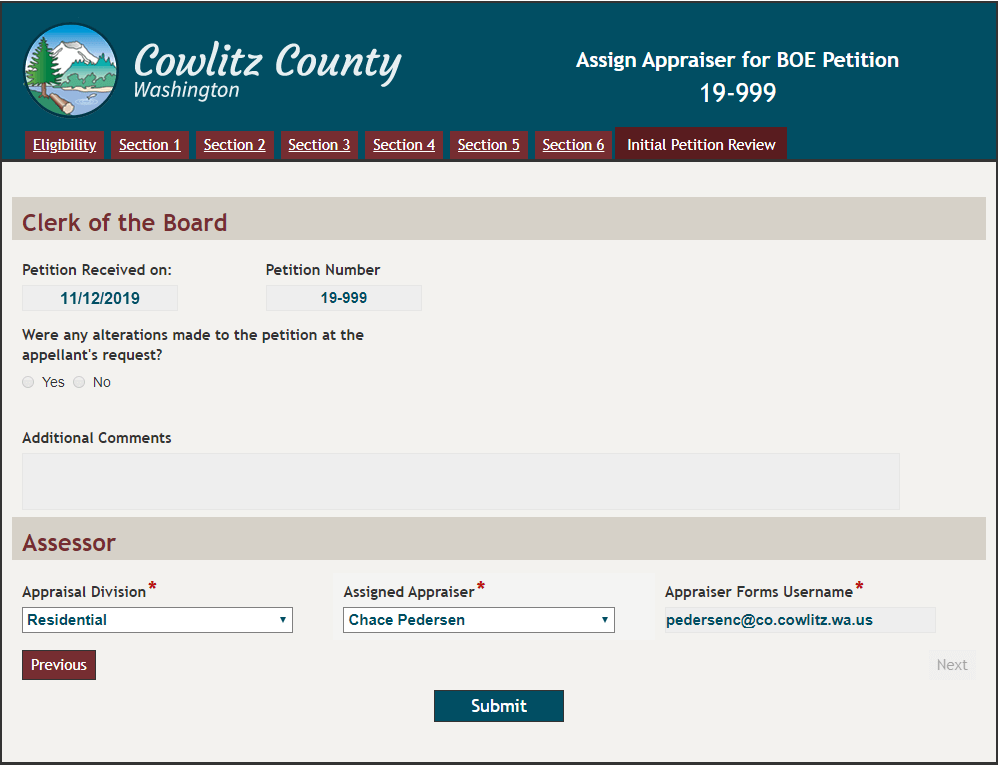
The petition is then routed to the chief appraiser inside the assessor’s office, who reviews the petition and selects the appraiser most qualified to handle this case.
The chief appraiser assigns an appraiser to handle the petition.
The petition is routed to the assigned appraiser and the appellant is either sent an email or letter letting them know the appraiser’s contact information.
The appraiser has two options:
Compromise on a new property value (if there is sufficient evidence to support a change).
Take the appeal to a hearing before the board of equalization to argue for maintaining the original value.
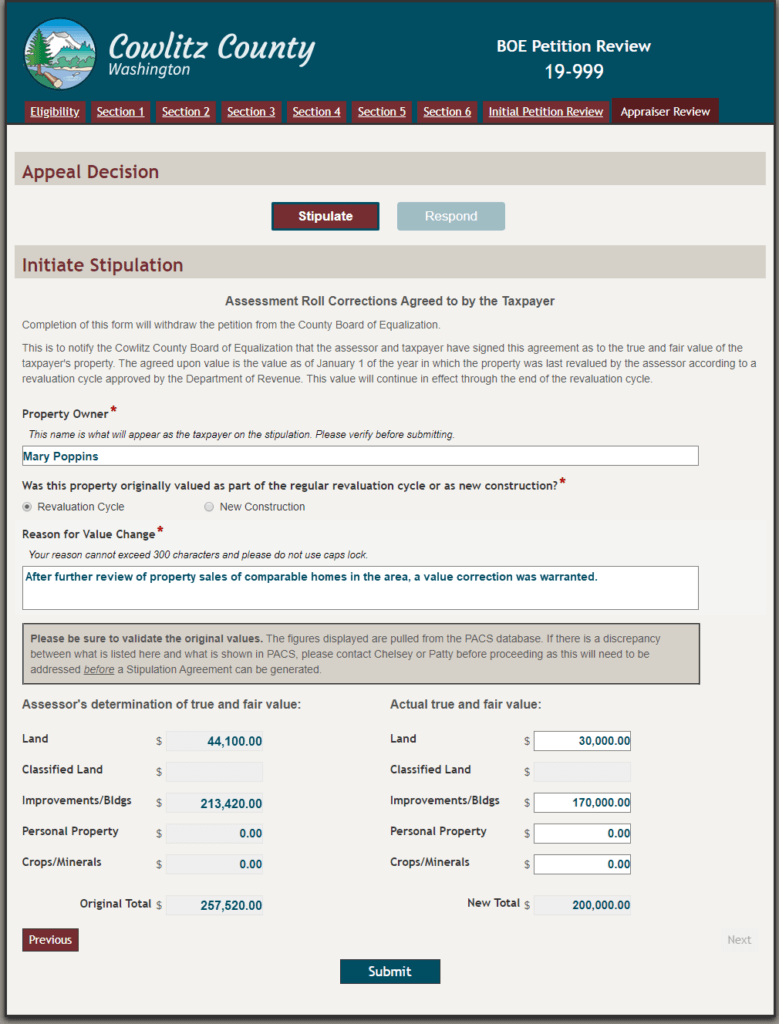
If the appraiser selects the first option, then he or she is prompted to fill out the value change fields within their user task which will be used to generate a document called a stipulation. If the appraiser selects the second option, he or she drafts a response document and uploads it within their user task. These documents must be reviewed and approved by the chief appraiser before being sent to the appellant.
The appraiser fills out a form to generate a stipulation.
Stipulations are signed by the chief appraiser and appellant, either electronically or by hand depending on the communications method selected by the appellant earlier in the process.
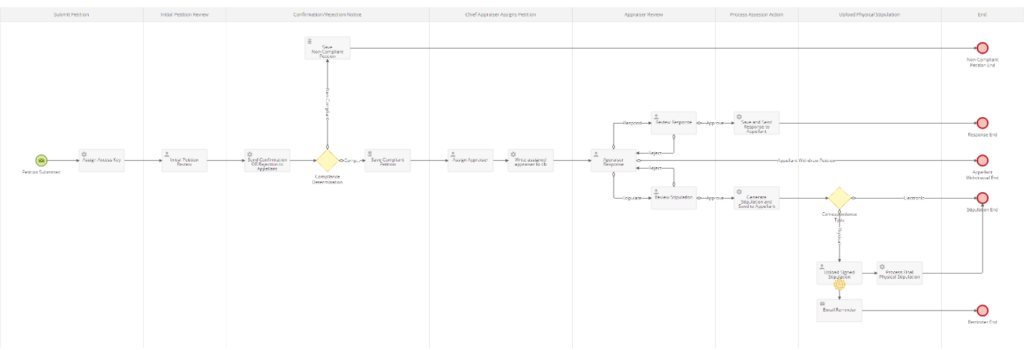
Below is the full Laserfiche Forms process diagram for the property value appeal process.
Click to view larger in a new window.
Appellants Can Access Documentation through a Custom Dashboard
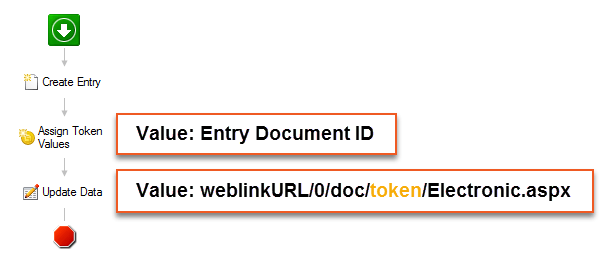
The county developed an innovative way of sharing documents with appellants throughout the process. Every time a document is generated it is saved in the repository. Laserfiche Workflow creates the entry, generates a Laserfiche WebLink URL and stores this URL in a database table along with all the other information about the petition.
Laserfiche Workflow creates a WebLink URL for the document and stores it into the database alongside other information about the petition.
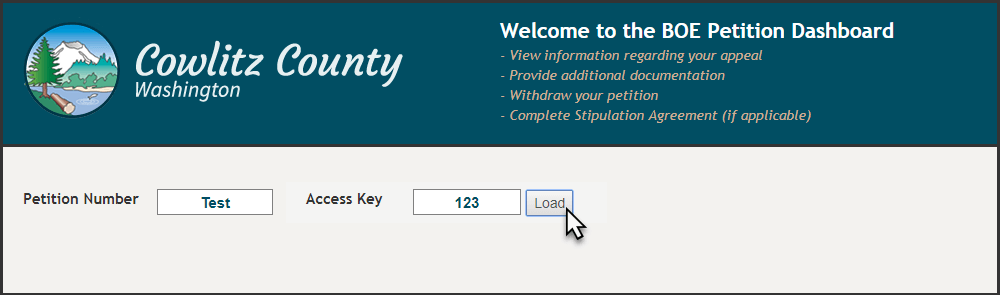
If the appellant wants to access documents related to a particular petition, he or she opens the petition dashboard. This dashboard is a Laserfiche form with the submit button hidden unless the appellant is performing an action, such as uploading evidence, submitting a withdrawal, etc.
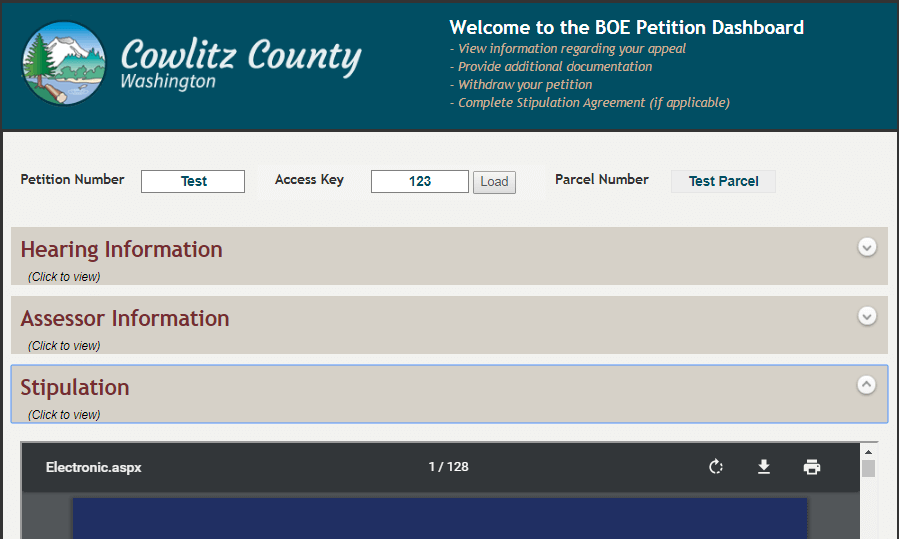
The appellant enters the petition number and access key provided in the initial confirmation letter. Forms performs a lookup into the database and fills specific hidden fields with the document’s URL. The documents are opened in WebLink through an iFrame embedded in the form.
Appellants can access documents related to a petition through a dashboard.
“By storing the URL in the database with the other petition information, we can provide access to one or multiple documents which will always be up to date. If there are revisions to a document, we override the URL in the database,” says Laserfiche specialist, Chelsey Hulsey Pedersen.
Documents are loaded from WebLink displayed in an embedded iFrame.
The Clerk of the Board Schedules Hearings
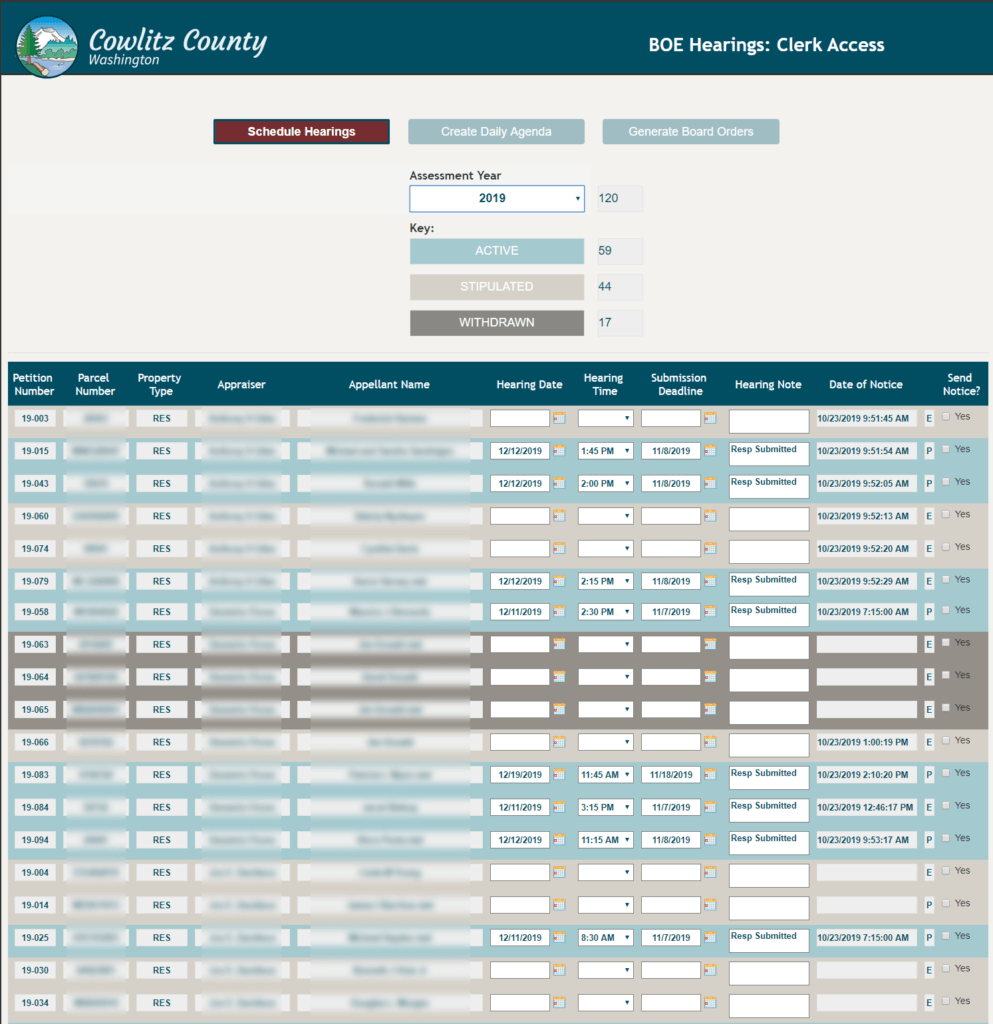
If the petition is not stipulated or withdrawn, the clerk of the board will schedule a hearing. The clerk opens up a hearing dashboard, which is basically an electronic form that contains a table filled with information from a look up into the database containing all of the petitions. The clerk can quickly see which petitions are active, stipulated or withdrawn, and can then schedule the hearings directly though this dashboard.
The clerk of the board can see information about all petitions that are active, stipulated or withdrawn in a central dashboard.
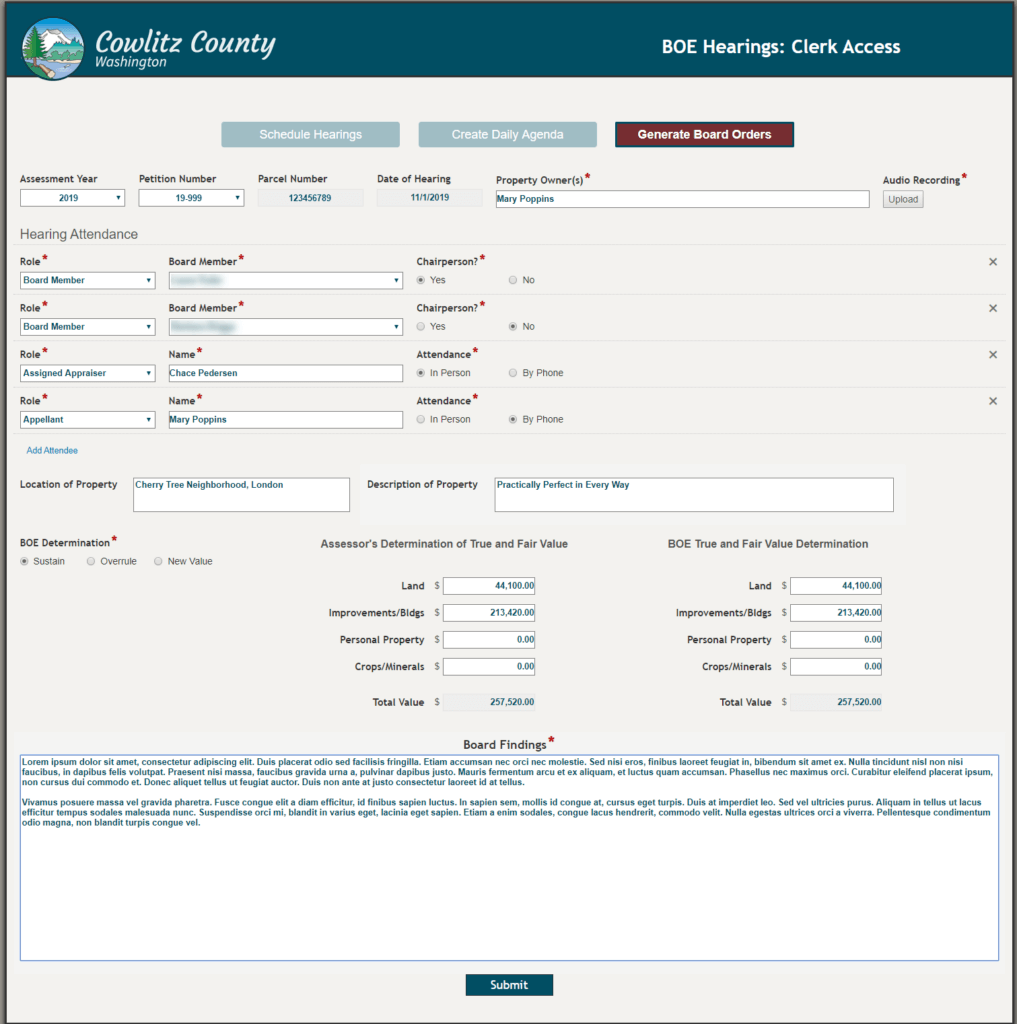
After the hearing is over, the clerk of the board uses Forms to populate a board order. He or she selects all attendees, types out the board findings and determination, and submits.
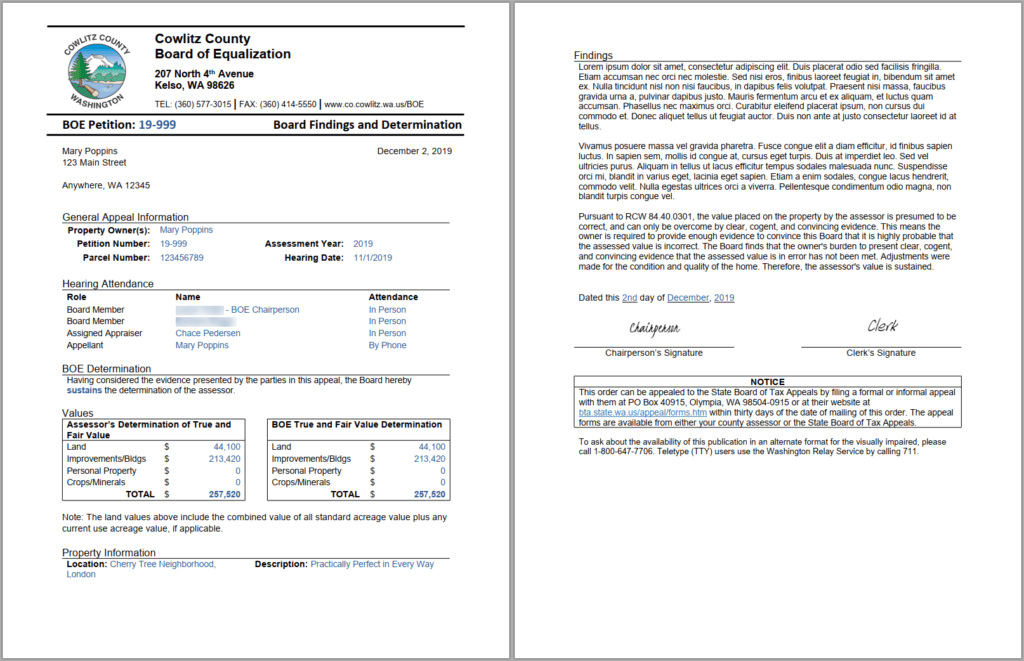
An electronic form helps the clerk generate a board order.The board order is generated with data from the electronic form.
Workflow automatically generates a board order document in Microsoft Word, which the appellant can access through the online portal.
The board can make one of three decisions:
Sustain the assessor’s property value.
Overrule the assessor’s property value.
Approve a new property value provided by the assessor.
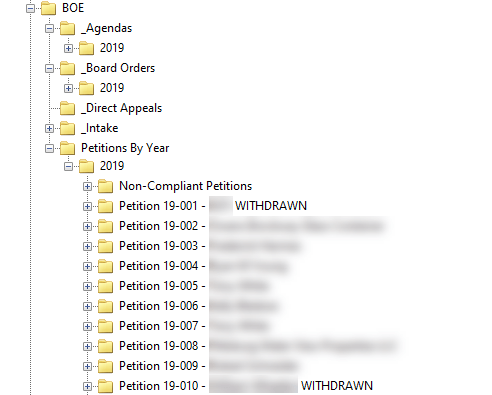
All documentation related to every petition is stored in the appropriate folder in the repository.
All petitions and related documents are stored in individual folders in the repository by year.
Benefits of Laserfiche
Automating the property tax assessment appeal process with Laserfiche has resulted in many benefits.
It used to take the clerk 15-20 minutes per petition to scan it in, enter the metadata and create a physical file in the cabinet. If there was a problem with the petition, it would take anywhere from 10 minutes to a couple weeks to resolve it. Now, with the online form it takes two minutes to process the petition. If the appellant submits the petition on paper, it takes up to 10 minutes to enter the data into the electronic form and scan in the attachments. Since the form has many required fields, petitions are submitted with fewer errors that need correcting.
The clerk used to take from an hour to 90 minutes to schedule one day’s worth of hearings using a separate spreadsheet. There are usually three or four hearing days, based on the number of petitions. It takes 15 minutes to schedule a full day’s worth of hearings now with the new dashboard.
Processing a stipulation in person took about 25 minutes and by mail from five days to two weeks. Now, the process is automated and can take as little as 10 minutes from start to finish.
Mille Lacs Corporate Ventures (MLCV), created by the tribal government of the Mille Lacs Band of Ojibwe, manages the business affairs of the Band. This includes oversight of two casinos, Grand Casino Mille Lacs and Grand Casino Hinckley, which employ nearly 3,000 people and welcome millions of guests each year. The casinos, as well as the rest of the Band’s portfolio, use Laserfiche enterprise content management (ECM) to automate and streamline key business processes.
Over the years, the casinos in particular have achieved great economic success thanks to a strong operations infrastructure powered by Laserfiche. That steady growth, however, has led to a very large and complex business environment that is catered to sustaining the needs of the casinos. The MLCV leadership team knew that they needed to create a separate business environment for corporate operations to maintain performance, so they made the decision to migrate MLCV content and processes to Laserfiche Cloud in order to create a more accessible and agile environment for corporate operations.
Transitioning Key Business Processes to the Cloud
For the last 10 years, Laserfiche has been instrumental in supporting the Band’s mission of building a sound economic future for generations to come by enabling the Band to standardize, automate and optimize core company processes. Having initially deployed Laserfiche on-premises, the MLCV team was confident that they could leverage Laserfiche Cloud to build an accessible corporate business environment quickly, with the added bonus of familiar technology.
“The digital workplace is constantly evolving, and the obvious next step for us was to start transitioning operations to the cloud,” said Angie Litchy, CIO of Mille Lacs Corporate Ventures. “We selected Laserfiche Cloud because we already had a successful on-prem solution, which means we could easily migrate key workflows and ensure business continuity while we made the transition.”
“Mille Lacs Corporate Ventures has always been at the forefront of using technology to create efficiencies,” said Ned Weizenegger, COO at Laserfiche Solution Provider Minokaw Technologies. “Moving operations to the cloud was a natural next step, and aligns well with MLCV’s vision of improving businesses and communities by infusing passion and ideas.”
Among the first workflows that Mille Lacs Corporate Ventures migrated to the cloud was the contract management process.
“Before our initial Laserfiche solution was implemented, contracts were impossible to get a status on because the process varied from person to person, which created bottlenecks and lost information,” said Andrew McElrath, strategic project manager at Mille Lacs Corporate Ventures. “Laserfiche introduced uniformity and a clear line of authority, which ultimately expedited the entire process from weeks to just hours. It was a priority to ensure that this process wasn’t interrupted as we transitioned operations to the cloud.”
The contract process was migrated to the cloud with few alterations. Today, associates can start the contract process by submitting a Laserfiche Form with the contract for review. The information is automatically routed to the submitter’s supervisor, contract coordinator, COO, CFO and legal counsel for review and approval. The document is then sent to the legal coordinator who prepares the document for final signature by the vendor, and then the countersignature of the MLCV CEO. The legal coordinator also stores a final version in the Laserfiche repository.
“In Laserfiche Cloud, it’s easier for us to determine where requests are in the process at a glance,” McElrath said. “And the transition itself was fairly easy. Our Laserfiche Solution Provider mocked up the forms and process for us, then we would review it and suggest changes. The most important part of the process is to communicate clearly and test thoroughly so that your solution fits your needs once it has been launched.”
Reevaluating Business Needs
Another major benefit of transitioning to the cloud was that it created an opportunity for MLCV leadership to reevaluate the organization’s established processes and make adjustments if needed.
“We have been using and building upon our Laserfiche Workflows for a number of years, and the way our business operates has evolved since that initial implementation,” said McElrath. “We wanted to introduce more efficiency into our processes, so we took a hard look at what we were doing and how we could do it better.”
For example, during the transition, the MLCV team realized that the purchasing process was cumbersome and it could be streamlined further. Migrating to the cloud provided the chance to take another look at the process and simplify it.
Today, associates can access Laserfiche Cloud in order to submit a purchase request. After logging into the online system, the employee navigates to the purchase request page, fills out required fields (such as the purchase amount, purchase order number and vendor IDs), attaches required materials, and submits the request. From there, the request is routed to an approver depending on the cost of the purchase. The appropriate reviewers will then approve or reject the purchase order through the system. If approved, the information is submitted to a purchasing agent who can then follow through with the request.
“The entire process is completed in the cloud,” said McElrath. “Every individual that is included in the workflow can complete their portion of the process from the comfort of their home, from a conference or on an airplane. All they need is a mobile device and access to the internet.”
Looking ahead
Mille Lacs Corporate Ventures has migrated many business processes to Laserfiche Cloud including contract management, purchase order requests, annual appraisals, direct deposits, system access requests, tuition reimbursement requests and more. This has been especially helpful since all the company officers now have remote access to one common business platform, enabling the organization to standardize, streamline and expedite major business processes.
“Laserfiche’s compliance tools in the cloud, and knowing that Laserfiche takes security very seriously have been important factors in our decision making.”
—Andrew McElrath, strategic project manager at Mille Lacs Corporate Ventures
Other benefits to transitioning to Laserfiche Cloud include:
The organization easily migrated key business processes to Laserfiche Cloud without introducing a learning curve or creating a gap in business continuity.
Employees no longer need to be on-site in order to complete work, which has reduced bottlenecks, improved efficiency and bolstered productivity.
MLCV simplified operations since Laserfiche Cloud requires no physical hardware and users receive instant updates.
“Once you’re invested in Laserfiche as a platform, you start to unlock a lot of the value,” said Litchy. “Now that we have the system, we are invested in leveraging it to its full potential to reach our business goals.”
In January 2017, the American University of Beirut (AUB) launched the most ambitious fundraising campaign in its region’s history. AUB needed to streamline and automate many key business processes, including gift processing and donation management. Using Laserfiche to automate many of the manual tasks involved with receiving gifts and acknowledging donors, the university has made the process faster, more transparent and more efficient, while also helping to keep any confidential information secure.
Supporting BOLDLY AUB
Founded in 1866, the American University of Beirut (AUB) is a private, independent institution of higher education. Lauded as a transformative leader in academia, the university has substantial impact on the region and the world—from its graduates’ contributions to the active research, community outreach and medical care the institution provides. In order to continue attracting top scholarly talent, enhance its current programming, and build and maintain world-class facilities, AUB launched BOLDLY AUB—the university’s largest-ever fundraising campaign—with the goal of raising $650 million in five years.
Along with an influx of donations, AUB also anticipated an influx of the paperwork related to those donations. The university needed a way to efficiently process and track funds, and thank donors, even when the volume increased dramatically.
AUB’s Advancement Services department is responsible for receiving and processing gifts, as well as acknowledging donors. Before implementing Laserfiche, this entire process was manual and paper-driven, requiring multiple photocopies for staff review, and additional copies for a master file. Once gifts were reviewed and approved, the gift processing team would issue an acknowledgement letter to the donor, which also must be reviewed by multiple people before finally being mailed to the donor.
The AUB team knew that the process had to change: Advancement Services receives an average of 5,000 donations per year. The tasks involved with processing each gift and acknowledging their donors could take anywhere from seven to 10 days per donation. At the same time, all of the hard copies required by the paper-based process resulted in the use of around 40,000 pieces of paper per year.
Automating for Efficiency and Achieving New Goals
Using Laserfiche, AUB re-engineered this process by creating a workflow that allowed the university to digitize donation information and automate many of the tasks involved. Now, information about gifts is automatically sent to the relevant reviewers. Managers and their staff are able to track the documents throughout the entire process, increasing accountability.
Additionally, because Laserfiche automatically names and files documents into a repository, staff can more easily locate records when they are needed. Documents are no longer misplaced, and the entire process has been streamlined.
The time needed to process a gift and issue a letter has decreased to just two days. Employees in charge of gift processing now save two to three hours’ worth of manual work, resulting in nearly $30,000 in savings. As a result of implementing Laserfiche, staff members spend less time on manual tasks and have increased the university’s donation processing capacity.
AUB has also reduced paper use by 75 percent, further helping the university reduce costs and its environmental impact.
As a result of the successful workflow automation in the Advancement Services office, other AUB offices have begun using Laserfiche solutions at various levels as the primary content services tool. As the institution continues to digitize and automate processes, it will continue to serve students and further AUB’s mission of providing excellence in education in the Middle East and beyond.
Tecnoglass is a leading glass and window manufacturer, and the first Colombian company to be listed on the NASDAQ. Since its beginnings in 1984, the company has gained recognition for delivering high-quality products, competitive prices and timely delivery. In more recent years, Tecnoglass experienced tremendous growth, doubling revenue since 2014 thanks to the company’s vertically integrated business and strong, innovative product offerings.
To remain on the forefront of the industry and continue to meet customer expectations, Tecnoglass introduced automation to its operations. This transfomation has affected not only the fabrication of products, but also core business processes across the enterprise.
At the heart of Tecnoglass’s digitization and business process automation initiatives is Laserfiche, which the company uses to store critical documents, manage records and enable collaboration between employees and with external suppliers. This Laserfiche-enabled digital transformation has benefited the entire organization, increasing accountability, improving compliance and accelerating business across all units. Today, Tecnoglass continues on its growth trajectory using Laserfiche to eliminate repetitive, time-intensive manual tasks, and enable employees to maintain focus on fulfilling customers’ quality and service expectations and remaining competitive in the marketplace.
Positioned for Growth
In December 2013, Tecnoglass debuted on NASDAQ. Shortly after, the organization sought a better way to manage documents, since the company’s legacy system was no longer robust enough to meet the demands of a rapidly growing business and could not be integrated with other core technologies.
“Records were disorganized, and stored in warehouses making them difficult to find,” said Plinio Florez, document management coordinator at Tecnoglass. “This led to high storage costs and labor costs associated with searching for documents. It was almost impossible to consult files for decision-making, which delayed critical processes.”
Tecnoglass also faced challenges collaborating with suppliers. The legacy supplier registration process was manually driven and paper-based, which led to lost documents, and difficulties with authorizing suppliers and making payments.
The Tecnoglass team found that Laserfiche could meet the company’s document management needs as well as enable the automation of key business processes such as supplier registration and accounts payable. The Laserfiche platform was also easily integrated with Tecnoglass’s ERP system, helping to centralize data and operations.
Tecnoglass also enlisted the help of Colombia-based Laserfiche Solution Provider, Gestech, for the implementation. “Having local support was another important part of our decision making process,” said Florez.
“Laserfiche was the perfect choice to take Tecnoglass into the next phase of growth and expansion,” said Jaime Barrios Perez, CEO of Gestech. “By using Laserfiche to centralize information, and digitize and automate processes, Tecnoglass created a more seamless experience for employees and suppliers that is closely aligned with the company’s modern, global vision.”
Getting Ahead by Going Digital-First
The most immediate change Tecnoglass made was to digitize documents and store the electronic files in a Laserfiche repository, making information easier to process and share with outside parties when needed.
“We had to change the mentality of employees, which was that documents are only safe if they’re ‘physically available,’” said Florez. “To the contrary, by digitizing paperwork, we have enhanced controls and mitigated risk of information loss.”
Digitization made an impact across the company, especially in the foreign trade department, which manages significant amounts of Tecnoglass’s transactions and activities. The company was able to save nearly $73,000,000 Colombian pesos in costs related to shipping and processing paperwork alone. Today, the company’s Laserfiche repository houses more than 10 million files, all easily searchable by authorized employees.
Moving toward a digital-first environment also made collaboration with outside parties easier. The paper-driven legacy supplier registration process was replaced with a Laserfiche electronic form and automated workflow. By digitizing and automating the process, the company eliminated lost paperwork and accelerated registration, improving the experience for both Tecnoglass employees and the company’s suppliers.
Using Laserfiche, Tecnoglass employees can now easily search and retrieve documents without having to step foot in a warehouse. This has resulted in faster decision making, as well as a faster response times to internal and external audits — such as those related to Sarbanes-Oxley Act, ISO standards and the company’s Authorized Economic Operator certification, for which Tecnoglass has committed to both physical and IT security and safety standards throughout its supply chain by meeting requirements set forth by the Colombian Tax and Customs National Authority (DIAN).
“Laserfiche has helped tremendously with the company’s compliance with legal and industry requirements. Having the search functions at our fingertips has eliminated headaches for many of our employees, and automating processes has eliminated repetitive, error-prone manual tasks like data entry, allowing employees to focus on more productive work.”
—Tecnoglass General Counsel Andrea Zambrano
Accelerating Across the Enterprise
The company’s success with Laserfiche continues to spread throughout the organization since initial implementation. Additional departments have automated key processes including accounts payable, supplier updates, correspondence management, user profile confirmation and document loan control.
“Departments that have benefited from the implementation of Laserfiche include: purchases, treasury, accounting, document management, foreign trade, warehouse and internal control, all of which mainly needed a solution that allowed them to optimize time, space and the fulfillment of obligations to third-parties,” said Zambrano. “We have created and opened up new channels of communication with third parties, such as our suppliers. We’re now able to notify suppliers when we have an issue with a document or bill — prevent billing errors and delays — and we give our suppliers more convenient methods for updating data online.”
Tecnoglass’s Laserfiche implementation has created a more integrated work environment, where processes are standardized and transparent, enabling the company’s management team to more easily optimize resources and personnel. Employees and departments are accountable, which has led to better collaboration and better communication, even with third parties.
“Adopting Laserfiche technology opened up new possibilities for our organization that were previously dismissed,” said Zambrano. “It turns out we just did not have the foundation and practices in place that would enable more innovation. Once we started implementing automated workflows, we eliminated silos and our operations became more connected. We continue to work on integrating workflows and centralizing data and processes. Laserfiche is an extremely powerful tool for our organization.”
Laserfiche Solution Contributed By: Joe Griffin, CTO, Clint Mehta, Systems Integration Architect, Dustin Blank, Assistant Superintendent of Student Services, Joseph Baker, Area Director of Student Services and Laura Lockhart, Area Director of Student Services, Keller Independent School District
Keller ISD serves more than 35,000 students across Tarrant County, Texas, and employs more than 4,000 staff members. Like other school districts, Keller ISD must keep students safe and manage bullying and harassment allegations while staying in compliance with federal reporting regulations.
Federal law requires an investigation of bullying and harassment allegations to be completed within 10 business days of its submittal. Keller ISD’s previous manual process made it hard to process incident reports, complete investigations within the time frame, and hold participants accountable
The district has completely streamlined this process using Laserfiche Forms.
Allegation Forms Can Be Submitted Anonymously Online
Allegations can now be reported through an electronic form on the district and campus websites. The form submitter can choose to remain anonymous.
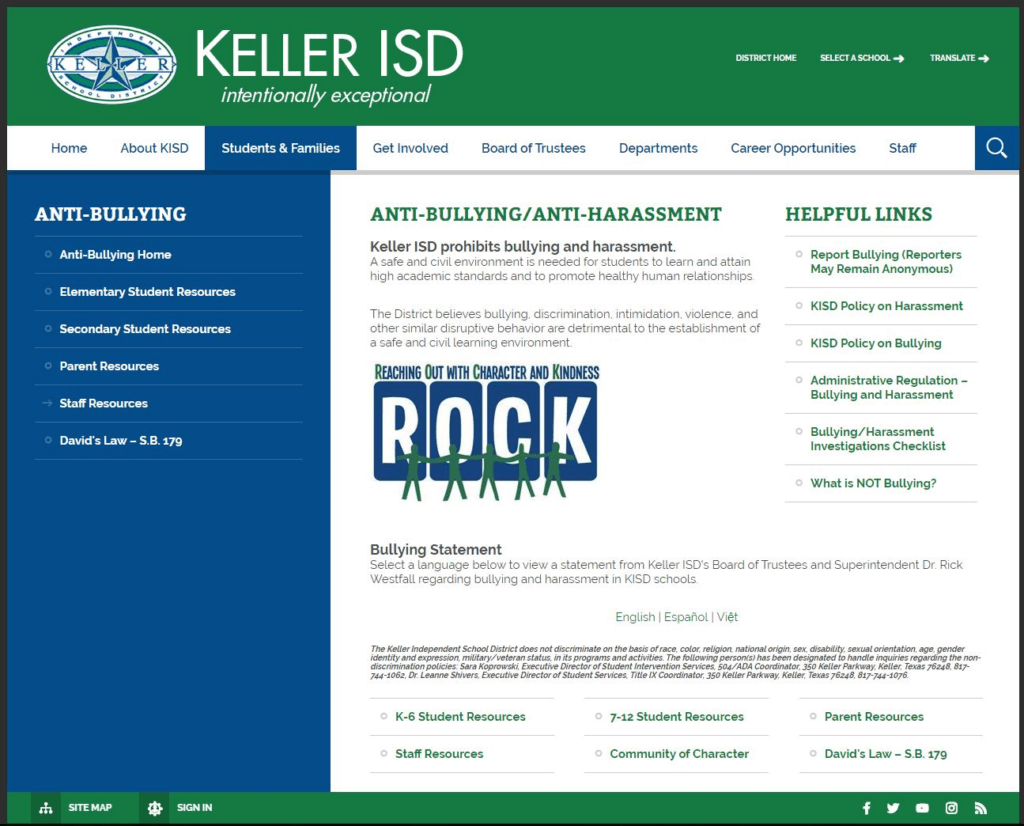
The Allegation reporting form is linked from the district’s website.
If the submitter knows the names of the students involved, he or she can input them into the form. Otherwise, the submitter needs to provide a thorough description of the incident and students in order to help identify them so the incident can be investigated.
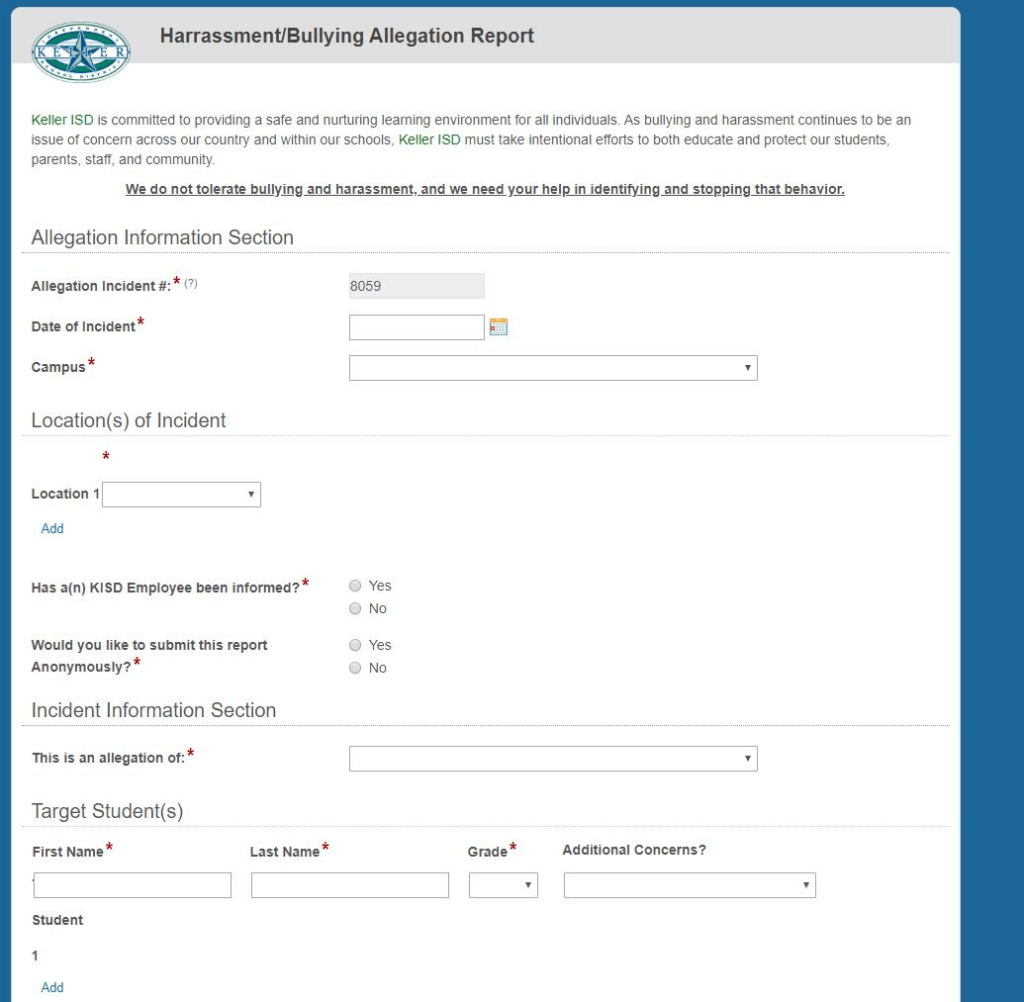
The Allegation reporting form is filled out electronically.
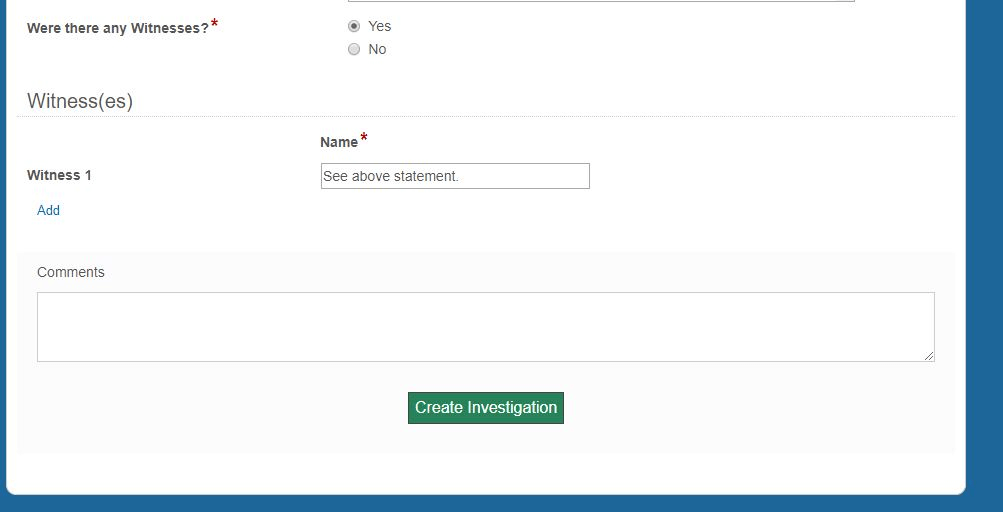
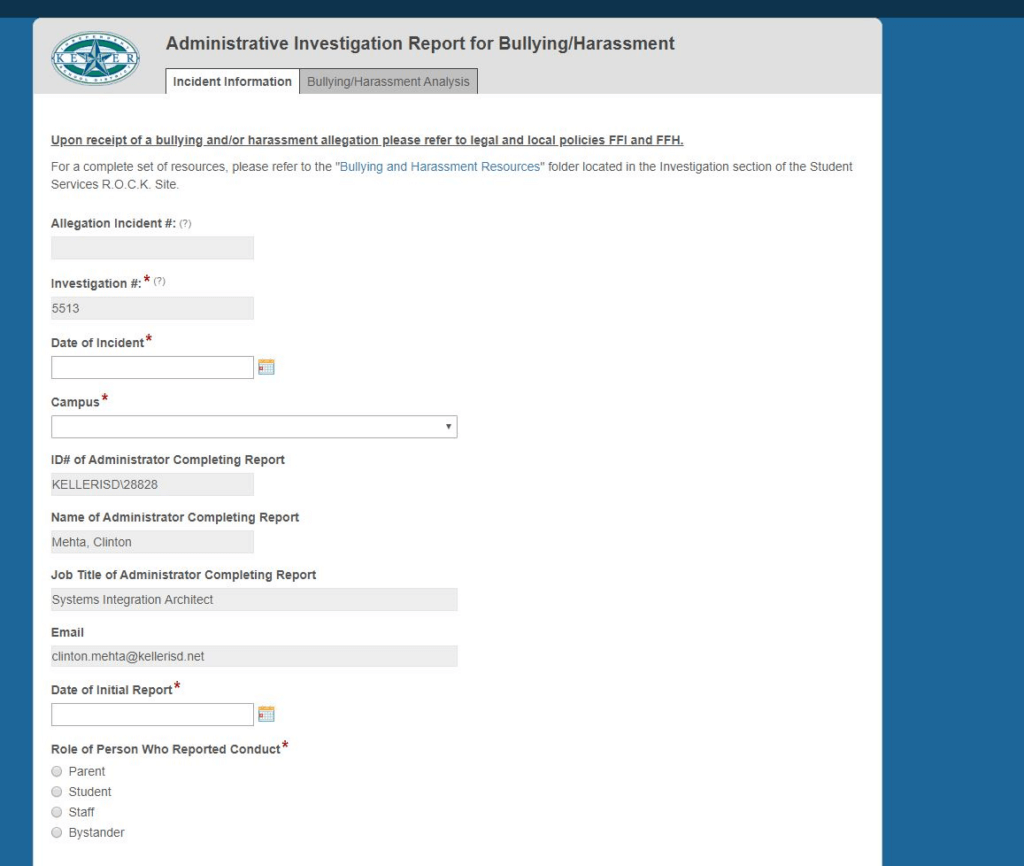
Once the form is submitted, it is sent to the principal of the campus on which the incident occurred. The principal can choose to investigate this allegation or delegate it to an assistant principal or other campus administrator. The campus administrator reads through the allegation and, when ready to start the investigation, clicks the Create Investigation button at the bottom of the form.
The campus administrator clicks the Create Investigation button to start the investigation.
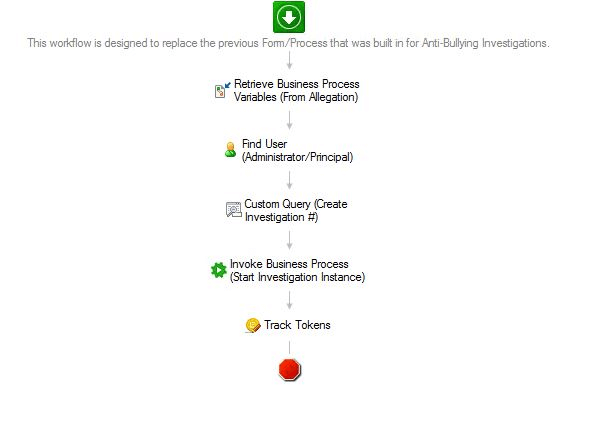
This action triggers a Laserfiche Workflow which launches the Investigations Forms process. This process is automatically assigned to the campus administrator and appears in their Forms Inbox as a new task. The campus administrator also receives an email about this task. To make filling out this form easier, the Investigation form has many fields prepopulated with data gathered during the Allegation process.
Workflow launches the Investigations process in Laserfiche Forms.
The Investigation form contains a long checklist of items that need to be completed as part of the investigation. The campus administrator inputs the student ID numbers of any students involved, which prepopulates many of the form fields. If an allegation is submitted verbally or in a method other than the Allegations form, then the campus administrator launches the Investigation form directly and fills out any of the fields related to the initial allegation.
Each incident is assigned a unique allegation incident number in order to make reporting easier.
Bullying and harassment investigations are managed through the Investigation form.
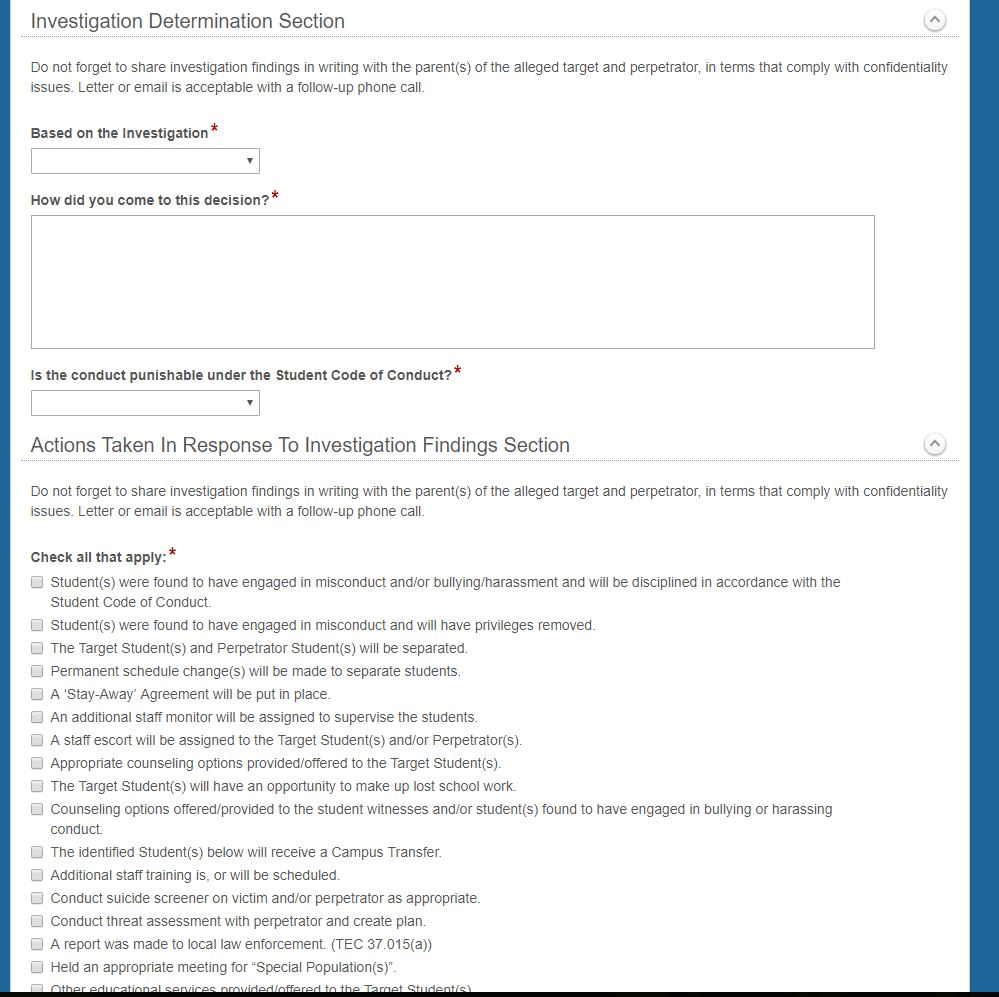
The form walks the campus administrator through the whole investigations process through a series of checklists. There is also a section in the form to describe actions taken in response to the investigation. Some of these actions include, but are not limited to:
A separation of the target student and perpetrator student.
Appropriate counseling provided to the target student.
Additional staff training.
Changes in student schedules.
Once the form is submitted, it is routed to the student services department. An employee from that department reviews the information in the form and, if more information is needed, can send it back to the campus administrator.
The Investigation form includes a section for actions taken in response to the investigation findings.
Once the investigation is finalized, the form is submitted and saved in the repository.
Built-In Timers Ensure Process Completion and Federal Compliance
Timers have been built in throughout the process in order to ensure that every investigation is completed within 10 business days, as specified by law. After five days, the campus administrator and student services department are notified that they have reached the halfway point in the process.
Within three days of the allegation submission, both the victim’s and perpetrator’s parents are automatically notified of the ongoing investigation, as per federal reporting regulations.
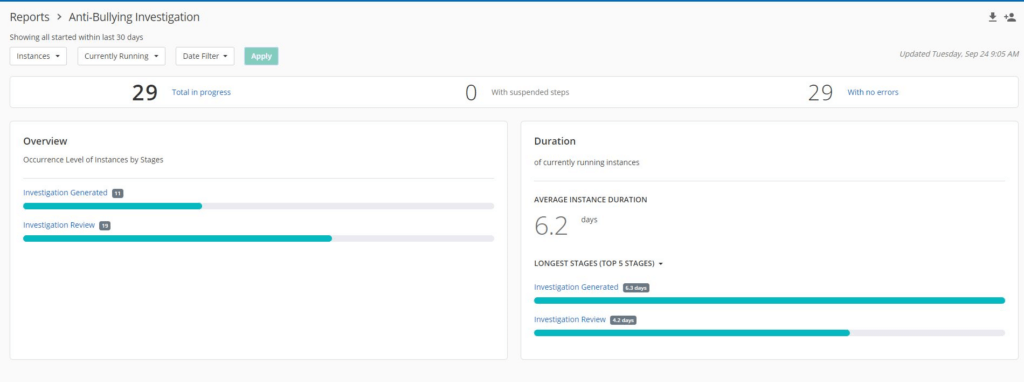
Administrators can use the Forms Operational Report to track the status of all investigations and make sure that none of them fall through the cracks.
The Operational Report displays the status of all investigations.
Reporting on the Data Helps Administrators See Incident Patterns
Data obtained through the Forms process is also used to create an annual overview report, which breaks down the allegations per campus based on type, location, protected class/group, etc. This report helps each campus identify any trends and leads to ideas on how these incidents can be mitigated.
“We want to address the root cause, not just the outcome. A thorough investigation helps ensure that both the victim and perpetrator get the required help they need. After all, they are bullying or harassing for a reason,” says Laura Lockhart, area director of student services.
An unintended benefit of creating an electronic allegation reporting form and embedding it on the website is that there have been many more incidents reported. In the past, incidents would go unreported because it was difficult to submit an allegation to school administrators. With more data available from which to draw conclusions, the school administrators can get a wider view of the harassment and bullying problems and come up with more effective strategies to address underlying issues.
Frisco Independent School District (ISD), located about 30 miles north of Dallas, Texas, has grown over 800% in the last 20 years. A focus on providing strong academics and outstanding opportunities for students has made the district a destination for families moving to the area. In order to continue providing students with personalized high-quality education, however, the district needed to address staffing needs and the administrative growing pains that coincided with a high enrollment rate.
The district assessed that it would need to double the number of educators on staff — a challenge made even more formidable with legacy manual, paper-driven HR processes. To accommodate a short hiring season of approximately four months, the district turned to Laserficheenterprise content management (ECM) to automate the employee onboarding and resignation processes. Using electronic forms and an automated workflow created in Laserfiche, Frisco ISD’s onboarding process can now be completed in a matter of days rather than four to six weeks.
Staff and faculty members have since expanded their use of Laserfiche beyond human resources, in departments such as accounting, operations and student services. Laserfiche now streamlines more than 50 key processes throughout the district, enabling faculty and staff to spend less time on repetitive tasks and more time focused on the success of the district’s growing student body. Additionally, when the COVID-19 pandemic arrived in Texas, Frisco ISD was able to seamlessly transition to remote and hybrid work environments, and easily adjust its electronic forms and automated processes to address the needs of its staff and students.
Onboarding Employees at a Record Pace
Frisco ISD has almost 64,000 students, 73 campuses and 8,000 employees. The HR department is tasked with onboarding approximately 1,600 employees every year.
The legacy employee hiring process depended almost entirely on paper, and district leadership knew that it would not support future growth. The resignation process was similarly paper-based, and driven by manual, ad hoc tasks. As a result of delays in both processes—which often had to be completed simultaneously during a short, four-month period—it would take four to six weeks to onboard a single employee.
“The biggest challenge the human resources department faced with this level of growth was not having enough time in each day to get things done,” said Bob Allen, director of business applications and process at Frisco ISD. “The sheer volume of growth hindered our ability to keep up with not only the hiring process, but also real-life situations. Whether it’s a campus issue, an employee need, or just trying to get a project completed, time becomes a challenging factor.”
To manage the influx of incoming employees, Frisco ISD worked with DocuNav Solutions, a Laserfiche Solution Provider, to digitize and automate its HR processes.
First, Frisco ISD used Laserfiche to automate the new employee onboarding process and now, nearly 100% of the process is streamlined with electronic forms and workflow.
Today, when a candidate is recommended for hire, the HR department receives an electronic notification from the hiring manager that kick-starts the process. An employment-offer email is sent to the candidate, who can accept or reject the offer via a Laserfiche Form. If they accept, they can complete and submit all necessary paperwork online. The automated workflow then sends the information to the relevant personnel for reviews and approvals.
New hires also receive important information, such as the employee handbook and an overview of benefits, through Laserfiche. All of these activities can be completed remotely—which was not possible before digitizing and automating the process.
“The flexibility and convenience of being able to complete tasks from home expedites the entire process and creates a great experience for both the new employee and HR representative,” said Dr. Duana Kindle, managing director of human resources at Frisco ISD.
All employees involved also receive email updates every time a task is complete, or a deadline is missed. Onboarding documents are automatically filed and saved in Laserfiche, helping Frisco ISD maintain secure, consistent and accurate records management without placing additional burden on staff.
Automating the employee onboarding process benefited the district in new and unexpected ways when the COVID-19 pandemic hit Texas. Before COVID, the collection of the I-9 employee eligibility form and proof of identity was intentionally completed face-to-face, to personally welcome employees and provide a form of engagement. The district had to swiftly shift to virtual, however, when in-person interactions could put people at exposure risk. This overnight change was made possible by Laserfiche.
“Laserfiche streamlines the entire onboarding process from beginning to end,” added Dr. Kindle. “New employees are completing paperwork, receiving deadline reminders, and receiving new-hire documents through the system while we are receiving critical information in one centralized location.”
Today, Frisco ISD is in the midst of hiring new teachers and staff for the coming school year, with the aid of the American Rescue Plan Elementary and Secondary School Emergency Relief Fund (ARP ESSER Fund) aimed at supporting educational agencies in addressing the impacts of COVID-19. The electronic forms and automated onboarding process are more important than ever before in supporting the district’s hiring needs while navigating uncertainty about the upcoming school year.
Taking a similar approach to the onboarding process, Frisco ISD has a Laserfiche automated workflow that routes the information to the appropriate managers for approval and notifies relevant employees along the way. In addition, the resigning employee is prompted to complete a questionnaire about their reasons for leaving Frisco ISD—providing valuable feedback for improving employee retention and organizational culture.
“Today, the resignation process is just as quick as the new onboarding process, which means we are no longer scrambling to free-up space for our new employees,” said Anna Koenig, managing director of human resources at Frisco ISD. “It’s all one seamless digital process.”
The new employee onboarding and resignation processes have improved tremendously since implementing Laserfiche. Today:
Onboarding an employee can be completed in a matter of days rather than four to six weeks.
Frisco ISD employees have the flexibility to complete tasks remotely.
The HR department has eliminated many repetitive, manual tasks, enabling employees to redirect time to addressing staff and student needs.
Employee records are stored digitally, in a central location using standardized filing practices.
Frisco ISD’s Journey Continues
Since these initial successes, Frisco ISD and Laserfiche have formed a strong partnership, and the district has continued to automate dozens of processes across the organization, including, but not limited to:
Invoice processing in accounts payable
Employee benefits document management
Compliance records management
Custodial, transportation, and general employee handbook acknowledgments
Employee address changes
Performance review acknowledgement and archiving
Employee transfer requests
Finance document management
Independent student mentoring registration
Student Gifted and Talented enrollment processing
Teacher certification tracking
Automating processes and eliminating repetitive, manual tasks has enabled the school district to scale as the student body continues to grow. In the district’s accounts payable department, for example, the staff is able to process 40% more volume with 25% less resources. Also critical to a fast-growing organization, the district now maintains a central location for records that is accessible to authorized personnel, improving information accuracy and governance district-wide.
Most importantly, however, Frisco ISD has established a culture of efficiency and automation. By streamlining the majority of its processes, the district can move quickly to respond to changes in policies or procedures, regulatory requirements and — perhaps most importantly — employee and student needs and expectations.
“We always talk about preparing students for the future,” Dr. Kindle added. “If we are not future-ready as educators, we can’t expect the same of our students. Laserfiche has supported us in being future-ready.”
District leadership knows that with this approach to processes, the organization will be able to gather data-supported insights into operations and make more informed decisions about allocation of resources.
“Our ultimate goal is to implement automation throughout the district so that we can collect process data and improve operations based on those analytics,” said Allen. “Laserfiche is an integral part of this strategy, and we look forward to implementing creative solutions that will ensure student success.”
Barranquilla is a cosmopolitan city and one of the largest ports in the northern Caribbean Coast region of Colombia. Rapid urban growth and economic development has transformed the region into a tourism hub and an active business community.
The Barranquilla Chamber of Commerce provides its services to over 72,000 companies that operate in northern Colombia and is tasked with fielding thousands of registry-related requests annually. To help support the area’s dynamic development, the chamber used Laserfiche to digitally transform its operations by giving affiliates the ability to access key services online. The initiative met government requirements and initially eliminated approximately $50,000 in annual costs related to document scanning. Additionally, the chamber’s use of Laserfiche created new opportunities to offer affiliates more convenient, faster online services by automating other core processes.
Changing With the Times
While the Barranquilla Chamber of Commerce prides itself on promoting the competitiveness and economic prosperity of the region, in 2015, the chamber’s processes were not keeping pace with the area’s accelerated growth. That year, the Colombian government mandated that chamber services must be made accessible online in order to meet modern business expectations and enable the country to compete in today’s global economy.
“One of our biggest customer service challenges was to take our traditional services on-site and make them available over the internet,” said Jorge Andon, public registry lawyer for the chamber. “We needed a platform that could satisfy the registry related requests of our more than 70,000 affiliates in a fast and safe way.”
The chamber’s services include enabling citizens to make requests related to the legal creation of businesses, modifying and renewing company information, and dissolving companies.
Previously, to access these services, citizens were required to travel or mail in the necessary documents to the chamber’s office in Barranquilla. For example, to create a company, citizens need to file documents—such as statutes of incorporation and standardized forms—which are received and reviewed by a lawyer who ensures they meet legal requirements. If they do, the documents are registered and the company is created. If information was incomplete or did not meet legal requirements, the process was delayed—documents had to be returned to requesting party, revised as needed and re-submitted to the chamber.
“Document returns constituted around 20% of our operation, which added up to many working hours,” Andon said.
In addition to streamlining these requests, the chamber also needed to make certain documents available online as part of the government’s initiative to increase access to public information.
After assessing a number of solutions, the chamber selected Laserfiche, which would enable the organization to digitally transform how it provides services while offering a centralized place to manage documents and make them available to the public. “Laserfiche met our expectations in regards to information security and integration with other core applications,” Andon added. “We also found that Laserfiche is characterized by innovative solutions in the field of document management software. Having a certified Laserfiche Solution Provider located in Barranquilla was another strong determinant.”
“As a Colombian-based business with many customers, we understand the challenges the Barranquilla Chamber of Commerce faced,” said Jaime Barrios Perez, CEO of Gestech, the Laserfiche Solution Provider that supports the chamber’s implementation. “Laserfiche is a great platform for the chamber since it meets the organization’s current digital transformation needs, while also enabling them to create new solutions and maintain scalability for future growth.
Streamlining Services for Affiliates and Employees
The chamber brought its paper-based registration process online by building a Laserfiche public portal, where affiliates can submit electronic forms to register for business licenses, update operational information and submit other requests.
Rather than having to fill out pages of paperwork and produce physical copies of documents for chamber employees to scan, affiliates can now log into the chamber’s online portal and complete a Laserfiche Form to request the desired service. There, affiliates can also upload documents related to their business’s public registry—such as articles of incorporation and bylaws; appointments of directors and administrators; or bankruptcy or liquidation documentation.
To streamline the process for chamber employees, the chamber used Laserfiche to design an automated workflow which routes information to a public registry lawyer for review. If documents meet legal requirements, the lawyer will approve them and Laserfiche will send the affiliate a tax and service bill, which can be paid online or on-site.
“The ability to request services online has brought an array of benefits for users, such as reduction in travel expenses, and reduced service response times,” Andon says.
Once payment is made, documents are inscribed in the public registry (performed by an application that is integrated with Laserfiche) and available to the public online through a Laserfiche portal. As part of the workflow, Laserfiche sends a notification letter to the affiliate once documents are inscribed. If documents don’t meet legal requirements, however, Laserfiche will notify the affiliate, and the system allows the affiliate to then upload corrected documents using the same filing number within one month.
“By reducing document returns, we also reduce reprocessing requests. As a lawyer, if I have a filing and I return it, then the chamber has to receive it again, and review it again, and scan it again,” Andon says. “Being able to reduce the percentage of documents returned is saving us time, effort and money.”
The automated process has dramatically accelerated the chamber’s response time, enabling better customer service.
“Some chambers of commerce take up to 10 to 15 days to process some registration requests and we take less than 24 hours to process them. Other chambers are now starting to look at us to see what we’re doing to solve these problems and deliver such fast service.”
—Jorge Andon, Barranquilla Chamber of Commerce Public Registry Lawyer
Growing Opportunity for Colombian Business
As a result of the Laserfiche solution, organization-wide savings include a reduction in employee time spent receiving, scanning and returning documents. The chamber has also enabled users to correct large documents without returning them by using Laserfiche’s version control function—which allows the organization to modify documents while keeping a record of changes as well as the intact originals. Improved process management has reduced the risk of complaints and consequential fines imposed by the regulatory commission.
Since the chamber’s success with affiliate service requests, it has implemented Laserfiche in almost every department, including accounting/finance, human resources, legal, operations, sales, executive, information technology, marketing and records management.
“The chamber saves approximately $50,000 per year as a direct result of our online services,” Andon says. “We have also seen increasing ROI at the organization-wide level that is yet to be determined.”
The automated processes have also enabled the chamber to become more data-driven. Using reporting and analytics features in Laserfiche, the chamber creates real-time reports on process health that have led to faster decision making, and improved customer service even further. This has led to reputational improvement of the organization at the national level.
“We implemented Laserfiche in the chamber for two particular reasons: to offer registration services online and to publish our public documents online so people could access them,” Andon explains. “But the benefits we received were much more than just that. Problems we’ve had in the chamber for years—we could solve them in just a couple of weeks. Designing and implementing processes in Laserfiche is so easy. If you can imagine it, you can do it.”