Sky Telecommunications Digitally Manages Employee Files and HR Processes

Serving 25,000 employees across the UK and Ireland, the telecommunications company’s HR department has sped up its processes and easily maintains its employee files.

My name is Nicola Doherty. I am the head of HR Administration at SKY. SKY are a media organization based in the UK and Ireland that provide direct home TV services for our customers. We have in the region of twenty-five thousand employees across the UK and Ireland and over 10 million customers. So, the HR admin function is responsible for, what it says on the tin really, HR administration for all of SKY’s employees.

We were taking back in-house some HR administration work that was previously delivered by a third party. For us to be able to do that. we had to look at, you know, how efficient we are in terms of our resources and our ability to deliver the service. So, it was at that point that we made the decision that we were going to upgrade the Laserfiche product that we had in place to Laserfiche Rio. We had a long-standing relationship with them with Laserfiche and through the conversations that we’d had with our sort-of partners we knew that there was more that we could get to enhance the product and its kind of ticked the boxes off of what we needed at that point in time of what we will need in the future. So, all of our employee files at Sky are held on the Laserfiche Rio product We use it to maintain, update employee files and to apply any rules that we need to arrange deletion for example.

We are a large organization that’s sort of diverse in terms of our structure and so that the Laserfiche product helps us to keep our sales organized. We use it for things like subject access requests that we get from employees. So, the new product has actually helped us with that process as well. For me, from an HR operations perspective, we never stand still so we’re always looking at better ways to do things. Whether that’s through automation or whether it’s just be more efficient at what we do. And, so I think Laserfiche as an organization it fits in with that.

The return that I see that we get from the Laserfiche product, the enhanced product, is that we are able to deliver our processes and quicker than we could before and that’s in relation to things such as subject access requests through new processes such as bar coding and in naming convention of files. There’s less human intervention in our processes so that the HR admin teams are able to file more and do it quickly and which is better than what we could do before.

The advice I would give to future Laserfiche users is and to keep things simple to give yourself enough time and to use the expertise that’s on offer. I think that the place it would end I was as always you know looking towards the future to see what other enhancements there might be further down the road. But we’ve got a really robust product in place now which is great.


Mitsui Sumitomo Insurance Group’s Digital Transformation

Laserfiche’s digital transformation model helps Mitsui Sumitomo Insurance Group go above and beyond by digitizing and streamlining the claims process so customers have the confidence to do more.

Mitsui Sumitomo Insurance Group Case Study

Mitsui Sumitomo Insurance Group uses Laserfiche Forms to make the customer experience as seamless as possible.

WECO (PTY) Ltd

A Johannesburg-based engineering company digitally transformed occupational health and safety incident reports, helping with compliance, communication and changing how the mining industry does business.

Dirección General De Desarrollo Social Y Asignaciones Familiares (DESAF)

Digital Transformation Energizes County of Los Angeles Housing Agency

The Los Angeles County Development Authority (LACDA) digitally transformed its records management program, incorporating Laserfiche to digitize, centralize and manage the lifecycle of records. Since deploying Laserfiche, the agency has reclaimed significant time for its case workers while boosting its ranking with the U.S. Department of Housing and Urban Development (HUD) to the designation of “high performer”—an improvement that helps secure funding and enables the LACDA to provide more services and programs to more people.

Case Managers’ One-Stop Shop

The LACDA is a public agency responsible for providing LA County residents essential programs related to subsidized housing, community development, and affordable housing development and preservation. Serving the most populous county in the United States requires the LACDA to house decades’ worth of records related to hundreds of thousands of cases. These span a wide range, from groups applying for Community Development Block Grants (CDBG) that provide resources to underserved areas, to people in need of Section 8 Housing Choice vouchers and residents of all ages applying for education and training in an effort to build better lives and better neighborhoods.

The LACDA previously stored records in filing cabinets and across various servers and systems. As the number of records grew, the agency identified the need to digitize and centralize them using a Laserfiche electronic records management solution. Laserfiche was also integrated with the LACDA’s property management software, Yardi, and enterprise resource planning (ERP) software, PeopleSoft, to eliminate the risk of duplicating information or work.

“Case managers don’t need to switch between applications to look up or copy information, they can view all the documents in one place,” says Rosa Chevarin, supervisor for Yardi/Laserfiche support. “They like the one-stop shop feel, and everything is streamlined in their natural workflow.”

Through this digital transformation, the agency made information more available, accessible and usable to authorized users.

“In an agency that manages more than 3,000 public and affordable housing units and assists more than 24,000 residents through a housing choice voucher program within the county, being able to pull up submitted information at a moment’s notice is vital,” says Doug Van Gelder, Manager of Information Technology at the LACDA.

This also enables the agency to:

  • Connect more people to the services they need in a more efficient manner
  • Mitigate risk of data loss or breach
  • Simplify the auditing processes

The LACDA’s new solution exceeds the basic expectations of records management and incorporates automation. Laserfiche automatically files documents with standardized naming and folder structure. Additionally, when a record’s retention period has ended, relevant employees are notified to handle disposition.

“The need for services is always going to be great, and everyone is always going to be busy doing their jobs,” Van Gelder says. “Finding and pulling documents, and making sure records are taken care of in accordance to regulations is time consuming. The new system takes that tedious work away from the case managers, so they can focus on the people they serve.”

Uncovering New Efficiencies to Serve More

Since transforming its records management, the LACDA has gained the ability to automate additional business processes. Agency staff has automated the new employee onboarding process, which previously required a new associate to spend about half of their first day on the job filling out paperwork. The new Laserfiche solution enables the agency to send the new employee a link to all the necessary forms that can be completed before their start date.

“I want to be as digital as possible,” says Van Gelder, adding that there are also plans to rebuild the LACDA’s housing portal to allow people to apply for programs online. The workflow for processing those applications would also be automated using Laserfiche to facilitate quicker response times, better transparency into the process for both the staff and applicant, and less risk for error.

The agency’s newfound efficiencies have proven essential in a time when the LACDA’s programs and services are needed more than ever. The waiting list to receive Section 8 Housing Choice vouchers has about 44,000 people on it, while the agency’s staff is down to about half of what it was a decade ago due to the economic downturn and attrition. “The only way we’ve been able to provide the same level of service with half the staffing is through technology,” Van Gelder explains.

Additionally, over 70 percent of the LACDA’s funding comes from HUD, which regularly audits housing authorities to ensure funding is going toward serving people who need these critical programs and services.

“If a housing authority does not rank well, HUD could potentially take funding back and give it to another housing authority that proves it is helping more people and running more efficiently,” Van Gelder says.

Since the LACDA deployed its Laserfiche records management initiative, it has boosted its ranking and maintained its status as a high performer.

“The need is always going to be greater than the funding, but IT is one of the units within the organization that has the ability to provide productivity enhancements while bringing cost down,” Van Gelder says. “We’ve been able to serve more people with quality services and programming with half the staffing we used to have through these technology solutions.”

Leading public sector organizations use an electronic records management solution to increase efficiency and improve citizen services. To learn more, download the free white paper: “Streamlining the Business of Government.”

DESAF Supports Social Programs with Digital Documentation

As part of Costa Rica’s Ministry of Labor and Social Security, DESAF finances and oversees a broad range of social services across the nation. The agency is responsible for administering the Fund for Social Development and Family Allowances, which allocates budget to 28 different institutions for education, poverty, housing and other programs.

In 2010, new federal regulations required DESAF to modernize its internal processes, and make its legal operations and administrative processes more accessible to its citizens and clients. DESAF, which relied on large physical facilities to store documents and cumbersome manual document searches, implemented Laserfiche to streamline operations and improve client response time.

Beyond Digitization

The agency began using the Laserfiche system to digitize over 32,000 employer files within its Department of Collection Management. With direct access to client files, staff can streamline funding allocation and track employment needs across each agency.

“Initially, the only expectation that we had was digitalizing all of the documents,” says Robert Delgado Castro, Debt Control Analyst for DESAF. “When we began to use the application and all the tools, we found out that we could obtain a lot of complementary usage of the platform.”

By eliminating physical paperwork and manual processes across the agency, staff members can conduct more productive meetings with employers or clients without worrying about missing documents or delaying service.

“In the past, meetings lasted hours and required the review of physical documents,” Castro says. “Now, a meeting is conducted in a digital way without any risk of losing information. What took hours before, now takes just 10 minutes using Laserfiche.”

Benefits:

  • The new system digitized over 32,000 employer files and provided on-demand access to employment files.
  • DESAF reduced its reliance on off-site scanning and paper storage.
  • The debt prescription process was simplified, and wait times were reduced by 50 percent.
  • The organization streamlined monthly log reports with better data transparency.

Streamlining document access ultimately allows the agency to more quickly allocate the right amount of funding to the right organizations, respond to inquiries from each agency and analyze the efficiency of its social programs across the board.

“I’m sure the relationship between DESAF and Laserfiche will last for many years in the future in order to accomplish our objective, to fight against poverty in a very efficient way,” says Castro.

Click here to learn more about streamlining records management using Laserfiche.

Using ‘Run-Grow-Transform’ to Change Your Business

We’ve all done it. Maybe it was for a New Year’s resolution. Maybe it was for a birthday. Maybe it was even at the beginning of fall. But we’ve all decided to simultaneously be more productive at the office, lose weight, exercise more, eat healthfully, get more organized, save money, keep the house clean, spend more time with the kids, listen to NPR, and get involved with the community. Chances are, by trying to change so much at once, we failed utterly at all of them.

Instead, you may have found that what worked was to change your diet one month. When that habit got ingrained, then you added exercise. In the process, you lost weight. And so on. By changing just one thing at a time, you succeeded.

Similarly, it’s not unusual for companies to try to change many different things at once. They might try to sell more, achieve higher customer satisfaction, streamline business processes, and upgrade all the software, all at the same time. Needless to say, this doesn’t work any better with companies than it does with individuals.

At the same time, you want to keep track of the things you’re going to want to change later but just haven’t gotten to yet. Otherwise, you could have great intentions for the next thing you plan to change, and then forget all about it as you struggle with the day-to-day issues of keeping the network lights on.

That’s where Run-Grow-Transform comes in.

According to Gartner, which popularized the concept, here’s what the three words mean in this context, writes Richard Hunter, vice president and Gartner Fellow in Gartner’s CIO Research Group.

  • Run: Carry out essential enterprise activities that do not connect directly to a particular customer segment (or, to put it another way, to a particular revenue stream)
  • Grow: Enhance business performance in established markets serving established customer segments with established value propositions
  • Transform: Enter new markets with new value propositions for new customer segments

The Run-Grow-Transform model is also useful for budgeting, writes Karim Vaes in his blog. “Run covers the general day to day expenses of keeping the IT infrastructure running,” he writes. “Grow covers the expenses for expansion of services or growth of the company. Transform covers the costs that are made to change your nature.”

“According to Gartner, companies on average spend 66 percent of their IT budgets to run the business (maintain IT systems) and they spend the rest on growth or transformation projects,” writes Mehmet Erdem in Hospitality Technology. “The ideal, according to Gartner, is a 50/50 split, but achieving it isn’t easy.” For example, even though the hospitality industry has been focusing on using technology to improve guest satisfaction, hotels report that they are still spending 53 percent of the total IT budget on running the business, 29 percent to grow the business, and 18 percent on transformative projects, he writes.

At the very least, any approved budget should include all your Run items and at least some Grow items, Vaes writes. “This part of the budget is in reality the minimal level you need to stay on par,” he writes. “A lower level will force you to start phasing out services from your service catalog!” Cutting Run items could introduce operational risk such as a server failure or a security breach, he warns.

But it’s also important to include more than just “Run” items in a budget. “It’s hard to innovate when most of your money goes toward keeping the lights on,” writes Erin Carson in ZDNet, noting that just day-to-day operations can take up more than half the budget. “The money that’s going towards doing the bare minimum is money that can’t go toward innovation.”

Ignoring the run-grow-transform model can also end up limiting the potential growth in your own job, Florida State College CIO Chris Markham relates in CIO Insight. While many organizations are starting to look at the CIO as the chief innovation officer, focusing too much on the day-to-day “run” aspects creates the risk of pigeonholing the CIO as chief infrastructure officer. “CIOs that don’t effect change are never going to embrace the Gartner strategy of run-grow-transform the business,” he says. “Some will choose to simply run the business, and you really need a good balance of all three.”

Run-Grow-Transform, like any other model, isn’t a panacea, nor is it the One True Way. If you’re using some other method that ends up with the same basic result, there’s no reason to change. But if it feels like you’re busy all the time just trying to keep in the same place, it can be a beneficial way to help the company grow.

Looking to make Laserfiche your solution to modernizing your organization’s operations? Customers can get started more quickly than ever with the Laserfiche Solution Marketplace, which has pre-built workflows for many of your everyday processes, including contract management, onboarding, front desk sign-ins, help desk requests and more!

A content services platform (CSP) can help you solve a wide variety of business challenges. Download the Gartner® Magic Quadrant™ for Content Services Platforms to gain valuable insights into the CSP market.

Community Action Partnership’s Automated Case Management for Low-Income Energy Assistance

Automating Case Management Paperwork Processing

Each winter, thousands of residents in Minnesota’s Ramsey and Washington Counties struggle to access basic heating and utilities. When a household finds itself in need, it turns to the Community Action Partnership of Ramsey and Washington Counties, which runs one of the state’s largest low-income home energy assistance program.

“We receive thousands of calls from clients anxious to know if we can help,” says Catherine Fair, Director of Energy Assistance Programs. “These kinds of calls were hard for our staff to field since we had over 25,000 active applications stored in filing cabinets. We knew that automating our application approval process would make us more efficient and accelerate our ability to help households in need.”

To automate the case management process, the agency began scanning applications and related documentation into a Laserfiche document repository connected to automated document filing, routing and approval workflows.

Case workers can now quickly determine grant amounts and deliver assistance faster:

  • Workflows automatically create case folders for new scanned applications, including eligibility worksheets and case note logs, and route them to case workers for review.
  • Urgent cases can be automatically sent to an expedited processing queue.
  • Staff members can re-direct files to other groups for review and action. If a case worker chooses “yes” under Furnace Problem metadata field, Laserfiche will auto-route the file to the furnace repair group for attention.

“We have significantly improved crisis response time,” says Fair. “Urgent calls for assistance are much more productive. We can find a client’s application immediately by looking in Laserfiche and can then let the client know exactly what he needs to do to complete his application.”

Standardizing Record Archival, Auditing and Security

In addition to expediting service delivery for low-income residents, the new case management process also streamlined the program’s twice-yearly audits. By law, the agency is required to keep archived case files for three years.

Fair explains, “Files are randomly selected by the auditors, and it was a daunting task to find the ones they requested among 25,000 others!”

Being able to store all records in TIFF format was another reason the agency choose document management software. The open file format ensures that the files stored in Laserfiche will still be supported in 25, 50 or even 100 years.

“Vendor lock-in is a big concern for the IT department. If you choose a file format that’s controlled by a single vendor, you invite a lot of unnecessary risk from both an IT and an information governance perspective.”

Laserfiche’s TIFF archival format means that the agency can continually adopt advances in hardware, software and communication technologies without limiting access to their records.

Built-in Windows authentication and named-user access to the repository also enabled the agency to better protect sensitive client information, like social security numbers.

“Laserfiche protects sensitive information while making our business processes more efficient, “ says Fair. “It has helped us tremendously and we hope that other non-profit agencies that deliver federal programs can learn from our success!”

Looking to digitize the case management process at your agency? Get a free demo of Laserfiche software for case management today.

How Steinhafels Automated 100+ Employment Forms

Improving HR Efficiency with Updated Employee Forms

  • Lost paperwork
  • Inconsistent filing
  • A lack of security and confidentiality
  • Missed review deadlines
  • A lack of transparency
  • Lost time (up to 10 hours per week were devoted to physically managing files
  • Lack of integration between legacy software systemsAs Malmberg jokingly puts it, “We had more issues than Reader’s Digest!”

Implementing New Job Requisition and Employee Onboarding Processes

“When I tell people about our culture and technology change, I frequently get the question, ‘Where do you begin?’” says Malmberg. “Well, how would you eat an elephant? One bite at a time.” Malmberg and her team first sat down to create a list of what frustrated them the most. “We literally put up giant Post-it® notes across my office wall. Then we got out markers, scribbled notes and redrew our process workflows. It was a little tedious, but it saved a lot of time on implementation.”

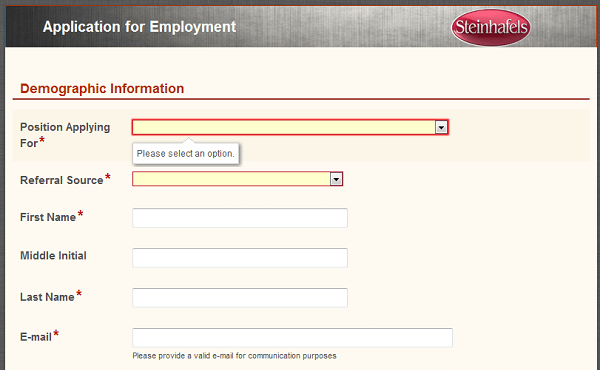
With a strong understanding of its ideal processes, Steinhafels’ HR department turned to Laserfiche and Laserfiche solution provider CDI to facilitate the flow of information across different locations, managers and systems. Steinhafels’ first order of business was to eliminate all of the non-standardized forms. Using Laserfiche Forms, Malmberg’s team turned the paper forms into a smaller set of standardized electronic forms a hiring manager and new employee can complete and submit through an their intranet website.

Lynda Malmberg, Steinhafels’ Senior HR Manager
Electronic forms can be submitted online and automatically routed to key staff for immediate action.

With Laserfiche, users don’t need to constantly reenter the same information on each form. For example, when a manager enters an employee ID into the new hire form, the form prepopulates with data mined from the initial job application. This eliminates duplicate entries. Likewise, when employees fill out their new hire paperwork, entry of the employee badge number auto-populates the necessary demographic data. Steinhafels also automated various stages of the process:

  • A completed job requisition form launches a workflow that notifies a recruiting manager to review and approve the form prior to posting
  • Approved job requisitions are automatically posted to specific third-party career sites like Monster.com|
  • Employment applications (along with any uploaded resumes) are stored together with the requisition, and the hiring manager is notified by email that they have a new application to review
  • The pre-hire process, which includes a background check, is launched via a status change to the metadata on the application
  • Once the application is changed to “hired,” Laserfiche:
    1. Generates an employee and digital employee folder
    2. Sends an email link to the hiring manager to complete the New Hire form
    3. Sends a welcome email to the new employee
    4. Automatic processes purge documents that have reached the end of their retention schedules

Becoming Experts in HR Automation

“This is what our IT department does for Laserfiche: it sets up the server, monitors the server processes and occasionally installs updates. That’s it,” says Malmberg. “Once we learned how to build workflows, we copied and pasted and changed what we needed to make them work for the new form we developed.” However, Steinhafel’s IT department still keeps busy. “They have bigger fish to fry and are happy to let us take the lead on HR-related projects,” says Malmberg. Left to its own devices, the HR department has achieved major success. By becoming more efficient, HR was able to continue driving Steinhafel’s growth without expanding its own department. This has resulted in annual savings of $80,000 that would have gone to more HR staff. Additionally, the HR team has more time to devote to engaging employees and helping them solve issues as they arise. The HR department’s results have inspired other departments to try Laserfiche. “We started with 36 HR forms in the repository. Now we’re up to 88 forms across all departments—from Sales to Merchandising,” says Malmberg. “Laserfiche spread everywhere after people got used to seeing what we built and how easy it was to work with.”

So what do you think – is it time for HR automation at your organization?

Try Laserfiche Cloud for Free.

It is the ultimate content management solution with a centralized, secure repository that’s accessible no matter where your work takes you.