Records Management Makeover, Kentucky Style

Kathy Jenisch, Records Manager for Kentucky Sanitation District No. 1 (SD1), had quite a messy document management problem to clean up.

Her organization, the second-largest public sewer utility in Kentucky, had been fined $40,000 for failing to produce just eight pieces of emailand that didn’t include the operational expense of paying several employees to spend six hours a day for three weeks searching for documents they couldn’t find.

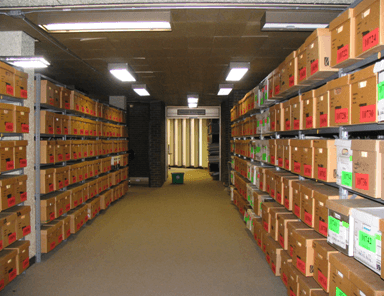
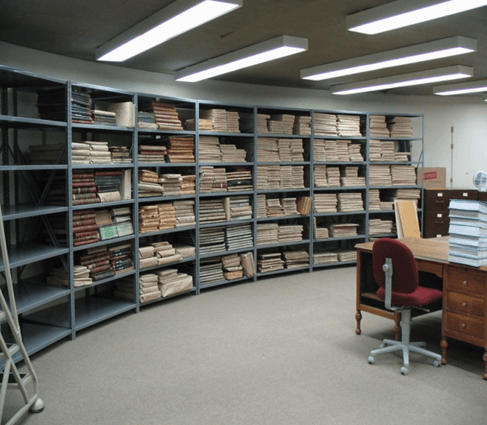
Then she discovered that the organization’s offsite storage facility was allowing records to get moldy or rodent-infested — leading to the destruction of almost six tons of documents.

On top of that, she had to comply with a new state government transparency law that required her to create a website that displayed records about the organization’s financial expenditures as well as its annual budget and annual audit.  The records needed to be searchable, updated monthly, and maintained on the web site for at least three years.

The solution to all these problems was obvious. Digitize SD1’s records.

That’s not to say it was a simple process. SD1 did it on a project by project basis.

One such project involved 27 tubs of documents. Jenisch spent $20,000 hiring a digitizing service to prepare and scan the documents. The job was completed in five weeks, as opposed to the years the department estimated it would have taken to do on its own, she says.

Having records digitized paid off when SD1 had to respond to requests for documents associated with a state audit. Instead of pulling HR file folders from archive and hand searching for the documents, the search took only a matter of minutes. SD1 was also able to summon up historical documents dating back to the creation of the organization, board meeting minutes, policies and procedures, travel expenses, board and staff contact information, and budgets. SD1 could search and copy everything to a CD in about an hour. Without digitized documents, it would have taken days to comply with the audit request. SD1 passed its state audit with compliments to its record keeping, and aced its local annual financial audit as well.

Jenisch has advice for other organizations contemplating a similar move. “Just start somewhere,” she says. “Pick a project and get started.  You can’t mess it up, it can always be changed or revised.”

How the Iowa Tribe of Oklahoma Created a Paperless Human Resources Department

Contributed by:  Iowa Tribe of Oklahoma

With more than 350 employees, the Iowa Tribe of Oklahoma is one of the largest employers in Payne County, OK. Prior to implementing Laserfiche, we had to deal with inconsistent personnel files and paperwork being constantly misfiled or lost. Laserfiche completely revitalized our human resources department and made it almost completely paperless. With twenty-five different workflows running in our HR department, we’ve used Laserfiche to automate everything from employee onboarding to employee separation.

Job application

The employee onboarding process begins when a job requisition is submitted electronically through our Microsoft SharePoint approval system. Once this requisition is approved, the HR assistant sends it into Laserfiche with Laserfiche Snapshot. Laserfiche Workflow then routes this document into a special requisition folder in Laserfiche.

The HR assistant posts this job description on our Website. Potential employees apply for the position by filling out an electronic employment application created with LincDoc – software that creates electronic forms.

Iowa Tribe Job Application<br />

LincDoc is fully integrated with Laserfiche, so once a candidate submits the employment application, it is automatically saved in the “LincwareApplications” folder in the repository with the appropriate template automatically applied.

Employment Application<br />

A large number of the fields in the template, such as “Name”, “SSN” and “Tribal Affiliation” are also populated automatically through the Laserfiche/LincDoc integration.

Laserfiche/Lincdoc Integration<br />

Laserfiche Workflow monitors the “Applications” folder and automatically routes incoming applications to the appropriate hiring manager for consideration based on the value of the “Approving Manager” field. Here is a screenshot of this workflow:

Laserfiche Workflow<br />

A shortcut to this job application is also placed in the requisition folder to await a hiring selection.

The hiring manager is able to communicate with candidates during the entire application review process by changing the value of the “Applicant Status” list field. Candidates receive an e-mail notifying them of every status change. Some of the status updates a manager can select are:

  • Does not meet minimum qualifications.
  • Application received after closed.
  • Manager declined.
  • Selected for hire.

Here is an example of an e-mail notification that is sent when the status is changed to “Manager declined”:

"“Manager

Employee onboarding

Once a hiring manager decides to hire an employee, the application is routed to Human Resources to complete the remainder of the onboarding process. HR maintains communication with the hiring manager throughout the hiring process by updating the “Applicant Status” field. Some of the different statuses they can choose from are:

  • Offer accepted.
  • Drug screen and background check completed.
  • New hire orientation scheduled.
  • Hired.

Here is an example of a notification e-mail that is sent when the status is changed to “New hire orientation scheduled”:

"“New

Throughout the process, every action taken on the document by Laserfiche Workflow is tracked in a special “WFhistory” multi-value field.

“Wfhistory” Multi-Value Field<br />

As the application moves through the various steps in the onboarding process, it also physically moves through the various folders in the Laserfiche repository.

Laserfiche Repository<br />

Once an applicant’s status is changed to “Hired”, Laserfiche Workflow notifies Payroll, Purchasing and IT by e-mail to begin distribution of company resources in preparation for the employee’s start date.

"Notifies

Laserfiche Workflow also:

  • Finds all other job applications that the applicant has in Laserfiche for other positions and sets their status to “rescinded”.
  • Finds all of the other job applications for this particular position and sets their status to “Manager declined”. This automatically notifies the candidates by e-mail that the position has been filled.

Another workflow performs an inventory of the requisition folder to check if the new employee has any missing documents.

  • If there are missing documents, HR is notified by e-mail.
"Notified
  • If no documents are missing the new employee’s documents are converted to recruitment documents and moved to a pending hire folder where they await an employee number.
  • As soon as HR assigns an employee number and fills out the “Employee ID” field, all of the documents are moved to a brand new active employee folder where an “HR-Employee Folder” template is assigned.
“Hr-Employee Folder”<br />

Another workflow scans the inactive employee record series to determine whether the new hire is a previous employee with an existing employee file. If it locates one, it automatically moves all documents back to the active employee folder.

"Workflow

Here is a screenshot of our active employee folders:

Active Employee Folders<br />

Employee document management

In addition to new employee documents, all other HR documents are stored in Laserfiche as soon as they are received. Some of the different document types are:

  • Personnel Action Notices (PANs) – forms that contain any change to an employee’s record or status.
  • Direct deposit forms.
  • Employee evaluations.
  • W4s.
  • I9s.
  • Benefits enrollment.
  • Worker’s compensation forms.
  • Discipline forms.
  • Certifications.
  • Leave donations.
  • Medical return to work letters.
  • Incident drug screens.
  • Garnishments.

All of these documents are either created electronically and sent to Laserfiche with Laserfiche Snapshot or scanned onto the network, imported into Laserfiche with Import Agent and immediately shredded. They are also assigned the “HR-Employee Files” template.

Hr-Employee Files<br />

Laserfiche Workflow finds each new document, determines its type and routes it to either Payroll or Benefits as needed. Workflow also performs a database lookup to automatically populate the metadata. Here is the main workflow that processes our incoming employee documents:

Main Workflow<br />

Employee separation

Employee Separation<br />

In addition to employee onboarding, Laserfiche Workflow also manages employee separation. Once HR staff submits a separation PAN, Workflow scans the repository for all documents for that employee, terminates them, and files them in our inactive employee record series to keep on file per the retention schedule for each document type.

Here is a section of our separation workflow:

"Separation

Benefits of Laserfiche

Implementing Laserfiche in the HR department has resulted in the following benefits at Iowa Tribe of Oklahoma:

  • We have eliminated 80 cubic feet of filing cabinets.
  • Authorized users can access any active employee file onsite from a Web browser or offsite via authorized VPN access.
  • The workflow which checks for missing documentation saved us 300 hours a year of employee time.
  • There is now clear and constant communication between everyone involved in the employee onboarding process including the hiring managers, job candidates and HR staff.

You can learn more about paperless processes in HR by downloading the free guide to HR automation