Enterprise content management (ECM) companies love their acronyms, especially in online conversations (perhaps because they eat up less characters when drafting tweets). While these acronyms can succinctly express technology and industry-specific concepts, they may also intimidate the uninformed.
To help ECM newcomers make sense of all this jargon, here’s a quick guide to 14 ECM-related acronyms you’re sure to encounter.
Industry
Before we dive into this industry of information management, what does the industry call itself? It’s important to note that some terms are fitting for specific solutions, while others can be labeled as all of the above.
CMS: Content Management System
This term seems like it could refer to anything from closet organization to email filtering. It actually refers to applications that allow users to store, edit, search for and control content, especially (but not exclusively) web content. CMSs range widely in functionality and application—ECM is one of the more feature-rich and powerful examples of a CMS.
ECM: Electronic Content Management & Enterprise Content Management
“Enterprise” ECM and “electronic” ECM are both established abbreviations in the industry. However, enterprise content management refers to solutions for enterprise organizations while electronic content management is a broader term that can include consumer products.
Enterprise content management is an umbrella term that encompasses nearly every other acronym on this list. Go here to learn the basics of ECM.
DMS: Document Management System
DMS refers to the management of physical and/or digital documents. Most companies in the ECM industry, including Laserfiche, came into being by developing document management software. Today, DMS is considered a subset of ECM, as organizations have to manage far more data formats than text documents alone.
Check out our complete guide to document management here.
EDMS: Electronic Document Management System
While DMS can refer to both physical and digital documents, EDMS implies—you guessed it—only digital documents. Well, that was an easy one. Moving on!
DI: Document Imaging
DI is the process of turning a paper document into a digital document. DI tools come in many forms, from printers to scanners to the camera on your smartphone. Any technology that can digitize a paper document can be considered a document imaging tool.
Here’s how documents can be captured and stored in Laserfiche.
CSP: Content Services Platform
While this is still a newcomer in the field, it’s important to note. This term came about with a re-categorization of ECM, initiated by research firm Gartner. Learn more about this change here.
Processes
In the ECM industry, processes make the work go ‘round.
BPA: Business Process Automation
As it relates to ECM, business process automation is a powerful feature that reduces the time and resources required to move documents from A to B. For example, instead of dragging electronic documents into different folders and emailing them to coworkers, employees can use BPA software to handle these tasks automatically.
Read more about the basics of BPA here.
BPM: Business Process Management
BPM is a strategic approach that concentrates on reshaping an organization’s existing business processes to achieve optimal efficiency and productivity. It encompasses, but does not necessarily indicate, the automation of business processes.
RPA: Robotic Process Automation
Cousin to BPA and BPM, though distinctive in its use of AI. Robotic Process Automation is a software technology that enables employees to better focus on high priority tasks by pushing routine, monotonous tasks to software “robots” to complete.
TCM: Transactional Content Management
This term is easy to confuse with BPM as it also refers to organizing, automating and tracking content. However, TCM refers specifically to transactional content such as invoices, receipts and contracts. This focus on transactional content means invoices get paid on time and business vendors stay happy.
Records
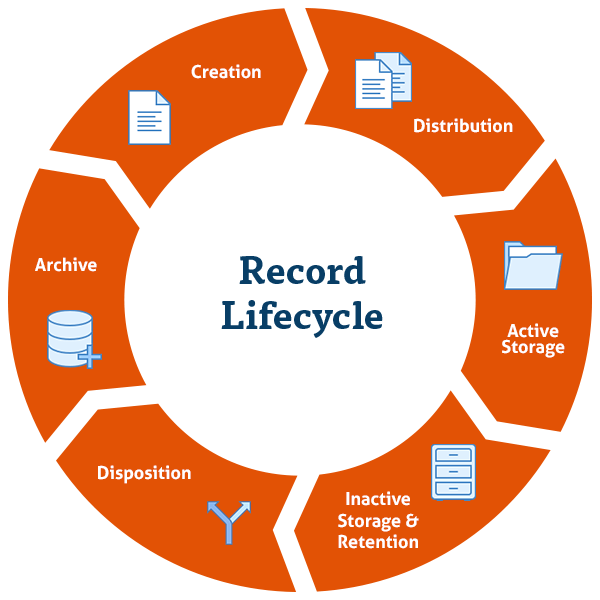
ECM handles both live and archived documents. Understanding the terms used to describe digital versus paper will make it easier to research solutions, if you’re planning a Digital Transformation.
RM: Records Management
Many documents used and produced by businesses eventually become records. Some have to be destroyed after five years, some after ten—and others are kept indefinitely. RM establishes rules and practices for maintaining diverse types of records in accordance with internal policies and legal mandates. Basically, RM helps organizations stay out of trouble.
Get a quick overview of RM here.
ERM: Electronic Records Management
Because records management can be as low-tech as boxes of paper in a storage closet, ERM has emerged as a distinct industry term. ERM systems greatly improve the management of records through features such as retention and disposition scheduling and activity monitoring.
Learn more about the benefits of ERM in this guide.
Business Continuity
ECM aims to protect information on good days and bad days.
DRP: Disaster Recovery Plan
IT departments use DRPs to plan for system and infrastructure failures. The goal of a DRP is to recover from a disaster—man-made or natural—as quickly as possible and with as little data loss as possible.
An ECM system plays a vital role in disaster recovery by keeping company information in electronic repositories rather than flammable, flood-able file cabinets.
BCP: Business Continuity Plan
BCP is the more comprehensive version of DRP. Rather than focusing on systems failures, business continuity aims to minimize interruptions and downtime across the entire organization in the event of a disaster.
With ECM, organizations can back up and recover documents and records because information is digitally stored off-site. Data remains safe from harm and, with the ability to remotely access information, employees can keep working even if they can’t access the company building.
Further Your Research: Check Out Our Reviews!
Want to dive deeper into your research on ECM? Explore our reviews to learn why Laserfiche leads in the industry.