



At the Government Innovation Showcase in Florida, state leaders gathered to discuss modernizing services, advancing digital transformation and the importance of cross-agency collaboration. With the theme “From Intent to Impact: Building Florida’s Next Decade of Digital Government”, the event facilitated networking opportunities and provided agency leaders time to hear real-world examples of strategic AI initiatives.
Eric Graham, State Chief Data Officer of Florida Digital Service, delivered the keynote “Preparing Florida for the Next Decade of Digital Government” with a statement relevant for all government leaders:
“AI readiness isn’t actually an AI problem. It’s a data problem.”
That observation gets to the heart of a challenge facing state and local governments today.
For the last decade, government modernization has largely focused on digital transformation. Agencies digitized records, automated forms, moved applications to the cloud and made services available online. Now, as agencies accelerate towards intelligent automation, the role of a secure and trusted data environment becomes foundational. Government agencies must evolve to operate effectively in an AI-enabled world. Florida is evolving its data approach to support enterprise-wide alignment as we enter the era of intelligent government.
Graham offered important insight for AI-driven government leaders: If information is fragmented, AI operates on that fragmentation. If definitions differ between agencies, AI doesn’t scale. If information can’t be trusted, neither can any decisions based on that data.
Small Digital Changes, Big Public Impact
We continued the discussion of AI’s impact on information readiness in a panel called ”Small Digital Changes, Big Public Impact.” Joined by Ryan May, CISO of the Florida Lottery; Arthur Bialowas, CISO of Florida A&M University; and Chris Welch, the Assistant Director/Lieutenant Colonel, Department of Financial Services / Criminal Investigations Division in Florida, we discussed the need to start with impactful use cases in order to find the measurable impact of AI initiatives.
In complex public sector environments, targeted digital workflows can strengthen service delivery and system performance without large-scale disruption. Often, incremental modernization reduces operational and cybersecurity risk while accelerating digital maturity—without disrupting critical services. Florida’s CIO also recently participated in The 2026 NASCIO State CIO Survey | The State CIO in Motion: Priorities, Pressures and Progress, which confirms Florida is on the right path. NASCIO’s survey explores how state CIOs navigate digital services, technology investment governance, AI, IT accessibility and technology. The results confirm Florida’s strategy: 78% of state CIOs reported they adopted an AI governance framework and 77% are using AI in inventory and documenting uses in agencies and applications, an increase from 2025.
Florida, Graham and our panelists are all in agreement: AI investment includes data governance and information readiness.
Any government agency evaluating their own readiness for the era of intelligent government should review their documents and content and ask the following questions:
- Is information accurate and discoverable?
- Is it governed throughout its lifecycle?
- Can employees securely access the right information when they need it?
- Can information move between processes and systems without losing its context?
- Can an agency demonstrate who or what system accessed sensitive information and what they did with it?
- Are audit reviews and cyber protocols integral parts of data governance?
- Those questions become increasingly important as AI moves from experimentation into operational government.
Secure, Holistic, Interoperable, Networked, Ethically Managed and Discoverable
As part of Florida’s emerging data strategy, they’ve also defined the ideal state for data as secure, holistic, interoperable, networked, ethically managed and discoverable—their SHINED principles. This federated approach is built around collaboration, interoperability and shared capabilities.
For years, modernization has largely optimized what happens inside agencies, but intelligent government requires improving what happens between them. Citizens don’t experience a permitting database, document repository, ERP system and workflow application; they experience their interaction. The technology architecture may be fragmented, but the citizen experience cannot be.
Modernize the Information Layer
This is also why modernization doesn’t always have to begin with replacing core systems.
Most Florida agencies have made substantial investments in mission-critical applications such as ERP, financial, permitting and GIS. Those systems contain important data and support essential functions. Now, there are opportunities to make the information surrounding those systems work more intelligently.
Platforms such as Laserfiche can provide an information and process layer across existing environments—connecting content with automated workflows in a governed environment.
Florida’s Justice Administrative Commission offered a practical example at the event. Long before today’s AI conversation, the agency moved away from paper-intensive processes with Laserfiche. When COVID suddenly forced employees to work from home, that digital foundation helped the agency continue to support Florida’s justice system. What looked like document modernization became operational resilience. The same principle applies to AI today.
Keep Pace or Drive Innovation? Build the Foundation Before the Next Technology Arrives
One of the most interesting things I heard in Florida was that the next decade of government won’t be defined by the technologies agencies adopt, but by the institutional capabilities they build. I think that’s exactly right.
AI will change. Models will change. Applications will change. The next breakthrough technology will eventually arrive. Through all the changes, government agencies will still need to take responsibility for protecting constituents’ information and maintaining public trust.
The agencies that lead in the AI era won’t be those that deploy AI first but the ones that can connect information across organizational boundaries, govern it throughout its lifecycle, protect it without limiting its use and turn it into public value.
That’s the foundation of intelligent government.
When a government leader considers the next AI initiative, they shouldn’t ask themselves, “Which AI should be deploy?”
The question should be much simpler:
“Is our information ready?”
If you’re ready to hear the best practices of information readiness and learn how to confidently modernize mission-critical operations with a secure, cloud-based content management platform designed for today’s security and compliance challenges, listen in now.
This month, we’re rolling out new features and product enhancements that help you capture more information from your documents using Smart Fields, keep tasks moving with greater control over reassignment and routing, and do more with Smart Chat and Agents. Explore these updates and more from our latest Cloud release.
Smart Fields Expands Intelligent Capture to Marks, Images, and More
Documents often contain critical information that cannot be captured through text extraction alone. Checkmarks, shaded answer bubbles, signatures, images, and handwriting can all communicate important information. Until now, Smart Fields had limited ability to interpret these visual elements, leaving teams to review documents and enter information manually even when the rest of the document could be processed automatically.
This update adds enhanced visual understanding to Smart Fields and AI-assisted form fill, allowing Laserfiche AI to interpret text and visual information in a document together to populate metadata or fill form fields.
This includes support for optical mark recognition (OMR), enabling Laserfiche AI to interpret marked selections such as checkmarks, shaded bubbles and boxes.
Other new capabilities include interpreting and describing images within your document and capturing text from logos and watermarks.
Smart Fields and AI-assisted form fill also perform better in other scenarios that rely on visual understanding, including detecting the presence of signatures and extracting difficult-to-read handwriting such as cursive.
Together, these enhancements allow you to capture a more complete picture of the critical data and key details within your organization’s content using Laserfiche AI.
New Controls for Task Configuration and Management
New updates to task configuration and management give team managers more flexibility to redistribute work and process designers greater control over task reassignment and routing.
Team managers can now reassign tasks within their own teams without needing to manage the process that created them. When a team member is unavailable or workloads become uneven, managers can now redistribute work directly to another team member, without escalation to a process owner or administrator. This gives managers the operational flexibility they need to manage their team’s tasks, without granting broader access to process data or administrative control over process instances –keeping permissions aligned with their responsibilities.
Additionally, process designers can now control whether users can reassign tasks assigned directly to them. This helps prevent tasks that should remain a specific person’s responsibility, like manager approvals or performance reviews, from being handed off. Authorized team managers, process owners and administrators can still reassign these tasks when needed.
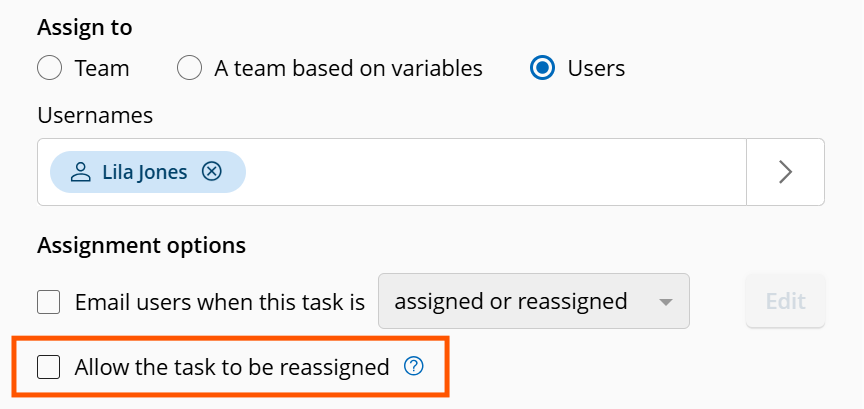
These updates also make task handoffs more predictable by preserving specialized routing when a task is released. When a team member releases a task they previously claimed, Laserfiche now reruns its assignment rules to determine who can claim it next, rather than making it available to the entire team. This helps ensure released tasks continue to follow the routing logic built into the process.
Together, these updates help keep work moving, simplifying task management and making reassignment and release more controlled and predictable.
To learn more about the latest task management updates and get a preview of what’s coming next, register for our upcoming webinar: Inbox Innovations: Simplifying Task Routing and Management.
Do More with Agents
You can now use directed agents to edit repository field values directly, further expanding their utility for metadata management.
To stay up to date on the latest in Laserfiche AI, join us for the New Laserfiche AI Innovations webinar series, with sessions in October, November, and December.
Ask Smart Chat About Your Workflows
Now, Smart Chat can help process designers understand their account’s workflows faster and with more confidence. Open Smart Chat in the workflow designer to ask questions about the specific workflow you’re viewing and get responses based on the actual design.
- Summarize Workflow Designs: Get grounded, plain-language summaries of what a workflow does, including its purpose, triggers, major branches and terminal paths.
- Explain Individual Activities & Logic: Ask about specific workflow activities to understand what they do, how they’re configured, and how they contribute to the overall automation. Follow how activities connect, how work moves through the design and why specific branches run.
- Troubleshoot and Onboard More Efficiently: Review complex, inherited or legacy workflows to identify issues and get up to speed faster.
Smart Chat Usability Improvements
New updates to the Smart Chat interface make it easier to read responses, customize your workspace and work across multiple tabs. You can now resize the chat window horizontally to best fit your content. Plus, switch between docked and floating views, follow responses more naturally as they’re generated and manage Smart Chat independently in each browser tab.
Dynamic Fields Improvements
Previously, a lookup rule could only take its input from a field filled by another lookup rule. Now, any field can serve as an input, allowing you to configure dynamic fields to display options based on free-form text entered by a user or a value generated by a field formula. This provides greater input flexibility while reducing the number of rules you need to build and maintain.
Lookup rules can also now populate multiple fields with dynamic data from a single data source. Instead of creating a separate rule for each field, you can use one rule to return multiple outputs and fill several fields in a template.
Additional interface improvements make it easier to configure dynamic fields and work with their values. A new label in the Properties pane of the template designer lets you quickly identify the field type, and improved error handling provides clearer feedback when an invalid input is selected. Additionally, users working with document metadata in the repository can now search within a dynamic field’s available options, making it easier to find the right value when a lookup returns a large number of results.
Import Agent Enhancements
Import Agent can now save email attachments as separate documents when importing email files from a local disk or directly from an email server. It can also ignore metadata assignment errors during import, applying valid values while logging invalid ones for administrators to review later, without stopping or rolling back the entire migration.
This month, we’re introducing new features and product enhancements that help you complete forms faster, do more with Laserfiche AI Agents, and get more visibility into AI usage. Explore these updates and more from our latest Cloud release.
AI-Assisted Form Fill
Filling out a form often means uploading a document and then reentering information from that document into the form. AI-assisted form fill uses Laserfiche AI to automatically populate relevant fields with information from the uploaded document, making form completion faster and easier.
How to Set It Up: When building a form, designers can enable this feature with a single setting on a file upload field.
Just select the file upload field of your choice and check the box next to “Extract and fill fields with AI” to tell Laserfiche AI which documents to analyze. Only files uploaded to a field with this setting enabled will trigger AI population.

With this setting enabled, Laserfiche AI handles both data extraction and field matching, so designers don’t need to configure any other form fields or define and maintain additional extraction rules or field-mapping logic.
How It Works: When someone uploads a file to an enabled field, Laserfiche AI reads the document, identifies the relevant data, and determines on its own which form fields the information belongs in. It then populates those fields automatically.
AI-assisted form fill never clears a field or overwrites information the submitter has already entered. If Laserfiche AI cannot find or confidently identify the information a field requires, that field remains blank.
The person completing the form can review the populated information, make corrections if needed, and complete any remaining fields before submitting the form.
AI-assisted form fill consumes AI units. Learn more about how usage is measured here.
By letting uploaded documents do more of the work, organizations can create a smoother submission experience and collect structured form data and supporting documents in one connected Laserfiche process.
Do More with Directed Agents
Laserfiche AI Agents can now take on more document management work with less back-and-forth.
Automate Complex Tasks with Fewer Interruptions: Complete complex tasks more efficiently. Now, for multi-step tasks, Agents will present their full plan upfront, giving you the option to review and confirm the proposed actions in one go instead of confirming each step one by one.
Create and Delete Collections: Agents can now create new personal Collections or delete existing ones on your behalf. Ask your Laserfiche AI Agent to find related documents, create and name a Collection, and add the documents to your new Collection in a single operation.
More Visibility into AI Usage
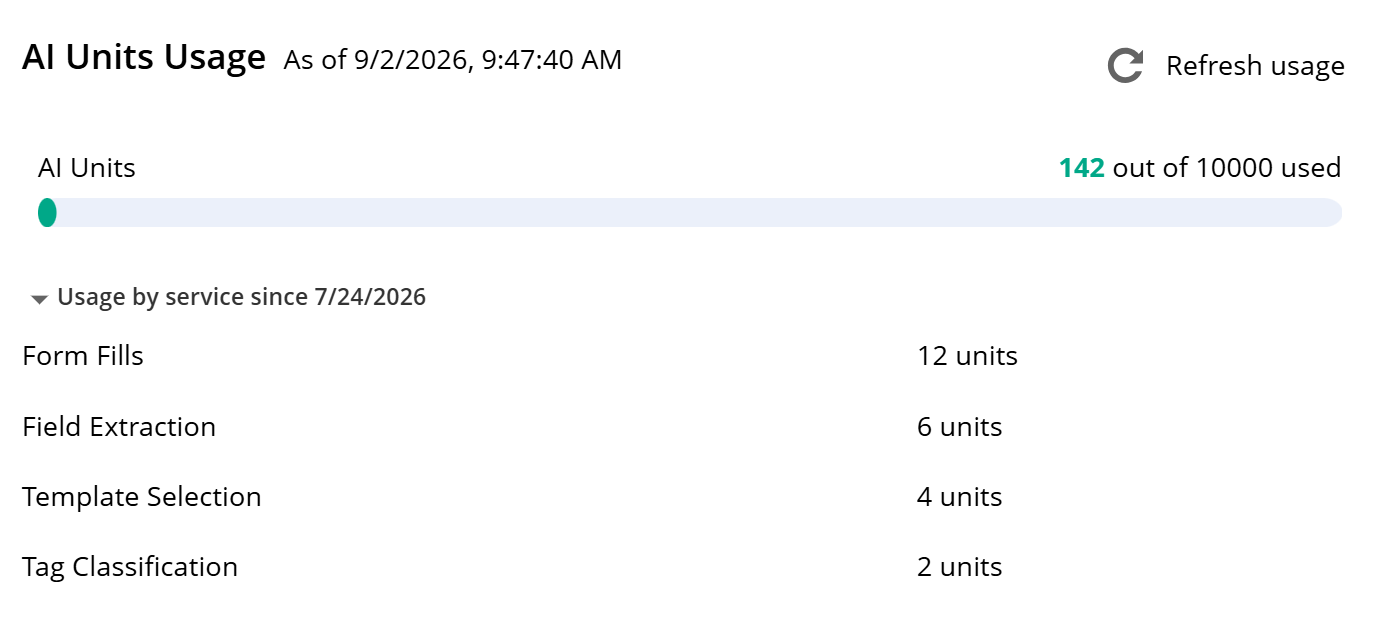
Admins can now get a clearer picture of how their account is using Laserfiche AI. The Plan page now includes a breakdown of AI units consumed by each feature, making it easier to understand which features are driving usage.
By providing more granular visibility into Laserfiche AI usage, this update helps admins more easily monitor where AI units are being used, spot inefficiencies that may be inflating usage, and manage AI resources more effectively.
Updated Software Development Kit
A new version of the Laserfiche Software Development Kit (SDK) is now available, providing a more current and secure foundation for building custom applications that interact with Laserfiche. The latest version, SDK 12, is now distributed through NuGet, making it easier for developers to install and deploy the components they need. SDK 12 also delivers upgraded versions of the Repository Access library and other supporting integration libraries, along with modernized interfaces and enhanced security. Additionally, documentation is newly available in the Laserfiche Developer Center.
Organizations using earlier SDK versions to connect to Laserfiche Cloud should begin planning to migrate to this latest SDK version, or to the Laserfiche API, as connections through earlier SDK versions will be discontinued in the future.
Additional Updates
Configure Audit Data Retention: You can now configure and enforce how long audit data is retained in Audit Trail for your account. This update gives administrators the control they need to meet compliance requirements and manage data growth.
Web Request Allotment Visibility: You can now view the number of web requests per day available for your account on the Plan page in Account Administration. Accounts that need an increased allotment have the option to purchase additional capacity as an add-on.